
Our Community is getting an upgrade! To get everything ready for the relaunch, we’ll be placing the site in read-only mode starting September 21st.
We really appreciate your understanding while we get things set up behind the scenes. Catch up on all the exciting details about the move here.
Need help or have questions? Drop us a line at [email protected]

Archives of Support Questions (Read Only)
- Cloudera Community
- Board Archive
- Archives of Support Questions (Read Only)
- Using Attribute for Output Directory in MoveHDFS ...
- Subscribe to RSS Feed
- Mark Question as New
- Mark Question as Read
- Float this Question for Current User
- Bookmark
- Subscribe
- Mute
- Printer Friendly Page
- Subscribe to RSS Feed
- Mark Question as New
- Mark Question as Read
- Float this Question for Current User
- Bookmark
- Subscribe
- Mute
- Printer Friendly Page
Using Attribute for Output Directory in MoveHDFS processor


Created 08-03-2018 02:35 PM
- Mark as New
- Bookmark
- Subscribe
- Mute
- Subscribe to RSS Feed
- Permalink
- Report Inappropriate Content
Hello,
I try to use FlowFile Attribute to set output directory in a MoveHDFS processor.
I set the Ouptut Directory to theis value :${path_to_prod_AS}${Librairie}
${path_to_prod_AS} is a variable and ${Librairie} is an Attribute.
My problem is that The file are move in ${path_to_prod_AS} driectory, it's as if he could not interpret the value of the attribute.
For the Input Directory, I Use that string : ${path_to_workspace}${now():format('yyyy-MM-dd')}/${Serveur}/${Librairie}/${Table}/
where ${path_to_workspace} is a variable and ${Serveur} ,${Librairie} and ${Table} ar attribute. There is no problem to collect the file.
Thank you for your help


Created on 08-03-2018 07:00 PM - edited 08-17-2019 09:00 PM
- Mark as New
- Bookmark
- Subscribe
- Mute
- Subscribe to RSS Feed
- Permalink
- Report Inappropriate Content
The issue is with the attribute ${Librairie} in Output Directory property value.
As per NiFi-1.7 MoveHDFS processor Usage

OutputDirectory Property value supports Expression Language but evaluated using variable registry only, But for InputDirectory/File property value will be evaluated using flowfile attributes and variable registry.
To resolve this issue:
Define your ${Librairie} attribute value in variable registry if possible.
As right now you are having the variable as flowfile attribute which this value will not be evaluated and files are moving to ${path_to_prod_AS} directory.
Created on 08-03-2018 07:00 PM - edited 08-17-2019 09:00 PM
- Mark as New
- Bookmark
- Subscribe
- Mute
- Subscribe to RSS Feed
- Permalink
- Report Inappropriate Content
The issue is with the attribute ${Librairie} in Output Directory property value.
As per NiFi-1.7 MoveHDFS processor Usage
OutputDirectory Property value supports Expression Language but evaluated using variable registry only, But for InputDirectory/File property value will be evaluated using flowfile attributes and variable registry.
To resolve this issue:
Define your ${Librairie} attribute value in variable registry if possible.
As right now you are having the variable as flowfile attribute which this value will not be evaluated and files are moving to ${path_to_prod_AS} directory.
Created 08-06-2018 01:00 PM
- Mark as New
- Bookmark
- Subscribe
- Mute
- Subscribe to RSS Feed
- Permalink
- Report Inappropriate Content
I'm looking into NiFi-1.7.1 documentation and the source code link of MoveHDFS processor(which have updated documentation)
In apache nifi org the documentation is created based NiFi-1.5 version, probably these missing things are updated NiFi 1.5+ versions.
As you have proposed below, we need to use RouteOnAttribute processor to make decision based on the attribute.
Created on 08-06-2018 07:07 AM - edited 08-17-2019 08:59 PM
- Mark as New
- Bookmark
- Subscribe
- Mute
- Subscribe to RSS Feed
- Permalink
- Report Inappropriate Content
Thank's a lot for your answer @Shu,
Can you tell me where did you find this information ? I was on the apache site and here is what I could find :
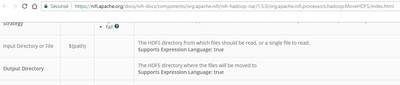
My problem is that this attribute depends on the flowfile and I wish I could change the final directory depending on the value of this attribute.
I have the impression that it is not possible to change the value of a variable dynamically. The only solution I see is to route the flow based on the attribute, but it will generate me a lot of branch in my process. Do you think there would be a more dynamic solution?


Created 01-09-2019 09:16 AM
- Mark as New
- Bookmark
- Subscribe
- Mute
- Subscribe to RSS Feed
- Permalink
- Report Inappropriate Content
Any progress on getting MoveHDFS to accept attributes in Output Directory? It seems difficult not be able to have a dynamic solution as mentioned in this thread.


