Our Community is getting an upgrade! To get everything ready for the relaunch, we’ll be placing the site in read-only mode starting September 21st.
We really appreciate your understanding while we get things set up behind the scenes. Catch up on all the exciting details about the move here.
Need help or have questions? Drop us a line at [email protected]

Archives of Support Questions (Read Only)
- Cloudera Community
- Board Archive
- Archives of Support Questions (Read Only)
- Using regular expression on flowfilename to update...
- Subscribe to RSS Feed
- Mark Question as New
- Mark Question as Read
- Float this Question for Current User
- Bookmark
- Subscribe
- Mute
- Printer Friendly Page
- Subscribe to RSS Feed
- Mark Question as New
- Mark Question as Read
- Float this Question for Current User
- Bookmark
- Subscribe
- Mute
- Printer Friendly Page
Using regular expression on flowfilename to update Attribute
- Labels:
-
Apache NiFi


Created 10-12-2017 12:33 PM
- Mark as New
- Bookmark
- Subscribe
- Mute
- Subscribe to RSS Feed
- Permalink
- Report Inappropriate Content
Hello,
I am ingesting files with
names like
I_XXX_20171002024210_LU2016DKABCDE12345-2017-10-02-TESTDAC2-000003_xxxxxxx.json
I_SSSSS_20171003024653_US2016US3661159602CC8FC7-4963-4304-A211-D8BCDA152625_xxxxxxx.json
I want to update/set a flowfile attribute using regular expression on the filename
Is there a nifi expression language function that support that.
ie. ${filename:<regexec:()>}
This regular expression extract the date yyyymmdd in capture group #2 from the filename
\_([A-Za-z]{3,5})\_([0-9]{8}).*xxxxxxx.json


Created on 10-12-2017 01:07 PM - edited 08-17-2019 07:45 PM
- Mark as New
- Bookmark
- Subscribe
- Mute
- Subscribe to RSS Feed
- Permalink
- Report Inappropriate Content
Can you once try using the below methods to change the filename
1.by using replaceAll string manupulation and adding the filename property as
${filename:replaceAll('.*\_([A-Za-z]{3,5})\_([0-9]{8}).*xxxxxxx.json','$2')}.json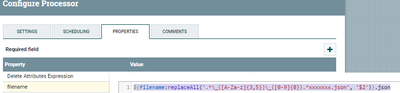
2.another way is using getdelimited Manupulation
by adding filename property as
${filename:getDelimitedField(3, '_'):substring(0,8)}.json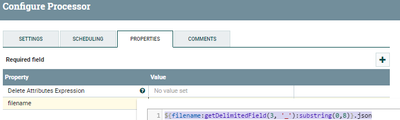
Both ways results the same output you can choose the best way which will fits for your case.
Output:-

Created on 10-12-2017 01:07 PM - edited 08-17-2019 07:45 PM
- Mark as New
- Bookmark
- Subscribe
- Mute
- Subscribe to RSS Feed
- Permalink
- Report Inappropriate Content
Can you once try using the below methods to change the filename
1.by using replaceAll string manupulation and adding the filename property as
${filename:replaceAll('.*\_([A-Za-z]{3,5})\_([0-9]{8}).*xxxxxxx.json','$2')}.json2.another way is using getdelimited Manupulation
by adding filename property as
${filename:getDelimitedField(3, '_'):substring(0,8)}.jsonBoth ways results the same output you can choose the best way which will fits for your case.
Output:-
Created 10-12-2017 01:11 PM
- Mark as New
- Bookmark
- Subscribe
- Mute
- Subscribe to RSS Feed
- Permalink
- Report Inappropriate Content
@Shu Thank you so very much for that really good answer.



Created on 10-12-2017 01:13 PM - edited 08-17-2019 07:45 PM
- Mark as New
- Bookmark
- Subscribe
- Mute
- Subscribe to RSS Feed
- Permalink
- Report Inappropriate Content
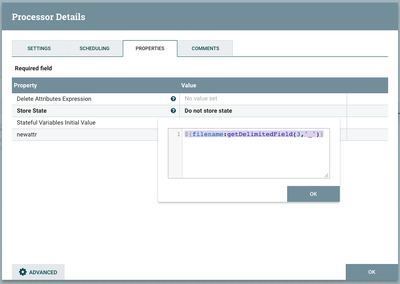
You can use UpdateAttribute and create a new attribute with the following EL : ${filename:getDelimitedField(3,'_')}