
Our Community is getting an upgrade! To get everything ready for the relaunch, we’ll be placing the site in read-only mode starting September 21st.
We really appreciate your understanding while we get things set up behind the scenes. Catch up on all the exciting details about the move here.
Need help or have questions? Drop us a line at [email protected]

Archives of Support Questions (Read Only)
- Cloudera Community
- Board Archive
- Archives of Support Questions (Read Only)
- Re: What extension file does Hue Configuration for...
- Subscribe to RSS Feed
- Mark Question as New
- Mark Question as Read
- Float this Question for Current User
- Bookmark
- Subscribe
- Mute
- Printer Friendly Page
- Subscribe to RSS Feed
- Mark Question as New
- Mark Question as Read
- Float this Question for Current User
- Bookmark
- Subscribe
- Mute
- Printer Friendly Page
What extension file does Hue Configuration for SSL
- Labels:
-
Cloudera Data Explorer


Created on
10-13-2014
10:44 AM
- last edited on
04-21-2026
07:00 AM
by
 GrazittiAPI

- Mark as New
- Bookmark
- Subscribe
- Mute
- Subscribe to RSS Feed
- Permalink
- Report Inappropriate Content
Hi,
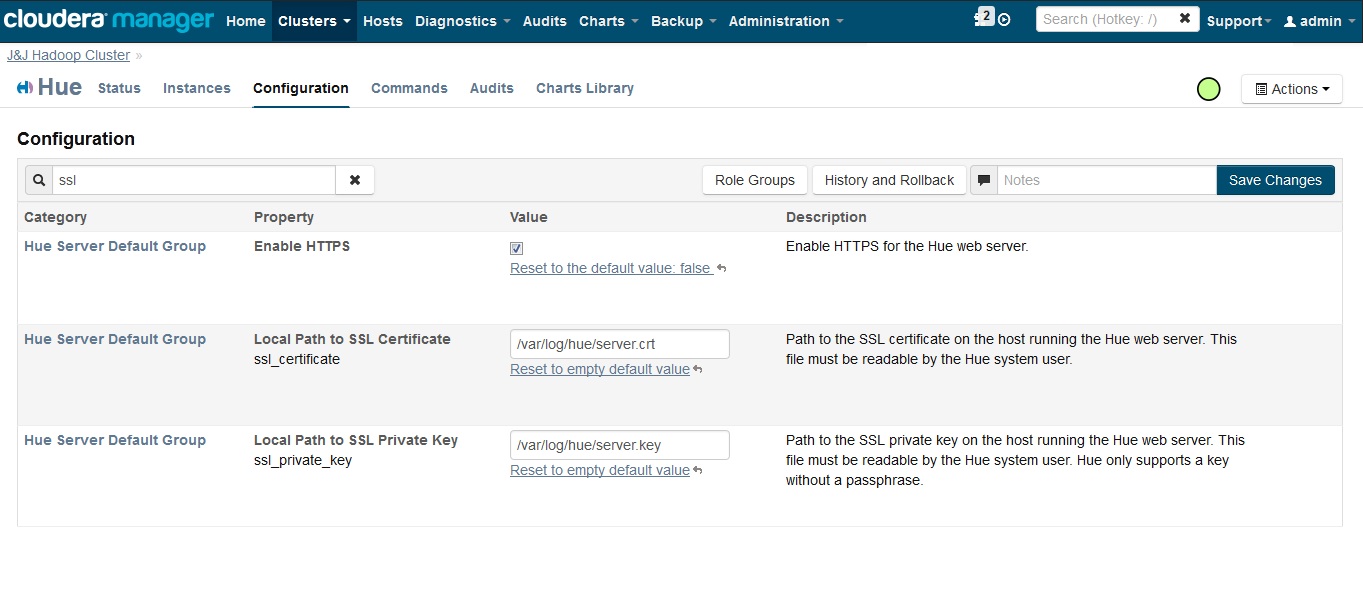
Does ssl_certificate accepts only as .crt file extension or .pem or .cer or .der also works?
because when i did ssl with self signed certificate everything hue starts but when i did with Microsoft generated ssl certificate and key it gave me this error
OpenSSL.SSL.Error: [('PEM routines', 'PEM_read_bio', 'no start line'), ('SSL
routines', 'SSL_CTX_use_certificate_file', 'PEM lib')]
Created 10-13-2014 06:47 PM
- Mark as New
- Bookmark
- Subscribe
- Mute
- Subscribe to RSS Feed
- Permalink
- Report Inappropriate Content
Thanks alot,
I got this issue resolved.
The certificate generated from IIS Microsoft was not correct
Once i got the ptx format for certificate.
I extracted the key and certificate from .ptx format as .key and .crt file like
For the key:-
openssl pkcs12 -in [yourfile.pfx] -nocerts -out [keyfile-encrypted.key]
For the certificate
openssl pkcs12 -in [yourfile.pfx] -clcerts -nokeys -out [certificate.crt]
Just gave all the rights to both key and cert and made the key passphrase less. as
cp [server.key] [server.key.org]
openssl rsa -in [server.key].org -out [server.key]
and gave the path of key and cert in Hue.
Created 10-13-2014 10:46 AM
- Mark as New
- Bookmark
- Subscribe
- Mute
- Subscribe to RSS Feed
- Permalink
- Report Inappropriate Content



Created 10-13-2014 11:20 AM
- Mark as New
- Bookmark
- Subscribe
- Mute
- Subscribe to RSS Feed
- Permalink
- Report Inappropriate Content
The extension does not matter, but the format does. The file should be in "PEM" format. It should contain these lines:
-----BEGIN CERTIFICATE-----
-----END CERTIFICATE-----
-Ben
Created 10-13-2014 06:47 PM
- Mark as New
- Bookmark
- Subscribe
- Mute
- Subscribe to RSS Feed
- Permalink
- Report Inappropriate Content
Thanks alot,
I got this issue resolved.
The certificate generated from IIS Microsoft was not correct
Once i got the ptx format for certificate.
I extracted the key and certificate from .ptx format as .key and .crt file like
For the key:-
openssl pkcs12 -in [yourfile.pfx] -nocerts -out [keyfile-encrypted.key]
For the certificate
openssl pkcs12 -in [yourfile.pfx] -clcerts -nokeys -out [certificate.crt]
Just gave all the rights to both key and cert and made the key passphrase less. as
cp [server.key] [server.key.org]
openssl rsa -in [server.key].org -out [server.key]
and gave the path of key and cert in Hue.


