Our Community is getting an upgrade! To get everything ready for the relaunch, we’ll be placing the site in read-only mode starting September 21st.
We really appreciate your understanding while we get things set up behind the scenes. Catch up on all the exciting details about the move here.
Need help or have questions? Drop us a line at [email protected]

Archives of Support Questions (Read Only)
- Cloudera Community
- Board Archive
- Archives of Support Questions (Read Only)
- What is the best way to organize many NiFi Process...
- Subscribe to RSS Feed
- Mark Question as New
- Mark Question as Read
- Float this Question for Current User
- Bookmark
- Subscribe
- Mute
- Printer Friendly Page
- Subscribe to RSS Feed
- Mark Question as New
- Mark Question as Read
- Float this Question for Current User
- Bookmark
- Subscribe
- Mute
- Printer Friendly Page
What is the best way to organize many NiFi Processors in a single flow
- Labels:
-
Apache NiFi


Created on 05-12-2016 05:12 PM - edited 08-19-2019 12:53 AM
- Mark as New
- Bookmark
- Subscribe
- Mute
- Subscribe to RSS Feed
- Permalink
- Report Inappropriate Content
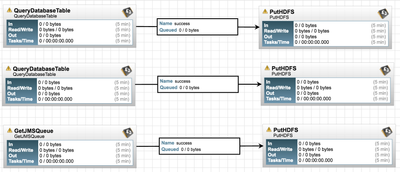
If the case where NiFi is reading from 30 database tables in a single flow what is the best way to visually identify which processor is connecting to each database and table?



Created 05-12-2016 05:14 PM
- Mark as New
- Bookmark
- Subscribe
- Mute
- Subscribe to RSS Feed
- Permalink
- Report Inappropriate Content
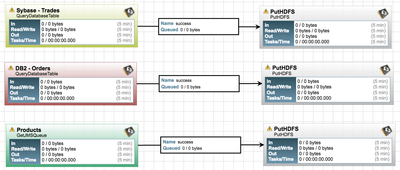
Processor's can be renamed on the first tab of the processor's configuration window. You could name each processor with the table name to easily see it when looking at the flow.
Created 05-12-2016 05:14 PM
- Mark as New
- Bookmark
- Subscribe
- Mute
- Subscribe to RSS Feed
- Permalink
- Report Inappropriate Content
Processor's can be renamed on the first tab of the processor's configuration window. You could name each processor with the table name to easily see it when looking at the flow.
Created on 05-12-2016 05:19 PM - edited 08-19-2019 12:53 AM
- Mark as New
- Bookmark
- Subscribe
- Mute
- Subscribe to RSS Feed
- Permalink
- Report Inappropriate Content
Great feature @bbende . This is much easier to visualize now.


Created on 05-12-2016 05:23 PM - edited 08-19-2019 12:53 AM
- Mark as New
- Bookmark
- Subscribe
- Mute
- Subscribe to RSS Feed
- Permalink
- Report Inappropriate Content
Hi @Kirk Haslbeck,
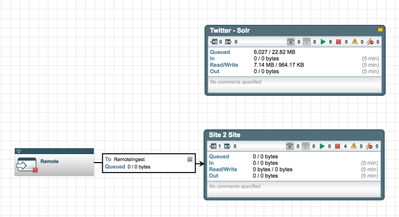
You can use "Process Groups" to groupe several processors in one unit. You can then click to zoom in and out.
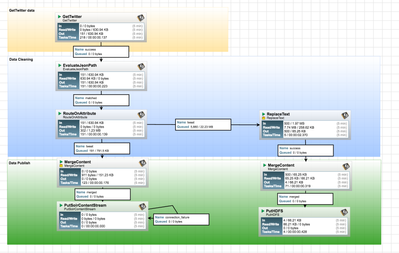
You can also use labels to visually differentiate between each part with background colors