
Our Community is getting an upgrade! To get everything ready for the relaunch, we’ll be placing the site in read-only mode starting September 21st.
We really appreciate your understanding while we get things set up behind the scenes. Catch up on all the exciting details about the move here.
Need help or have questions? Drop us a line at [email protected]

Archives of Support Questions (Read Only)
- Cloudera Community
- Board Archive
- Archives of Support Questions (Read Only)
- Re: What's the meaning of the number label on NiFi...
- Subscribe to RSS Feed
- Mark Question as New
- Mark Question as Read
- Float this Question for Current User
- Bookmark
- Subscribe
- Mute
- Printer Friendly Page
- Subscribe to RSS Feed
- Mark Question as New
- Mark Question as Read
- Float this Question for Current User
- Bookmark
- Subscribe
- Mute
- Printer Friendly Page
What's the meaning of the number label on NiFi processor
- Labels:
-
Apache NiFi


Created on 08-24-2016 08:02 AM - edited 08-19-2019 03:47 AM
- Mark as New
- Bookmark
- Subscribe
- Mute
- Subscribe to RSS Feed
- Permalink
- Report Inappropriate Content
Hi,
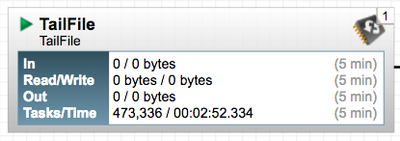
Maybe this is a newbie question, but what's the meaning for the number that appears on the upper-right corner of the processor in this creenshoot ?
Thanks



Created 08-24-2016 08:14 AM
- Mark as New
- Bookmark
- Subscribe
- Mute
- Subscribe to RSS Feed
- Permalink
- Report Inappropriate Content
That is the number of threads currently running in the processor. You sometimes see this if you have threads running for a while (e.g. long running processes like TailFile, or Listening processes). If you increase the number of concurrent tasks, you will also see this go up.
Created 08-24-2016 08:14 AM
- Mark as New
- Bookmark
- Subscribe
- Mute
- Subscribe to RSS Feed
- Permalink
- Report Inappropriate Content
That is the number of threads currently running in the processor. You sometimes see this if you have threads running for a while (e.g. long running processes like TailFile, or Listening processes). If you increase the number of concurrent tasks, you will also see this go up.


Created 08-24-2016 12:53 PM
- Mark as New
- Bookmark
- Subscribe
- Mute
- Subscribe to RSS Feed
- Permalink
- Report Inappropriate Content
Most threads are very short running (miliseconds) and since the NiFi refresh rate defaults are every 30 seconds. The number in the upper right corner may not represent a still running thread. In your screenshot above, the TailFile processor shows as having recorded the completion of 473,336 Tasks (Each task using a thread to complete) and a total cumulative thread time of only 2 min, 52 seconds and 334 milliseconds over the past 5 minutes.
Long running threads will show much different stats in the Tasks/Time field.
Created 09-10-2016 04:51 PM
- Mark as New
- Bookmark
- Subscribe
- Mute
- Subscribe to RSS Feed
- Permalink
- Report Inappropriate Content
What is a task in this context ? reading a line ?


