
Our Community is getting an upgrade! To get everything ready for the relaunch, we’ll be placing the site in read-only mode starting September 21st.
We really appreciate your understanding while we get things set up behind the scenes. Catch up on all the exciting details about the move here.
Need help or have questions? Drop us a line at [email protected]

Archives of Support Questions (Read Only)
- Cloudera Community
- Board Archive
- Archives of Support Questions (Read Only)
- Where is the ssh private key file on host machine?
- Subscribe to RSS Feed
- Mark Question as New
- Mark Question as Read
- Float this Question for Current User
- Bookmark
- Subscribe
- Mute
- Printer Friendly Page
- Subscribe to RSS Feed
- Mark Question as New
- Mark Question as Read
- Float this Question for Current User
- Bookmark
- Subscribe
- Mute
- Printer Friendly Page
Where is the ssh private key file on host machine?
- Labels:
-
Apache Ambari


Created 10-31-2016 04:21 PM
- Mark as New
- Bookmark
- Subscribe
- Mute
- Subscribe to RSS Feed
- Permalink
- Report Inappropriate Content
Hi, when trying to add a node, ambari asks for the ssh private key and has a "choose file" button which you can navigate through your hosts file system. I created the key and can now access the new node without the need of password. What file is it looking for? Thanks

Created on 11-11-2016 09:10 PM - edited 08-18-2019 05:14 AM
- Mark as New
- Bookmark
- Subscribe
- Mute
- Subscribe to RSS Feed
- Permalink
- Report Inappropriate Content
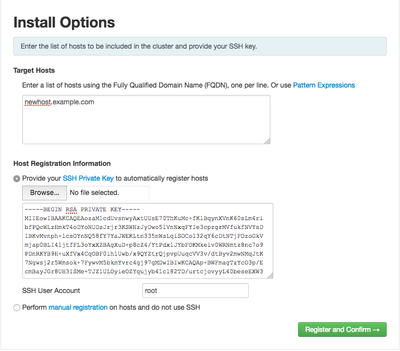
Yes, you should copy the id_rsa file from the sandbox to your Windows host. Alternatively you can copy and paste the contents of id_rsa in to the edit box that says 'ssh private key' like in the screenshot below.
Created 10-31-2016 04:41 PM
- Mark as New
- Bookmark
- Subscribe
- Mute
- Subscribe to RSS Feed
- Permalink
- Report Inappropriate Content
@Roger Young Assuming you are running Ambari as 'root' it will be in ~root/.ssh/id_rsa. If you're running Ambari as a non-root user you will need to set up passworldless SSH for that user so the file will be ~<username>/.ssh/id_rsa.
Created 10-31-2016 04:48 PM
- Mark as New
- Bookmark
- Subscribe
- Mute
- Subscribe to RSS Feed
- Permalink
- Report Inappropriate Content
Hi, the "choose file" button in ambari allows me to search my host(windows10) filesystem, but i created the /.ssh/id_rsa file within the sandbox. Have i to copy it to my host?
Created on 11-11-2016 09:10 PM - edited 08-18-2019 05:14 AM
- Mark as New
- Bookmark
- Subscribe
- Mute
- Subscribe to RSS Feed
- Permalink
- Report Inappropriate Content
Yes, you should copy the id_rsa file from the sandbox to your Windows host. Alternatively you can copy and paste the contents of id_rsa in to the edit box that says 'ssh private key' like in the screenshot below.


Created 11-22-2016 03:26 AM
- Mark as New
- Bookmark
- Subscribe
- Mute
- Subscribe to RSS Feed
- Permalink
- Report Inappropriate Content
hi,Terry
Do you have any idea about the usage of id_rsa file
hope your share


Created 01-25-2017 08:11 AM
- Mark as New
- Bookmark
- Subscribe
- Mute
- Subscribe to RSS Feed
- Permalink
- Report Inappropriate Content
I am installing HDF on my Ubuntu 16.04. I have single host "localhost" for this installation? What should I mention in both of these fields on this Install Options Screen of Ambari Launch Install Wizard?
- One or more hosts on to which you want you install, specified with an FQDN. ?
- Your SSH Private Key, or select the option to perform manual registrations on hosts. ?
I am stuck ? Plz suggest a workaround as I dont want to do a manual install for Ambari Agent.
Quick reply shall be appreciated!!!
Created 01-25-2017 09:55 AM
- Mark as New
- Bookmark
- Subscribe
- Mute
- Subscribe to RSS Feed
- Permalink
- Report Inappropriate Content
Hi, you need to give your Ubuntu host a domain name which you then add as the FQDN.
For the second part, you need to copy your id_rsa file you created and paste it into the SSh private key box. (It is either the id_rsa or id_rsa.pub, i cant remember), as shown in the image above.


