Our Community is getting an upgrade! To get everything ready for the relaunch, we’ll be placing the site in read-only mode starting September 21st.
We really appreciate your understanding while we get things set up behind the scenes. Catch up on all the exciting details about the move here.
Need help or have questions? Drop us a line at [email protected]

Archives of Support Questions (Read Only)
- Cloudera Community
- Board Archive
- Archives of Support Questions (Read Only)
- Why I am having problem with Ambari Hadoop Service...
- Subscribe to RSS Feed
- Mark Question as New
- Mark Question as Read
- Float this Question for Current User
- Bookmark
- Subscribe
- Mute
- Printer Friendly Page
- Subscribe to RSS Feed
- Mark Question as New
- Mark Question as Read
- Float this Question for Current User
- Bookmark
- Subscribe
- Mute
- Printer Friendly Page
Why I am having problem with Ambari Hadoop Services start?
- Labels:
-
Hortonworks Data Platform (HDP)


Created 02-26-2016 06:19 PM
- Mark as New
- Bookmark
- Subscribe
- Mute
- Subscribe to RSS Feed
- Permalink
- Report Inappropriate Content
Hi all,
Last week, I had set up a two-node HDP 2.3 on ec2 with just one master and a slave. Ambari installation went smoothly and it deployed and started the hadoop services.
I prefer to keep the cluster down when not in use for reasons of efficient cost utilisation. With the public IP changing with a reboot, ambari-server could not start hadoop services this week. Some services start if I were to launch them manually in sequence starting with HDFS. It will not start the services on reboot.
I believe the server has lost the connectivity after the change of public IP address. I am still not able to resolve the problem. I do not think changing the addresses in confg and other files are straightforward; they may be embedded in numerous files/locations.
I have got two elastic IP addresses and assigned them to two instances. I want to use the elastic IPs DNS name (example: 3c2-123.157.1.10.compute-1.amazonaws.com) to connect externally, while using the same (Elastic IP DNS) to let servers communicate with each other over the internal ec2 network. I wont be charged for the network traffic as long as my servers are in the same ec2 availability zone. I am aware there would be a tiny charge for the duration where the elastic IPs are not in use, which may be a few $ a month. I do not want to use the external elastic IP address (example: 123.157.1.10) directly for internal server access as I would be charged for network traffic.
Please advise the best way to resolve the hadoop services breakdown issue. Please note that I am also a Linux newbie. A detailed guidance is very much appreciated.
Thanks,
Created 03-13-2016 12:43 AM
- Mark as New
- Bookmark
- Subscribe
- Mute
- Subscribe to RSS Feed
- Permalink
- Report Inappropriate Content
I am cleaning them out and attempt a fresh install. I will close this thread and post a new one, if required. Thanks every one for the help
Created 03-05-2016 03:56 PM
- Mark as New
- Bookmark
- Subscribe
- Mute
- Subscribe to RSS Feed
- Permalink
- Report Inappropriate Content
Thanks. I will check this out and post after fixing the ssh access denied (public key) issue of the master node, where ambari server is installed.
I attached the volume to a running instance. The attached volume (of the master node) shows a GPT system. I am getting an unknown file system type GPT. Since both instances have same permissions, I want to clear this permission issue on the mounted volume and reattach to the master.
1: I do not what I cannot mount the volume with GPT type. Is there any recommendation please?
2: The linux instances were given in ready to install state. I wonder if GPT file type is not causing issues, considering I already successfully deployed Hadoop. Ambari automatically creates the HDFS format. So, writing data/output/codes in hadoop should not be an issue, should it?
Warning: fdisk GPT support is currently new, and therefore in an experimental phase. Use at your own discretion.
Disk /dev/xvdf: 1099.5 GB, 1099511627776 bytes, 2147483648 sectors
Units = sectors of 1 * 512 = 512 bytes
Sector size (logical/physical): 512 bytes / 512 bytes
I/O size (minimum/optimal): 512 bytes / 512 bytes
Disk label type: gpt
#         Start          End    Size  Type            Name
 1         2048         4095      1M  BIOS boot parti
 2         4096   2147483614   1024G  Microsoft basic
[ec2-user@datanode /]$ sudo mount /dev/xvdf2 /bad -t gpt
mount: unknown filesystem type 'gpt'
Created 03-05-2016 04:25 PM
- Mark as New
- Bookmark
- Subscribe
- Mute
- Subscribe to RSS Feed
- Permalink
- Report Inappropriate Content
Additional comment - this makes me a little suspicious of the way the instances were presented as ready to install. Mount: wrong fs type, bad option, bad superblock on /dev/xvdf, missing codepage or helper program, or other error In some cases useful info is found in syslog - try dmesg | tail or so.


Created 03-05-2016 04:44 PM
- Mark as New
- Bookmark
- Subscribe
- Mute
- Subscribe to RSS Feed
- Permalink
- Report Inappropriate Content
@S Srinivasa You are mixing lot of issues in one thread and there is high probability that it will slow down the process to get the effective response.
Created 03-05-2016 09:21 PM
- Mark as New
- Bookmark
- Subscribe
- Mute
- Subscribe to RSS Feed
- Permalink
- Report Inappropriate Content
@ Neeraj Sabharwal Sorry about bringing multiple issues as come in multiples! I have sorted out the access problem. I will focus on your recommendation and post how I got on. Thanks
Created 03-08-2016 04:53 PM
- Mark as New
- Bookmark
- Subscribe
- Mute
- Subscribe to RSS Feed
- Permalink
- Report Inappropriate Content
I am running into ssh problems.
I checked both the nodes, which have authorized_keys, id_rsa, id_rsa.pub in the \home\ec2-user\.ssh\ folder
I could ssh with .pem key from the data node to master node, which I could not even achieve it from the master to slave.
ssh without keys/pws do not work at all.
sudo ssh -i keypair.pem [email protected]
Warning: Identity file keypair.pem not accessible: No such file or directory.
Permission denied (publickey,gssapi-keyex,gssapi-with-mic).
Created 03-08-2016 10:54 PM
- Mark as New
- Bookmark
- Subscribe
- Mute
- Subscribe to RSS Feed
- Permalink
- Report Inappropriate Content
I hope someone can throw some light on this. Both nodes have the same set of files; the .pem key is common for both of them. the only difference is the master node server crash. I created a new instance, used the same .pem key for the master node and created a new volume using the ami.
[ec2-user@namenode .ssh]$ sudo ssh -v -i ~/.ssh/UKBigDataKeypair.pem [email protected]
Warning: Identity file /home/ec2-user/.ssh/UKBigDataKeypair.pem not accessible: No such file or directory.
OpenSSH_6.6.1, OpenSSL 1.0.1e-fips 11 Feb 2013
debug1: Reading configuration data /etc/ssh/ssh_config
debug1: /etc/ssh/ssh_config line 56: Applying options for *
debug1: Connecting to ec2-xx-x-xx-xx.compute-1.amazonaws.com [xxx.xx.x.xxx] port 22.
debug1: Connection established.
debug1: permanently_set_uid: 0/0
debug1: identity file /root/.ssh/id_rsa type -1
debug1: identity file /root/.ssh/id_rsa-cert type -1
debug1: identity file /root/.ssh/id_dsa type -1
debug1: identity file /root/.ssh/id_dsa-cert type -1
debug1: identity file /root/.ssh/id_ecdsa type -1
debug1: identity file /root/.ssh/id_ecdsa-cert type -1
debug1: identity file /root/.ssh/id_ed25519 type -1
debug1: identity file /root/.ssh/id_ed25519-cert type -1
debug1: Enabling compatibility mode for protocol 2.0
debug1: Local version string SSH-2.0-OpenSSH_6.6.1
debug1: Remote protocol version 2.0, remote software version OpenSSH_6.6.1
debug1: match: OpenSSH_6.6.1 pat OpenSSH_6.6.1* compat 0x04000000
debug1: SSH2_MSG_KEXINIT sent
debug1: SSH2_MSG_KEXINIT received
debug1: kex: server->client aes128-ctr [email protected] none
debug1: kex: client->server aes128-ctr [email protected] none
debug1: kex: [email protected] need=16 dh_need=16
debug1: kex: [email protected] need=16 dh_need=16
debug1: sending SSH2_MSG_KEX_ECDH_INIT
debug1: expecting SSH2_MSG_KEX_ECDH_REPLY
debug1: Server host key: xxx
debug1: Host 'ec2-xx-x-xxx-xxx.compute-1.amazonaws.com' is known and matches the ECDSA host key.
debug1: Found key in /root/.ssh/known_hosts:7
debug1: ssh_ecdsa_verify: signature correct
debug1: SSH2_MSG_NEWKEYS sent
debug1: expecting SSH2_MSG_NEWKEYS
debug1: SSH2_MSG_NEWKEYS received
debug1: SSH2_MSG_SERVICE_REQUEST sent
debug1: SSH2_MSG_SERVICE_ACCEPT received
debug1: Authentications that can continue: publickey,gssapi-keyex,gssapi-with-mic
debug1: Next authentication method: gssapi-keyex
debug1: No valid Key exchange context
debug1: Next authentication method: gssapi-with-mic
debug1: Unspecified GSS failure.  Minor code may provide more information
No Kerberos credentials available

debug1: Unspecified GSS failure.  Minor code may provide more information
No Kerberos credentials available

debug1: Unspecified GSS failure.  Minor code may provide more information

debug1: Unspecified GSS failure.  Minor code may provide more information
No Kerberos credentials available

debug1: Next authentication method: publickey
debug1: Trying private key: /root/.ssh/id_rsa
debug1: Trying private key: /root/.ssh/id_dsa
debug1: Trying private key: /root/.ssh/id_ecdsa
debug1: Trying private key: /root/.ssh/id_ed25519
debug1: No more authentication methods to try.
Permission denied (publickey,gssapi-keyex,gssapi-with-mic).

I don not know why it is suggesting "no kerberos credentials available" during ssh. I never installed/deployed kerberos. Previous instances have been cleaned out fully.
Created 03-08-2016 11:59 PM
- Mark as New
- Bookmark
- Subscribe
- Mute
- Subscribe to RSS Feed
- Permalink
- Report Inappropriate Content
sorted. managed to ssh with .pem between instances. will post further
Created 03-10-2016 08:38 PM
- Mark as New
- Bookmark
- Subscribe
- Mute
- Subscribe to RSS Feed
- Permalink
- Report Inappropriate Content
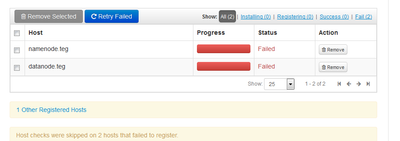
Ambari data node did manage to register manually as it was picked up by Ambari console. However, ambari console's register/confirm failed. Moreover, I can SSH master node (ambari server) and datanode only with ssh .pem username@address. FYI. The id_pub.rsa is the same for both machines. I tried ssh username@address. It failed with Access denied.
Are you sure you want to continue connecting (yes/no)? yes
Warning: Permanently added 'ec2-xx.compute-1.amazonaws.com,xx' (ECDSA) to the list of known hosts.
Permission denied (publickey,gssapi-keyex,gssapi-with-mic).
Created 03-10-2016 10:04 PM
- Mark as New
- Bookmark
- Subscribe
- Mute
- Subscribe to RSS Feed
- Permalink
- Report Inappropriate Content
I used the below command to set up pwless ssh between two ec2 instances. It works from master to slave but vice-versa.
[ec2-user@datanode .ssh]$ cat id_rsa.pub |ssh [email protected] `cat >> .ssh/authorized_keys`
-bash: .ssh/authorized_keys: No such file or directory
cat: id_rsa.pub: Permission denied
Pseudo-terminal will not be allocated because stdin is not a terminal.
Permission denied (publickey,gssapi-keyex,gssapi-with-mic).
[ec2-user@datanode .ssh]$
--
[ec2-user@datanode ~]$ ssh [email protected]
Permission denied (publickey,gssapi-keyex,gssapi-with-mic).
[ec2-user@datanode .ssh]$
Created on 03-11-2016 04:08 PM - edited 08-18-2019 04:41 AM
- Mark as New
- Bookmark
- Subscribe
- Mute
- Subscribe to RSS Feed
- Permalink
- Report Inappropriate Content
I still do not know why ssh (pw-less) works only from the master to slave and not vice versa. I am getting the following errors. I hope some one can guide here please. thanks
11 Mar 2016 15:54:44,732  WARN [qtp-ambari-agent-55] SecurityFilter:103 - Request https://namenode.teg:8440/ca doesn't match any pattern.
11 Mar 2016 15:54:44,732  WARN [qtp-ambari-agent-55] SecurityFilter:62 - This request is not allowed on this port: https://namenode.teg:8440/ca