
Our Community is getting an upgrade! To get everything ready for the relaunch, we’ll be placing the site in read-only mode starting September 21st.
We really appreciate your understanding while we get things set up behind the scenes. Catch up on all the exciting details about the move here.
Need help or have questions? Drop us a line at [email protected]

Archives of Support Questions (Read Only)
- Cloudera Community
- Board Archive
- Archives of Support Questions (Read Only)
- Why am I seeing this odd behaviour? YARN / App Tim...
- Subscribe to RSS Feed
- Mark Question as New
- Mark Question as Read
- Float this Question for Current User
- Bookmark
- Subscribe
- Mute
- Printer Friendly Page
- Subscribe to RSS Feed
- Mark Question as New
- Mark Question as Read
- Float this Question for Current User
- Bookmark
- Subscribe
- Mute
- Printer Friendly Page
Why am I seeing this odd behaviour? YARN / App Timeline Web UI: Connection Failed
- Labels:
-
Apache Ambari
-
Apache YARN


Created 05-15-2016 12:39 PM
- Mark as New
- Bookmark
- Subscribe
- Mute
- Subscribe to RSS Feed
- Permalink
- Report Inappropriate Content
Hi All,
Recently I setup email notifications in Ambari (2.2.1.0) to receive notifications when alert states change. I've found that throughout each day the YARN alert App Timeline Web UI: Connection Failed switches from CRITICAL (connection timed out on port 8188) to OK. This happens 12 / 14 times a day. I'm unsure why this is? I have a basic 2 node cluster, the App Timeline and History Server components are on node 1, and the Resource Manager is on node 1 if that helps.
Any thoughts on why this might happen - it doesn't seem to effect performance.
Mike


Created 05-16-2016 06:07 AM
- Mark as New
- Bookmark
- Subscribe
- Mute
- Subscribe to RSS Feed
- Permalink
- Report Inappropriate Content
This seems to be known behaviour in Ambari 2.2.1.0. There is also internal bug raised in hortonworks jira for the same - BUG-47724.
This jira is resolved and the resolution seems to be fixed in Ambari 2.2.2.0
Created 05-16-2016 06:07 AM
- Mark as New
- Bookmark
- Subscribe
- Mute
- Subscribe to RSS Feed
- Permalink
- Report Inappropriate Content
This seems to be known behaviour in Ambari 2.2.1.0. There is also internal bug raised in hortonworks jira for the same - BUG-47724.
This jira is resolved and the resolution seems to be fixed in Ambari 2.2.2.0
Created 05-16-2016 06:10 AM
- Mark as New
- Bookmark
- Subscribe
- Mute
- Subscribe to RSS Feed
- Permalink
- Report Inappropriate Content
Meanwhile can you check if you are able to get JMX value of the alert. Also try to get the alert defination using api -
Make a GET request to get the alert definition for the alert you want to change
- GET api/v1/clusters/<cluster>/alert_definitions
- GET api/v1/clusters/<cluster>/alert_definitions/<id> from above call
Created on 05-16-2016 12:30 PM - edited 08-18-2019 06:11 AM
- Mark as New
- Bookmark
- Subscribe
- Mute
- Subscribe to RSS Feed
- Permalink
- Report Inappropriate Content
You can try 2 options -
- You can also try modifying the "Check Interval" for this service by logging to - Ambari UI->Alerts-"App Timeline Web UI"->Edit -> modify "Check Interval" to higher value.
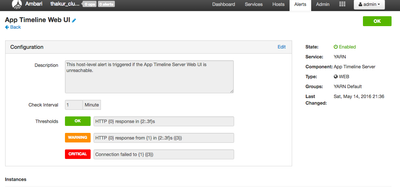
2.You can try modifying "connection_timeout" value for the timeline webui. Please follow steps below
a.Check alert defination using below command -
http://<ambari_fqdn>:8080/api/v1/clusters/<cluster-name>/alert_definitions/
b.Get the respective alert definition you want to modify from above command- here for example we will modify "App Timeline webui" alert value for "connection_timeout" changing value from 5.0 to 50.0
c. Copy the json into file name test.json
d. Modify the json value for "connection_timeout" : 5.0" to "connection_timeout" : 50.0" and save the file.
e. PUT it using below command -
curl -H 'X-Requested-By:ambari' -u $ambari_username:$ambari_password -X PUT --data @test.json http://<ambari_fqdn>:8080/api/v1/clusters/<cluster-name>/alert_definitions/<alert_no>/



Created 05-16-2016 12:34 PM
- Mark as New
- Bookmark
- Subscribe
- Mute
- Subscribe to RSS Feed
- Permalink
- Report Inappropriate Content
If you have Kerberos enabled, you might be hitting: https://issues.apache.org/jira/browse/AMBARI-14847
You can upgrade to Ambari 2.2.2 and that should resolve the issue.


