Our Community is getting an upgrade! To get everything ready for the relaunch, we’ll be placing the site in read-only mode starting September 21st.
We really appreciate your understanding while we get things set up behind the scenes. Catch up on all the exciting details about the move here.
Need help or have questions? Drop us a line at [email protected]

Archives of Support Questions (Read Only)
- Cloudera Community
- Board Archive
- Archives of Support Questions (Read Only)
- Why is CDH 5.4 not set as the latest parcels at ht...
- Subscribe to RSS Feed
- Mark Question as New
- Mark Question as Read
- Float this Question for Current User
- Bookmark
- Subscribe
- Mute
- Printer Friendly Page
- Subscribe to RSS Feed
- Mark Question as New
- Mark Question as Read
- Float this Question for Current User
- Bookmark
- Subscribe
- Mute
- Printer Friendly Page
Why is CDH 5.4 not set as the latest parcels at http://archive.cloudera.com/cdh5/parcels/latest/ ?


Created on 05-03-2015 10:09 AM - edited 09-16-2022 02:27 AM
- Mark as New
- Bookmark
- Subscribe
- Mute
- Subscribe to RSS Feed
- Permalink
- Report Inappropriate Content
Looking at http://archive.cloudera.com/cdh5/parcels/latest/ it still holds CDH 5.3. When will it change to CDH 5.4? I can point directly at the CDH 5.4 parcels via http://archive.cloudera.com/cdh5/parcels/5.4/ but wanted to know if there was reason why the latest archive is not hosting the CDH 5.4 parcels?


Created 05-04-2015 05:19 AM
- Mark as New
- Bookmark
- Subscribe
- Mute
- Subscribe to RSS Feed
- Permalink
- Report Inappropriate Content
This is not a defect of archive.cloudera.com symlinks or the Cloudera Manager product, but rather is intended to protect from upgrading to a version of CDH that cannot be properly deployed, activated and managed.
Administrators may be accustomed to the /latest parcel repository URL continually tracking the latest dot-release of CDH. As of CDH 5.3.x, the /latest endpoint on archive.cloudera.com is frozen and will not track beyond the latest release of CDH 5.3.x.
As a replacement for this symlink-based solution, Cloudera Manager versions 5.4 and above will negotiate the highest-supported CDH version permissible to download and activate with that specific deployment version of Cloudera Manager. This facilitates remaining within support matrix software combinations.
Instructions: If you wish to install CDH 5.4.0 or higher, you must upgrade Cloudera Manager to version 5.4.0 or higher first.
To simplify this transition away from a /latest symlink mechanism, CM 5.4 and higher make use of a Remote Parcel Repository URL configuration variable that lets the Cloudera Manager Server negotiate and determine the Highest-Supported CDH version using this {latest_supported} variable. If you upgrade to Cloudera Manager 5.4.0 or higher and wish to see all supported CDH parcel versions, ensure your parcel settings for Report Parcel Repository URLs contains a property similar to the following (assuming your cluster can contact archive.cloudera.com😞
http://archive.cloudera.com/cdh5/parcels/{latest_supported}
If you host CDH parcels in an internal repository adapt the URL to point to your properly-populated Parcel Repository.
Robert Justice, Technical Resolution Manager
Was your question answered? Make sure to mark the answer as the accepted solution.
If you find a reply useful, say thanks by clicking on the thumbs up button.
Learn more about the Cloudera Community:
Created 05-04-2015 05:19 AM
- Mark as New
- Bookmark
- Subscribe
- Mute
- Subscribe to RSS Feed
- Permalink
- Report Inappropriate Content
This is not a defect of archive.cloudera.com symlinks or the Cloudera Manager product, but rather is intended to protect from upgrading to a version of CDH that cannot be properly deployed, activated and managed.
Administrators may be accustomed to the /latest parcel repository URL continually tracking the latest dot-release of CDH. As of CDH 5.3.x, the /latest endpoint on archive.cloudera.com is frozen and will not track beyond the latest release of CDH 5.3.x.
As a replacement for this symlink-based solution, Cloudera Manager versions 5.4 and above will negotiate the highest-supported CDH version permissible to download and activate with that specific deployment version of Cloudera Manager. This facilitates remaining within support matrix software combinations.
Instructions: If you wish to install CDH 5.4.0 or higher, you must upgrade Cloudera Manager to version 5.4.0 or higher first.
To simplify this transition away from a /latest symlink mechanism, CM 5.4 and higher make use of a Remote Parcel Repository URL configuration variable that lets the Cloudera Manager Server negotiate and determine the Highest-Supported CDH version using this {latest_supported} variable. If you upgrade to Cloudera Manager 5.4.0 or higher and wish to see all supported CDH parcel versions, ensure your parcel settings for Report Parcel Repository URLs contains a property similar to the following (assuming your cluster can contact archive.cloudera.com😞
http://archive.cloudera.com/cdh5/parcels/{latest_supported}
If you host CDH parcels in an internal repository adapt the URL to point to your properly-populated Parcel Repository.
Robert Justice, Technical Resolution Manager
Was your question answered? Make sure to mark the answer as the accepted solution.
If you find a reply useful, say thanks by clicking on the thumbs up button.
Learn more about the Cloudera Community:


Created 02-28-2017 10:49 PM
- Mark as New
- Bookmark
- Subscribe
- Mute
- Subscribe to RSS Feed
- Permalink
- Report Inappropriate Content
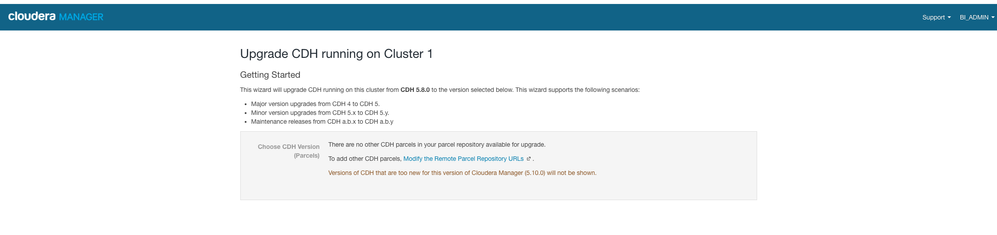
I recently upgraded CM to 5.10.0. Trying to upgrade CDH from the Manager from 5.8.0 throws up the same issue. I cannot see or select the CDH. Attached is a screenshot. Any help in figuring out next steps to get this running will help.