
Our Community is getting an upgrade! To get everything ready for the relaunch, we’ll be placing the site in read-only mode starting September 21st.
We really appreciate your understanding while we get things set up behind the scenes. Catch up on all the exciting details about the move here.
Need help or have questions? Drop us a line at [email protected]

Archives of Support Questions (Read Only)
- Cloudera Community
- Board Archive
- Archives of Support Questions (Read Only)
- Windows - Hive connection issue through ODBC usin...
- Subscribe to RSS Feed
- Mark Question as New
- Mark Question as Read
- Float this Question for Current User
- Bookmark
- Subscribe
- Mute
- Printer Friendly Page
- Subscribe to RSS Feed
- Mark Question as New
- Mark Question as Read
- Float this Question for Current User
- Bookmark
- Subscribe
- Mute
- Printer Friendly Page
Windows - Hive connection issue through ODBC using Hive ODBC Driver for HDP 2.2
- Labels:
-
Apache Hive


Created on 02-09-2016 04:02 PM - edited 08-19-2019 02:09 AM
- Mark as New
- Bookmark
- Subscribe
- Mute
- Subscribe to RSS Feed
- Permalink
- Report Inappropriate Content
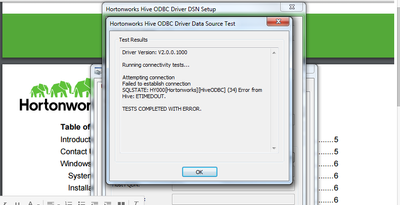
I installed Hive ODBC Driver for HDP 2.2 on my windows 7 machine and trying to connect to hive through ODBC(hadoop istalled on CENTOS).I encoutered with following error. configs are all default. For example authentication for hiveserver2 is "none"(default).Is anything i missed out.I followed the document of hortoworks.I gave the server ip and port is 10000.I assumed hiveserver2 is running because beeline command line is working for following command
beeline -u jdbc:hive2://ip:10000


Created 02-09-2016 04:13 PM
- Mark as New
- Bookmark
- Subscribe
- Mute
- Subscribe to RSS Feed
- Permalink
- Report Inappropriate Content
Check your connection details and it should be like below:
Host <Give IP of HiveServer2>,
Port: 10000, Database: optional( you can specify your target as well, if you don't specify it will show default db).
Hive Server Type: Hive Server 2,
Mechanism: User Name and Password,
User Name : give your name and ensure that user has access in that edge node.
Paswd: XXXXX


Created 02-09-2016 04:08 PM
- Mark as New
- Bookmark
- Subscribe
- Mute
- Subscribe to RSS Feed
- Permalink
- Report Inappropriate Content
@Suresh Bonam
Can you have a look at this doc
Created 02-09-2016 04:13 PM
- Mark as New
- Bookmark
- Subscribe
- Mute
- Subscribe to RSS Feed
- Permalink
- Report Inappropriate Content
Check your connection details and it should be like below:
Host <Give IP of HiveServer2>,
Port: 10000, Database: optional( you can specify your target as well, if you don't specify it will show default db).
Hive Server Type: Hive Server 2,
Mechanism: User Name and Password,
User Name : give your name and ensure that user has access in that edge node.
Paswd: XXXXX


