Archives of Support Questions (Read Only)

This is an archived board for historical reference. Information and links may no longer be available or relevant
Announcements
This board is archived and read-only for historical reference. To ask a new question, please post a new topic on the appropriate active board.

With ATLAS, which format attribute Date is accepted ? where I can change it ?

avatar
New Member

Hi,

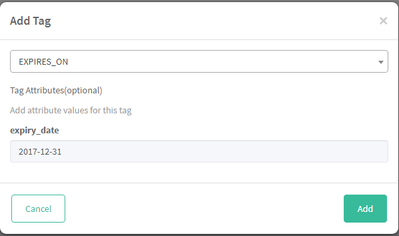
In Atlas, I would like test, the "EXPIRES_ON" tag. For this I try to put a specific date in the "expiry_date" attribute. (like image1)

24389-2017-08-02-13h49-42.png

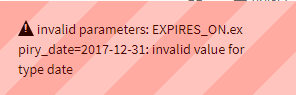
But when I put a value, I have always the same error message (like image2)

24390-2017-08-02-14h01-18.png

I tried differents formats like : yyyy/mm/dd, yyyy-mm-dd, mm-dd-yyyy, etc, but nothing work.

Can you help give me the good format date is accepted ?

I saw some TP on community, with the format yyyy/mm/dd, but in my case, it don't work.

Thank for your reply

Marc

1 ACCEPTED SOLUTION

avatar

@Marc Parmentier

The date format is as follows:

{yyyy}-{mm}-{dd}T{hh}:{mm}:{ss}.{zzz}Z

{year}-{month}-{day}T{hours}:{minutes}:{seconds}.{timezone_id}Z

e.g. 2017-04-18T18:49:44.000Z

View solution in original post

1 REPLY 1

avatar

@Marc Parmentier

The date format is as follows:

{yyyy}-{mm}-{dd}T{hh}:{mm}:{ss}.{zzz}Z

{year}-{month}-{day}T{hours}:{minutes}:{seconds}.{timezone_id}Z

e.g. 2017-04-18T18:49:44.000Z