
Our Community is getting an upgrade! To get everything ready for the relaunch, we’ll be placing the site in read-only mode starting September 21st.
We really appreciate your understanding while we get things set up behind the scenes. Catch up on all the exciting details about the move here.
Need help or have questions? Drop us a line at [email protected]

Archives of Support Questions (Read Only)
- Cloudera Community
- Board Archive
- Archives of Support Questions (Read Only)
- add disk and storage to hdp sandbox vm
- Subscribe to RSS Feed
- Mark Question as New
- Mark Question as Read
- Float this Question for Current User
- Bookmark
- Subscribe
- Mute
- Printer Friendly Page
- Subscribe to RSS Feed
- Mark Question as New
- Mark Question as Read
- Float this Question for Current User
- Bookmark
- Subscribe
- Mute
- Printer Friendly Page
add disk and storage to hdp sandbox vm
- Labels:
-
Apache Hadoop

Created 06-10-2016 09:41 PM
- Mark as New
- Bookmark
- Subscribe
- Mute
- Subscribe to RSS Feed
- Permalink
- Report Inappropriate Content
I am running HDP Sandbox in an Azure VM. I can successfully add a disk to the VM and format / mount it. I would like to add it to HDFS to extend my storage. I am performing the following steps to get it recognized:
- Create directory on the volume: i.e. mkdir /data/hdfs/data
- Change perms: sudo chmod -R 755 /data/hdfs/data
- Change ownership: sudo chown -R hadoop:hdfs /data/hdfs/data
- Stop datanode through Ambari
- Change dfs.data.dir property in /etc/hadoop/conf/hdfs-site.xml, add directory comma delimited
- Restart datanode


Created 06-10-2016 09:48 PM
- Mark as New
- Bookmark
- Subscribe
- Mute
- Subscribe to RSS Feed
- Permalink
- Report Inappropriate Content
Have you tried changing the setting through the HDFS service in Ambari?
Created 06-10-2016 09:48 PM
- Mark as New
- Bookmark
- Subscribe
- Mute
- Subscribe to RSS Feed
- Permalink
- Report Inappropriate Content
Have you tried changing the setting through the HDFS service in Ambari?
Created on 06-10-2016 09:51 PM - edited 08-19-2019 02:12 AM
- Mark as New
- Bookmark
- Subscribe
- Mute
- Subscribe to RSS Feed
- Permalink
- Report Inappropriate Content
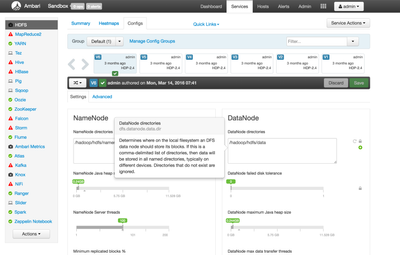
It looks like you should be able to add a directory
Created on 06-10-2016 10:10 PM - edited 08-19-2019 02:12 AM
- Mark as New
- Bookmark
- Subscribe
- Mute
- Subscribe to RSS Feed
- Permalink
- Report Inappropriate Content
I get the following error adding it there:

Created on 06-10-2016 10:22 PM - edited 08-19-2019 02:12 AM
- Mark as New
- Bookmark
- Subscribe
- Mute
- Subscribe to RSS Feed
- Permalink
- Report Inappropriate Content
Interesting. So it seems I actually got it to add another directory. These were the steps I followed:
I ran your commands above
mkdir /data/hdfs/data
chmod -R 755 /data/hdfs/data
sudo chown -R hdfs /data/hdfs/data
After running those commands I moved to Ambari. Moved to the HDFS service. From there instead of using a comma to separate the two, I just put the new directory on a separate line underneath so it looked like:
/hadoop/hdfs/data
/data/hdfs/data
After this I Ambari asked me to restart a few of the components. (It was taking a while so I ended up rebooting the Sandbox)
After rebooting the Sandbox I went back to the Ambari config and the new directory I added earlier was still present.
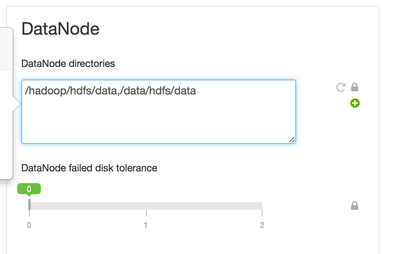
EDIT: Try removing the space after the comma. Ambari gave me an error when there was a space after the comma.
Created 06-28-2016 01:38 AM
- Mark as New
- Bookmark
- Subscribe
- Mute
- Subscribe to RSS Feed
- Permalink
- Report Inappropriate Content
Thanks @zblanco! Removing the comma did the trick.


