
Our Community is getting an upgrade! To get everything ready for the relaunch, we’ll be placing the site in read-only mode starting September 21st.
We really appreciate your understanding while we get things set up behind the scenes. Catch up on all the exciting details about the move here.
Need help or have questions? Drop us a line at [email protected]

Archives of Support Questions (Read Only)
- Cloudera Community
- Board Archive
- Archives of Support Questions (Read Only)
- ambari Views fail after Kerberos Enabled.
- Subscribe to RSS Feed
- Mark Question as New
- Mark Question as Read
- Float this Question for Current User
- Bookmark
- Subscribe
- Mute
- Printer Friendly Page
- Subscribe to RSS Feed
- Mark Question as New
- Mark Question as Read
- Float this Question for Current User
- Bookmark
- Subscribe
- Mute
- Printer Friendly Page
ambari Views fail after Kerberos Enabled.
- Labels:
-
Apache Ambari
-
Apache Hadoop


Created 08-31-2017 05:45 PM
- Mark as New
- Bookmark
- Subscribe
- Mute
- Subscribe to RSS Feed
- Permalink
- Report Inappropriate Content
Hi,
I am not able to view any ambari views except Yarn after kerberos enabled. I dont have any proxy users setup and just have ambari server.
Any suggestions Please :
How to configure after kerberos enabled:
Hive View :
Issues detected
Service 'ats' check failed: Server ErrorService 'userhome' check failed: Authentication required
Service 'userhome' check failed:
org.apache.hadoop.security.AccessControlException: Authentication required
	at org.apache.hadoop.hdfs.web.WebHdfsFileSystem.validateResponse(WebHdfsFileSystem.java:457)
	at org.apache.hadoop.hdfs.web.WebHdfsFileSystem.access$200(WebHdfsFileSystem.java:113)
	at org.apache.hadoop.hdfs.web.WebHdfsFileSystem$AbstractRunner.runWithRetry(WebHdfsFileSystem.java:738)
	at org.apache.hadoop.hdfs.web.WebHdfsFileSystem$AbstractRunner.access$100(WebHdfsFileSystem.java:582)
	at org.apache.hadoop.hdfs.web.WebHdfsFileSystem$AbstractRunner$1.run(WebHdfsFileSystem.java:612)
	at java.security.AccessController.doPrivileged(Native Method)
	at javax.security.auth.Subject.doAs(Subject.java:422)
	at org.apache.hadoop.security.UserGroupInformation.doAs(UserGroupInformation.java:1724)
	at org.apache.hadoop.hdfs.web.WebHdfsFileSystem$AbstractRunner.run(WebHdfsFileSystem.java:608)
	at org.apache.hadoop.hdfs.web.WebHdfsFileSystem.getHdfsFileStatus(WebHdfsFileSystem.java:987)
	at org.apache.hadoop.hdfs.web.WebHdfsFileSystem.getFileStatus(WebHdfsFileSystem.java:1003)
	at org.apache.ambari.view.utils.hdfs.HdfsApi$3.run(HdfsApi.java:127)
	at org.apache.ambari.view.utils.hdfs.HdfsApi$3.run(HdfsApi.java:125)
	at java.security.AccessController.doPrivileged(Native Method)
	at javax.security.auth.Subject.doAs(Subject.java:422)
Trace : Ambari Files View
Authentication required
org.apache.hadoop.security.AccessControlException: Authentication required
	at org.apache.hadoop.hdfs.web.WebHdfsFileSystem.validateResponse(WebHdfsFileSystem.java:457)
	at org.apache.hadoop.hdfs.web.WebHdfsFileSystem.access$200(WebHdfsFileSystem.java:113)
	at org.apache.hadoop.hdfs.web.WebHdfsFileSystem$AbstractRunner.runWithRetry(WebHdfsFileSystem.java:738)
	at org.apache.hadoop.hdfs.web.WebHdfsFileSystem$AbstractRunner.access$100(WebHdfsFileSystem.java:582)
	at org.apache.hadoop.hdfs.web.WebHdfsFileSystem$AbstractRunner$1.run(WebHdfsFileSystem.java:612)
	at java.security.AccessController.doPrivileged(Native Method)
	at javax.security.auth.Subject.doAs(Subject.java:422)
	at org.apache.hadoop.security.UserGroupInformation.doAs(UserGroupInformation.java:1724)


Created 08-31-2017 09:54 PM
- Mark as New
- Bookmark
- Subscribe
- Mute
- Subscribe to RSS Feed
- Permalink
- Report Inappropriate Content
Then you have to use
hadoop.proxyuser.root.groups=*
hadoop.proxyuser.root.hosts=*
hadoop.proxyuser.ambari-server.groups=*
hadoop.proxyuser.ambari-server.hosts=*
Created 08-31-2017 09:45 PM
- Mark as New
- Bookmark
- Subscribe
- Mute
- Subscribe to RSS Feed
- Permalink
- Report Inappropriate Content
Here we are talking of the user running the ambari processes check like below
# ls -al /etc/ambari-server/conf/
Regards
Created 08-31-2017 09:50 PM
- Mark as New
- Bookmark
- Subscribe
- Mute
- Subscribe to RSS Feed
- Permalink
- Report Inappropriate Content
@Geoffrey Shelton Okot
total 28
drwxr-xr-x 2 root root  131 Aug 29 11:49 .
drwxr-xr-x 3 root root   18 Aug  1 22:37 ..
-rwxrwxrwx 1 root root 6824 Aug 24 13:02 ambari.properties
-rwxrwxrwx 1 root root  311 Aug 29 11:49 krb5JAASLogin.conf
-rw-r--r-- 1 root root  286 Aug 29 11:49 krb5JAASLogin.conf.bak
-rwxrwxrwx 1 root root 4929 Aug  1 22:37 log4j.properties
-rw-r----- 1 root root    7 Aug  1 22:47 password.dat
Created 08-31-2017 09:54 PM
- Mark as New
- Bookmark
- Subscribe
- Mute
- Subscribe to RSS Feed
- Permalink
- Report Inappropriate Content
Then you have to use
hadoop.proxyuser.root.groups=*
hadoop.proxyuser.root.hosts=*
hadoop.proxyuser.ambari-server.groups=*
hadoop.proxyuser.ambari-server.hosts=*
Created on 08-31-2017 10:01 PM - edited 08-17-2019 05:34 PM
- Mark as New
- Bookmark
- Subscribe
- Mute
- Subscribe to RSS Feed
- Permalink
- Report Inappropriate Content
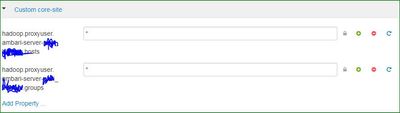
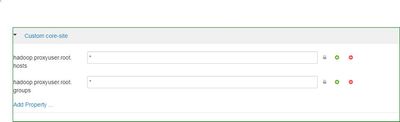
Created 08-31-2017 10:13 PM
- Mark as New
- Bookmark
- Subscribe
- Mute
- Subscribe to RSS Feed
- Permalink
- Report Inappropriate Content
The bold part obscured above should be part Authentication part in the File/hive view
hadoop.proxyuser.ambari-server-xxxx.hosts
hadoop.proxyuser.ambari-server-xxxx.groups
In the part of the views
WebHDFS Authentication : auth=KERBEROS;proxyuser=ambari-server-xxxx@REALM
Created 08-31-2017 10:49 PM
- Mark as New
- Bookmark
- Subscribe
- Mute
- Subscribe to RSS Feed
- Permalink
- Report Inappropriate Content
After restartred ambari server got new issue :
Service 'hdfs' check failed:
java.lang.NullPointerException
	at org.apache.hadoop.security.authentication.util.KerberosName.getShortName(KerberosName.java:383)
	at org.apache.hadoop.security.User.<init>(User.java:48)
	at org.apache.hadoop.security.User.<init>(User.java:43)
	at org.apache.hadoop.security.UserGroupInformation.createRemoteUser(UserGroupInformation.java:1270)
	at org.apache.hadoop.security.UserGroupInformation.createRemoteUser(UserGroupInformation.java:1254)
	at org.apache.ambari.view.utils.hdfs.HdfsApi.getProxyUser(HdfsApi.java:78)
	at org.apache.ambari.view.utils.hdfs.HdfsApi.<init>(HdfsApi.java:66)
	at org.apache.ambari.view.utils.hdfs.HdfsUtil.connectToHDFSApi(HdfsUtil.java:127)
	at org.apache.ambari.view.commons.hdfs.HdfsService.hdfsSmokeTest(HdfsService.java:136)
	at org.apache.ambari.view.filebrowser.HelpService.hdfsStatus(HelpService.java:86)
	at sun.reflect.NativeMethodAccessorImpl.invoke0(Native Method)
	at sun.reflect.NativeMethodAccessorImpl.invoke(NativeMethodAccessorImpl.java:62)
	at sun.reflect.DelegatingMethodAccessorImpl.invoke(DelegatingMethodAccessorImpl.java:43)
	at java.lang.reflect.Method.invoke(Method.java:498)
Created 09-01-2017 05:34 AM
- Mark as New
- Bookmark
- Subscribe
- Mute
- Subscribe to RSS Feed
- Permalink
- Report Inappropriate Content
2 things to do can you first restart the cluster and see if it persists.
What is the value for WebHDFS Authentication in the views ?
From the stack trace the problem is due to the mapping from full Kerberos principal name to short username. This mapping is driven by the following configuration property in core-site.xml.
<property>
  <name>hadoop.security.auth_to_local</name>
  <value></value>
  <description>Maps kerberos principals to local user names</description>
</property>
Please revert
Created 09-01-2017 05:21 PM
- Mark as New
- Bookmark
- Subscribe
- Mute
- Subscribe to RSS Feed
- Permalink
- Report Inappropriate Content
I don't know what is the issue. did lot of research but still issue persist.
Webhdfs : auth=KERBEROS;[email protected]
Created 09-01-2017 08:35 PM
- Mark as New
- Bookmark
- Subscribe
- Mute
- Subscribe to RSS Feed
- Permalink
- Report Inappropriate Content
I have also been trying to understand what is wrong. What's this command's output?
# klist -kt /etc/security/keytabs/ambari.server.keytab
keytab name: FILE:/etc/security/keytabs/ambari.server.keytab
KVNO           Timestamp           Principal
---- ------------------- ------------------------------------------------------
   1 08/24/2017 15:42:24 [email protected]
   1 08/24/2017 15:42:24 [email protected]
   1 08/24/2017 15:42:24 [email protected]
   1 08/24/2017 15:42:24 [email protected]
   1 08/24/2017 15:42:24 [email protected]
Then grab a valid Kerberos ticket
$ kinit -kt /etc/security/keytabs/ambari.server.keytab [email protected]
Then try accessing then retry.
Created 09-01-2017 08:47 PM
- Mark as New
- Bookmark
- Subscribe
- Mute
- Subscribe to RSS Feed
- Permalink
- Report Inappropriate Content
Thank You. after lot of edits i am able to open FilesView But not Hive View.
Issues detected
Service 'hdfs' check failed: E090 NullPointerException
Service 'userhome' check failed: HdfsApi connection failed. Check "webhdfs.url" property


