
Our Community is getting an upgrade! To get everything ready for the relaunch, we’ll be placing the site in read-only mode starting September 21st.
We really appreciate your understanding while we get things set up behind the scenes. Catch up on all the exciting details about the move here.
Need help or have questions? Drop us a line at [email protected]

Archives of Support Questions (Read Only)
- Cloudera Community
- Board Archive
- Archives of Support Questions (Read Only)
- ambari-server installation
- Subscribe to RSS Feed
- Mark Question as New
- Mark Question as Read
- Float this Question for Current User
- Bookmark
- Subscribe
- Mute
- Printer Friendly Page
- Subscribe to RSS Feed
- Mark Question as New
- Mark Question as Read
- Float this Question for Current User
- Bookmark
- Subscribe
- Mute
- Printer Friendly Page
ambari-server installation
- Labels:
-
Apache Ambari


Created 08-16-2016 11:20 PM
- Mark as New
- Bookmark
- Subscribe
- Mute
- Subscribe to RSS Feed
- Permalink
- Report Inappropriate Content
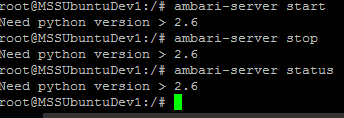
I am trying to install ambari-server in Ubuntu. while ambari-server install or setup system asking about install python >2.6 .
I installed python 2.7 version then trying to setup the ambari-server then also prompting the same that "Need python version >2.6.
Previously it was not asked like that. could you please help me.


Created 09-17-2016 11:32 AM
- Mark as New
- Bookmark
- Subscribe
- Mute
- Subscribe to RSS Feed
- Permalink
- Report Inappropriate Content
Got the same issue on Centos7, when launching by systemctl.
systemctl status ambari-server
.....
Sep 17 13:02:15 sr1 systemd[1]: Starting LSB: ambari-server daemon...
Sep 17 13:02:15 sr1 ambari-server[1339]: Need python version > 2.6
Sep 17 13:02:15 sr1 systemd[1]: ambari-server.service: control process exited, code=exited status=1
But,
/etc/init.d/ambari-server starts
works fine!
I fixed it by patching ambari-server file:
Replace:
export ROOT=`dirname $(dirname $SCRIPT_DIR)`
ROOT=`echo $ROOT | sed 's/\/$//'`
by
export ROOT='/'
I don't know what this ROOT variable is intended for, but in my case, it was set to '/etc' when launching by systemctl. This will of course break the launched process
TRICK:
Just add
env >/tmp/env.txt
at appropriate place in ambari-server file. And you will get
PATH=/etc/usr/lib/ambari-server/*:/usr/local/sbin:/usr/local/bin:/usr/sbin:/usr/bin:/sbin/:/usr/sbin
PWD=/
LANG=en_US.UTF-8
AMBARI_CONF_DIR=/etc/etc/ambari-server/conf
ROOT=/etc
AMBARI_PASSPHRASE=DEV
SHLVL=1
PYTHON=
_=/usr/bin/env
Which is obviously wrong....
Hope this will help
Created 08-16-2016 11:36 PM
- Mark as New
- Bookmark
- Subscribe
- Mute
- Subscribe to RSS Feed
- Permalink
- Report Inappropriate Content
Created 08-16-2016 11:38 PM
- Mark as New
- Bookmark
- Subscribe
- Mute
- Subscribe to RSS Feed
- Permalink
- Report Inappropriate Content
using Ubuntu OS -I was installed the other server but it doesn't ask about python installation in the server. I don't know where I am missing the steps to install the ambari-server.


Created 08-17-2016 12:15 AM
- Mark as New
- Bookmark
- Subscribe
- Mute
- Subscribe to RSS Feed
- Permalink
- Report Inappropriate Content
I will start with something very basic. After installing python, did you start a new ssh window or putty session? if not, can you please try that first. Also run python -V to find python version.
Created 08-17-2016 12:26 AM
- Mark as New
- Bookmark
- Subscribe
- Mute
- Subscribe to RSS Feed
- Permalink
- Report Inappropriate Content
I have started new putty session but still getting the same problem. No luck.
python version is Python 2.7.5
Created 08-17-2016 02:21 AM
- Mark as New
- Bookmark
- Subscribe
- Mute
- Subscribe to RSS Feed
- Permalink
- Report Inappropriate Content
Please check the following code (line 81). Basically your python version is evaluating to less than 2.6. It is definitely not coming evaluating as 2.7.5.
https://github.com/apache/ambari/blob/trunk/ambari-server/sbin/ambari-server
What is your PYTHON home?
Can you run "/usr/bin/python -V" and share the result.
If you still see the message then based on following link, you can try with "--skip-borken"
Created 08-17-2016 02:57 AM
- Mark as New
- Bookmark
- Subscribe
- Mute
- Subscribe to RSS Feed
- Permalink
- Report Inappropriate Content
i am getting the result : Python 2.7.6
But ubuntu doesn't have -skip-broken function it seems and it is not working. Please give the ubuntu related code.
When shall I use the --skip-broken command ? any sample code please.
Is this really works?
Thanks,
Narender
Created 08-17-2016 03:02 AM
- Mark as New
- Bookmark
- Subscribe
- Mute
- Subscribe to RSS Feed
- Permalink
- Report Inappropriate Content
Can you try removing python and then reinstalling it.
sudo dpkg -P python2.7sudo apt-get install python2.7


Created 08-17-2016 02:30 AM
- Mark as New
- Bookmark
- Subscribe
- Mute
- Subscribe to RSS Feed
- Permalink
- Report Inappropriate Content
Here are Python supported versions for HDP
For CentOS 6: Python 2.6.*
For SLES 11: Python 2.6.8 or later
For CentOS 7, Ubuntu 12, Ubuntu 14, and Debian 7: Python 2.7.*
https://community.hortonworks.com/questions/23315/using-python-279-with-hdp-24.html
I hope this will help you.
Created 09-17-2016 11:32 AM
- Mark as New
- Bookmark
- Subscribe
- Mute
- Subscribe to RSS Feed
- Permalink
- Report Inappropriate Content
Got the same issue on Centos7, when launching by systemctl.
systemctl status ambari-server
.....
Sep 17 13:02:15 sr1 systemd[1]: Starting LSB: ambari-server daemon...
Sep 17 13:02:15 sr1 ambari-server[1339]: Need python version > 2.6
Sep 17 13:02:15 sr1 systemd[1]: ambari-server.service: control process exited, code=exited status=1
But,
/etc/init.d/ambari-server starts
works fine!
I fixed it by patching ambari-server file:
Replace:
export ROOT=`dirname $(dirname $SCRIPT_DIR)`
ROOT=`echo $ROOT | sed 's/\/$//'`
by
export ROOT='/'
I don't know what this ROOT variable is intended for, but in my case, it was set to '/etc' when launching by systemctl. This will of course break the launched process
TRICK:
Just add
env >/tmp/env.txt
at appropriate place in ambari-server file. And you will get
PATH=/etc/usr/lib/ambari-server/*:/usr/local/sbin:/usr/local/bin:/usr/sbin:/usr/bin:/sbin/:/usr/sbin
PWD=/
LANG=en_US.UTF-8
AMBARI_CONF_DIR=/etc/etc/ambari-server/conf
ROOT=/etc
AMBARI_PASSPHRASE=DEV
SHLVL=1
PYTHON=
_=/usr/bin/env
Which is obviously wrong....
Hope this will help


