
Our Community is getting an upgrade! To get everything ready for the relaunch, we’ll be placing the site in read-only mode starting September 21st.
We really appreciate your understanding while we get things set up behind the scenes. Catch up on all the exciting details about the move here.
Need help or have questions? Drop us a line at [email protected]

Archives of Support Questions (Read Only)
- Cloudera Community
- Board Archive
- Archives of Support Questions (Read Only)
- ambari-server setup error 'cannot import name pars...
- Subscribe to RSS Feed
- Mark Question as New
- Mark Question as Read
- Float this Question for Current User
- Bookmark
- Subscribe
- Mute
- Printer Friendly Page
- Subscribe to RSS Feed
- Mark Question as New
- Mark Question as Read
- Float this Question for Current User
- Bookmark
- Subscribe
- Mute
- Printer Friendly Page
ambari-server setup error 'cannot import name parse_log4j_file'


Created on 11-18-2016 10:37 AM - edited 08-19-2019 04:27 AM
- Mark as New
- Bookmark
- Subscribe
- Mute
- Subscribe to RSS Feed
- Permalink
- Report Inappropriate Content
I am installing HDP-2.5.0.0
When I setup the ambari-server, i have an error as follows:
Using python /usr/bin/python Setup ambari-server Traceback (most recent call last): File "/usr/sbin/ambari-server.py", line 33, in <module> from ambari_server.dbConfiguration import DATABASE_NAMES, LINUX_DBMS_KEYS_LIST File "/usr/lib/python2.6/site-packages/ambari_server/dbConfiguration.py", line 28, in <module> from ambari_server.serverConfiguration import decrypt_password_for_alias, get_ambari_properties, get_is_secure, File "/usr/lib/python2.6/site-packages/ambari_server/serverConfiguration.py", line 36, in <module> from ambari_commons.os_utils import run_os_command, search_file, set_file_permissions, parse_log4j_file ImportError: cannot import name parse_log4j_file
The command is : ambari-server setup -j /usr/local/cloud/java/jdk1.8.0_65 --jdbc-driver=/usr/share/java/mysql-connector-java.jar --jdbc-db=mysql -v -g

My ambari-server's version is 2.4.1.0,installed from http://public-repo-1.hortonworks.com/ambari/centos6/2.x/updates/2.4.1.0
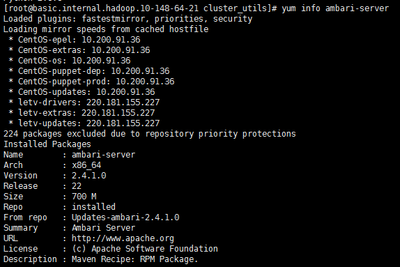
My python is 2.6.6

So why does it show "ImportError: cannot import name parse_log4j_file", i haven't met it in previous hdp version
Wait for your reply, thanks


Created 11-19-2016 05:41 PM
- Mark as New
- Bookmark
- Subscribe
- Mute
- Subscribe to RSS Feed
- Permalink
- Report Inappropriate Content
try to reinstall Ambari after you uninstall it, delete any ambari-server directories and especially remove the following directory /usr/lib/python2.6/site-packages/ambari_server
Created 11-19-2016 05:41 PM
- Mark as New
- Bookmark
- Subscribe
- Mute
- Subscribe to RSS Feed
- Permalink
- Report Inappropriate Content
try to reinstall Ambari after you uninstall it, delete any ambari-server directories and especially remove the following directory /usr/lib/python2.6/site-packages/ambari_server
Created 11-20-2016 01:42 PM
- Mark as New
- Bookmark
- Subscribe
- Mute
- Subscribe to RSS Feed
- Permalink
- Report Inappropriate Content
ok, i will try it
appreciate reply
Created 11-21-2016 08:34 AM
- Mark as New
- Bookmark
- Subscribe
- Mute
- Subscribe to RSS Feed
- Permalink
- Report Inappropriate Content
thank you Artem
It worked


Created 01-01-2017 04:26 AM
- Mark as New
- Bookmark
- Subscribe
- Mute
- Subscribe to RSS Feed
- Permalink
- Report Inappropriate Content
in my case, version of Ambari and Python mismatched, I installed a lower version of Ambari and it started to work


Created 03-07-2017 06:28 PM
- Mark as New
- Bookmark
- Subscribe
- Mute
- Subscribe to RSS Feed
- Permalink
- Report Inappropriate Content
Hi @Artem Ervits, I am facing similar issue while setting up ambari server v2.4.1.0 and python 2.6.6. I tried to uninstall and made sure /usr/lib/python2.6/site-packages/ambari_server is cleaned but still issue exists. Can you please let me know what else can be done to resolve this issue.
Traceback (most recent call last): File "/usr/sbin/ambari-server.py", line 33, in <module> from ambari_server.dbConfiguration import DATABASE_NAMES, LINUX_DBMS_KEYS_LIST File "/usr/lib/python2.6/site-packages/ambari_server/dbConfiguration.py", line 28, in <module> from ambari_server.serverConfiguration import decrypt_password_for_alias, get_ambari_properties, get_is_secure, \ File "/usr/lib/python2.6/site-packages/ambari_server/serverConfiguration.py", line 36, in <module> from ambari_commons.os_utils import run_os_command, search_file, set_file_permissions, parse_log4j_file ImportError: cannot import name parse_log4j_file
Created 03-07-2017 06:33 PM
- Mark as New
- Bookmark
- Subscribe
- Mute
- Subscribe to RSS Feed
- Permalink
- Report Inappropriate Content
I also tried deploying ambari version 2.4.2.0 and also in different environement, still seeing the same issue.
Created 03-07-2017 06:39 PM
- Mark as New
- Bookmark
- Subscribe
- Mute
- Subscribe to RSS Feed
- Permalink
- Report Inappropriate Content
please open this as a new HCC question not to hijack the current thread.
Created 03-07-2017 06:59 PM
- Mark as New
- Bookmark
- Subscribe
- Mute
- Subscribe to RSS Feed
- Permalink
- Report Inappropriate Content
Hi @Artem Ervits ... I have opened new thead in HCC. Below is the link,


