
Our Community is getting an upgrade! To get everything ready for the relaunch, we’ll be placing the site in read-only mode starting September 21st.
We really appreciate your understanding while we get things set up behind the scenes. Catch up on all the exciting details about the move here.
Need help or have questions? Drop us a line at [email protected]

Archives of Support Questions (Read Only)
- Cloudera Community
- Board Archive
- Archives of Support Questions (Read Only)
- Re: change the port for ambari server
- Subscribe to RSS Feed
- Mark Question as New
- Mark Question as Read
- Float this Question for Current User
- Bookmark
- Subscribe
- Mute
- Printer Friendly Page
- Subscribe to RSS Feed
- Mark Question as New
- Mark Question as Read
- Float this Question for Current User
- Bookmark
- Subscribe
- Mute
- Printer Friendly Page
change the port for ambari server
- Labels:
-
Apache Ambari


Created 12-01-2017 12:17 PM
- Mark as New
- Bookmark
- Subscribe
- Mute
- Subscribe to RSS Feed
- Permalink
- Report Inappropriate Content
when I start configuring My Ambari server, I put the port (3306): 8080, but I realize later that this port is the wrong port, so I restart My set up of My ambari service from scratch (sudo service ambari server setup) but i get this error when I want to start the service:
DB configs consistency check: no errors and warnings were found.
ERROR: Exiting with exit code 1.
REASON: Server not yet listening on http port 8080 after 50 seconds. Exiting.<br>
it seems like the 8080 port still exists.
How can I Force the change?



Created 12-01-2017 12:32 PM
- Mark as New
- Bookmark
- Subscribe
- Mute
- Subscribe to RSS Feed
- Permalink
- Report Inappropriate Content
If you are planning to change the ambari server port due to the following message then you should not.
.
The following error just indicates that your Ambari Server is taking slightly more than default 50 Seconds time to open port 8080 and hence you see this message.
ERROR: Exiting with exit code 1.
REASON: Server not yet listening on http port 8080 after 50 seconds. Exiting.
You should try the following to fix this:
Edit the "/etc/ambari-server/conf/ambari.properties" and increase the following property value to 120 or 150 seconds.
server.startup.web.timeout=120
Then restart the ambari-server again.
# ambari-server restart
.
Reference: https://issues.apache.org/jira/browse/AMBARI-20220


Created 12-01-2017 12:21 PM
- Mark as New
- Bookmark
- Subscribe
- Mute
- Subscribe to RSS Feed
- Permalink
- Report Inappropriate Content
Ambari will by default run on port 8080. 3306 is default port for mysql . If you still want to use 3306 for ambari (though it is not recommended)
You can add this line in /etc/ambari-server/conf/ambari.properties
client.api.port=3306
Restart ambari server after doing this
ambari-server restart
Also check the logs to find out exact issue, (/var/log/ambari-server/ambari-server.log)
Thanks,
Aditya
Created 12-01-2017 12:32 PM
- Mark as New
- Bookmark
- Subscribe
- Mute
- Subscribe to RSS Feed
- Permalink
- Report Inappropriate Content
If you are planning to change the ambari server port due to the following message then you should not.
.
The following error just indicates that your Ambari Server is taking slightly more than default 50 Seconds time to open port 8080 and hence you see this message.
ERROR: Exiting with exit code 1.
REASON: Server not yet listening on http port 8080 after 50 seconds. Exiting.
You should try the following to fix this:
Edit the "/etc/ambari-server/conf/ambari.properties" and increase the following property value to 120 or 150 seconds.
server.startup.web.timeout=120
Then restart the ambari-server again.
# ambari-server restart
.
Reference: https://issues.apache.org/jira/browse/AMBARI-20220
Created 12-01-2017 12:36 PM
- Mark as New
- Bookmark
- Subscribe
- Mute
- Subscribe to RSS Feed
- Permalink
- Report Inappropriate Content
Also pelase see the "Fixed Issues" section here: https://docs.hortonworks.com/HDPDocuments/Ambari-2.5.2.0/bk_ambari-release-notes/content/ambari_reln... (Search for "AMBARI-20220")


Created 02-14-2018 09:14 AM
- Mark as New
- Bookmark
- Subscribe
- Mute
- Subscribe to RSS Feed
- Permalink
- Report Inappropriate Content
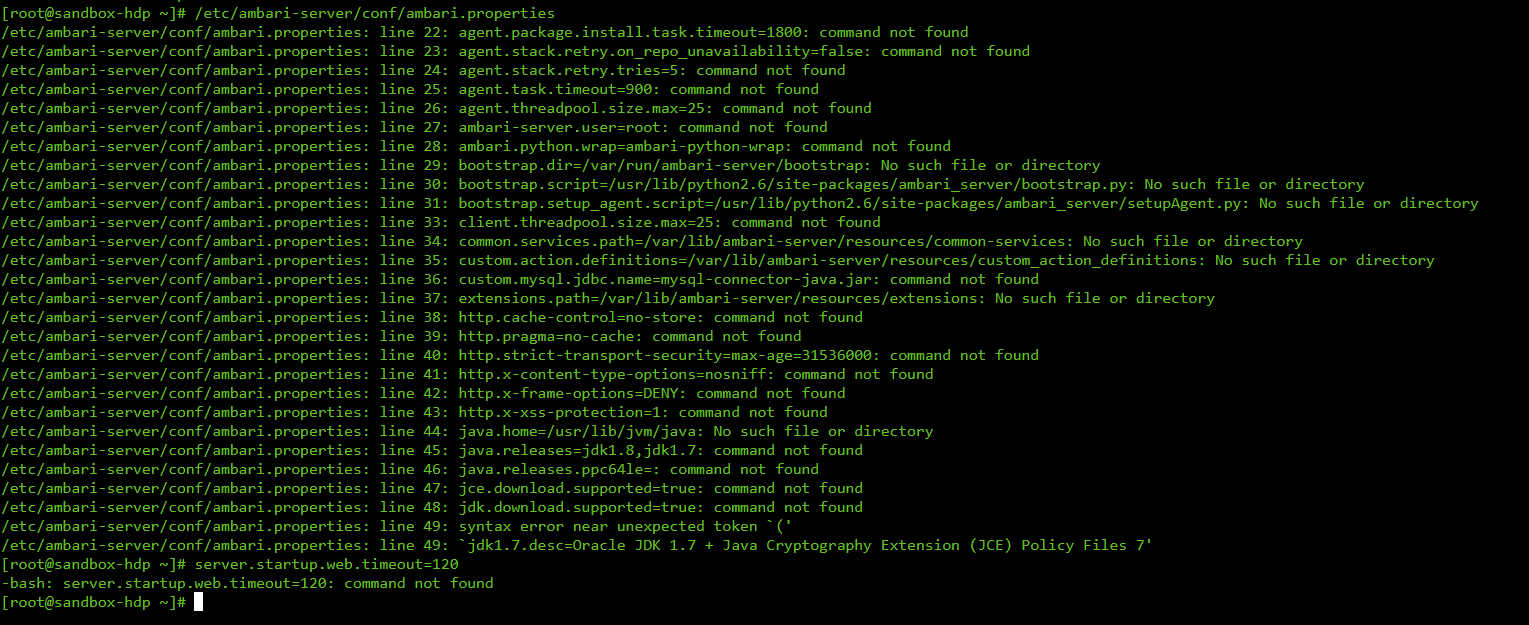
Thank you @Jay Kumar SenSharma . This makes sense and I understand what is causing the error. But i have a bit of an issue in fixing it. I'm still fairly new in Linux, could you help me by specifying the exact commands i need to run in to adjust the 50 to 120. I'm attaching an image showing what i have tried and results thereof. runtime-error.png

Created 03-20-2018 03:55 AM
- Mark as New
- Bookmark
- Subscribe
- Mute
- Subscribe to RSS Feed
- Permalink
- Report Inappropriate Content
Any way we can edit parameters before starting VM? I starting it first time and it is stuck on ‘ connecting ambari agent services’ . Nothing further. It really is annoying and doesn’t allow me further to work.
Created 03-20-2018 03:53 AM
- Mark as New
- Bookmark
- Subscribe
- Mute
- Subscribe to RSS Feed
- Permalink
- Report Inappropriate Content
How can I edit file if I am starting the VM first time and the VM did not start yet. Is there a way I can edit parameter in the file before starting VM?
I am not even able to open VM, so how can I change parameters from 50 sec to 120 sec in the file suggested?

Created 11-16-2018 06:36 AM
- Mark as New
- Bookmark
- Subscribe
- Mute
- Subscribe to RSS Feed
- Permalink
- Report Inappropriate Content
Use vi /etc/ambari-server/conf/ambari.properties , add the entry, then esc, then :, then wq for save and quite or q! for without saving
,use vi to edit and wq to save and quite or q! to exit without saving


