
Our Community is getting an upgrade! To get everything ready for the relaunch, we’ll be placing the site in read-only mode starting September 21st.
We really appreciate your understanding while we get things set up behind the scenes. Catch up on all the exciting details about the move here.
Need help or have questions? Drop us a line at [email protected]

Archives of Support Questions (Read Only)
- Cloudera Community
- Board Archive
- Archives of Support Questions (Read Only)
- decrease log verbosity of container log output ?
- Subscribe to RSS Feed
- Mark Question as New
- Mark Question as Read
- Float this Question for Current User
- Bookmark
- Subscribe
- Mute
- Printer Friendly Page
- Subscribe to RSS Feed
- Mark Question as New
- Mark Question as Read
- Float this Question for Current User
- Bookmark
- Subscribe
- Mute
- Printer Friendly Page
decrease log verbosity of container log output ?
- Labels:
-
Apache YARN


Created 01-17-2016 07:25 PM
- Mark as New
- Bookmark
- Subscribe
- Mute
- Subscribe to RSS Feed
- Permalink
- Report Inappropriate Content
Hi,
I am facing lots of "bad dir status" issues on Nodemanagers while running huge job. This is caused by flooding the container log files with [DEBUG] messages (in detail the 'syslog' file is getting very large).
How can I modify the loglevel of the container specific log to reduce the size of the syslog file ?
E.g.:
$ ls -alh
./container_e12_1453036276967_0004_01_000004:
total 7.4G
drwxr-s---  2 siad hadoop 4.0K Jan 17 18:39 .
drwxr-s--- 10 siad hadoop 4.0K Jan 17 20:21 ..
-rw-r-----  1 siad hadoop  222 Jan 17 18:47 stderr
-rw-r-----  1 siad hadoop    0 Jan 17 18:39 stdout
-rw-r-----  1 siad hadoop 7.4G Jan 17 18:47 syslog
In /etc/hadoop I cannot find any config setting including the value 'debug', so where does this DEBUG output come from ?
Thanks, Gerd
Created 02-04-2016 05:06 PM
- Mark as New
- Bookmark
- Subscribe
- Mute
- Subscribe to RSS Feed
- Permalink
- Report Inappropriate Content
Seems like for that particular job the log setting got overwritten by a local container-log4j.properties, which included DEBUG loglevel.


Created 01-17-2016 07:33 PM
- Mark as New
- Bookmark
- Subscribe
- Mute
- Subscribe to RSS Feed
- Permalink
- Report Inappropriate Content
See this yarn.app.mapreduce.am.log.level
Created on 01-17-2016 07:40 PM - edited 08-19-2019 05:11 AM
- Mark as New
- Bookmark
- Subscribe
- Mute
- Subscribe to RSS Feed
- Permalink
- Report Inappropriate Content
Hello @Neeraj Sabharwal ,
thanks for your hint, this property is set to
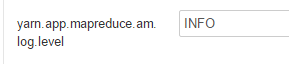
I checked the process list, and detected that the processes are using file 'container-log4j.properties' as log4j configuration.
The only file with that name I could find is:
/usr/hdp/2.2.4.2-2/hadoop/src/hadoop-yarn-project/hadoop-yarn/hadoop-yarn-server/hadoop-yarn-server-nodemanager/src/main/resources/container-log4j.properties
...and indeed, there is the property =>
hadoop.root.logger=DEBUG,CLA
Do I have to edit that file directly or is that just kind of template ?!?!
Created 01-17-2016 07:44 PM
- Mark as New
- Bookmark
- Subscribe
- Mute
- Subscribe to RSS Feed
- Permalink
- Report Inappropriate Content
You may want to see this and follow it LINK
Created on 01-17-2016 07:46 PM - edited 08-19-2019 05:11 AM
- Mark as New
- Bookmark
- Subscribe
- Mute
- Subscribe to RSS Feed
- Permalink
- Report Inappropriate Content
and, in addition, the process itself lists also the hadoop.root.logger property as DEBUG,CLA

Is that setting be applied from file /usr/hdp/2.2.4.2-2/hadoop/src/hadoop-yarn-project/hadoop-yarn/hadoop-yarn-server/hadoop-yarn-server-nodemanager/src/main/resources/container-log4j.properties, or from where ?!?!
Created on 01-17-2016 07:51 PM - edited 08-19-2019 05:11 AM
- Mark as New
- Bookmark
- Subscribe
- Mute
- Subscribe to RSS Feed
- Permalink
- Report Inappropriate Content
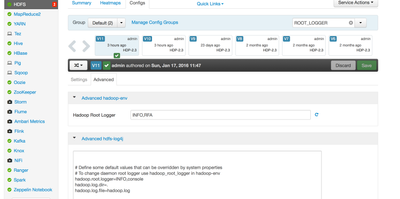
Is it set to debug in your case?
Created on 01-17-2016 09:05 PM - edited 08-19-2019 05:11 AM
- Mark as New
- Bookmark
- Subscribe
- Mute
- Subscribe to RSS Feed
- Permalink
- Report Inappropriate Content
Created on 01-17-2016 09:26 PM - edited 08-19-2019 05:10 AM
- Mark as New
- Bookmark
- Subscribe
- Mute
- Subscribe to RSS Feed
- Permalink
- Report Inappropriate Content
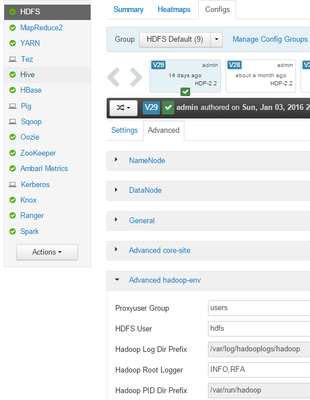
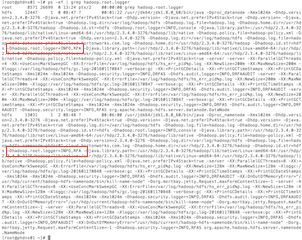
Please see this...Not sure whats causing the inconsistencies in your env. You may want to restart the services
[root@phdns01 ~]# ps -ef | grep hadoop.root.logger
root 8571 26699 0 13:24 pts/2 00:00:00 grep hadoop.root.logger
Dhadoop.root.logger=INFO,RFA

Created 02-03-2016 01:48 AM
- Mark as New
- Bookmark
- Subscribe
- Mute
- Subscribe to RSS Feed
- Permalink
- Report Inappropriate Content
@Gerd Koenig has this been resolved? Can you provide your solution or accept the best answer?
Created 02-04-2016 05:06 PM
- Mark as New
- Bookmark
- Subscribe
- Mute
- Subscribe to RSS Feed
- Permalink
- Report Inappropriate Content
Seems like for that particular job the log setting got overwritten by a local container-log4j.properties, which included DEBUG loglevel.


