
Our Community is getting an upgrade! To get everything ready for the relaunch, we’ll be placing the site in read-only mode starting September 21st.
We really appreciate your understanding while we get things set up behind the scenes. Catch up on all the exciting details about the move here.
Need help or have questions? Drop us a line at [email protected]

Archives of Support Questions (Read Only)
- Cloudera Community
- Board Archive
- Archives of Support Questions (Read Only)
- exception error when using bridge network adapter ...
- Subscribe to RSS Feed
- Mark Question as New
- Mark Question as Read
- Float this Question for Current User
- Bookmark
- Subscribe
- Mute
- Printer Friendly Page
- Subscribe to RSS Feed
- Mark Question as New
- Mark Question as Read
- Float this Question for Current User
- Bookmark
- Subscribe
- Mute
- Printer Friendly Page
exception error when using bridge network adapter during hdp 2.4 installation
- Labels:
-
Hortonworks Data Platform (HDP)


Created on 03-25-2016 11:08 AM - edited 08-19-2019 01:03 AM
- Mark as New
- Bookmark
- Subscribe
- Mute
- Subscribe to RSS Feed
- Permalink
- Report Inappropriate Content
first , i tried "host only adapter" by seeing community hortonworks article . could not able to open hdp welcome page and 8080(ambari).
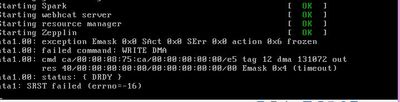
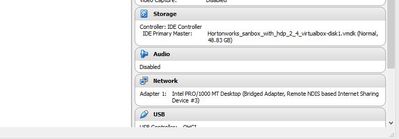
after, i tried using "bridge network" , got below error .
can you tell what mistake i have done?
Created 03-29-2016 02:25 PM
- Mark as New
- Bookmark
- Subscribe
- Mute
- Subscribe to RSS Feed
- Permalink
- Report Inappropriate Content
atlast, am able to hit 127.0.0.1:8080 after several times deleting and importing VM's . in my case, the problem is am able to start ambari server , ambari agent ..but couldnot in web.
i checked in windows command prompt whether it is listening to port 8080 by command 'netstat' ..it didnot listening so i added port 8080 in windows firewall advanced settings.. after starting ambari serevr..waited for few minutes and then hitted 127.0.0.1:8080 successsfully...


Created 03-25-2016 12:10 PM
- Mark as New
- Bookmark
- Subscribe
- Mute
- Subscribe to RSS Feed
- Permalink
- Report Inappropriate Content
Are you using sandbox?
Created 03-25-2016 03:43 PM
- Mark as New
- Bookmark
- Subscribe
- Mute
- Subscribe to RSS Feed
- Permalink
- Report Inappropriate Content
In sandbox NAT should be used. See this https://community.hortonworks.com/questions/23453/yum-install-doesnt-work-couldnt-resolve-host-mirro...
Created 03-25-2016 03:43 PM
- Mark as New
- Bookmark
- Subscribe
- Mute
- Subscribe to RSS Feed
- Permalink
- Report Inappropriate Content
yes, hdp 2.4 in oracle virtual box
Created 03-27-2016 04:16 PM
- Mark as New
- Bookmark
- Subscribe
- Mute
- Subscribe to RSS Feed
- Permalink
- Report Inappropriate Content
yes, it is running


Created 03-27-2016 04:55 PM
- Mark as New
- Bookmark
- Subscribe
- Mute
- Subscribe to RSS Feed
- Permalink
- Report Inappropriate Content
@priyanka - You should double check that ambari server is running by running the following
ambari-server status
If ambari server is not running then you can start it with the command:
ambari-server start
Created on 03-27-2016 06:29 PM - edited 08-19-2019 01:03 AM
- Mark as New
- Bookmark
- Subscribe
- Mute
- Subscribe to RSS Feed
- Permalink
- Report Inappropriate Content

Created 03-28-2016 01:11 PM
- Mark as New
- Bookmark
- Subscribe
- Mute
- Subscribe to RSS Feed
- Permalink
- Report Inappropriate Content
Created 03-28-2016 01:21 PM
- Mark as New
- Bookmark
- Subscribe
- Mute
- Subscribe to RSS Feed
- Permalink
- Report Inappropriate Content
It depends on how much you have to spare.
My laptop has 8 GB RAM so I have given 4 GB RAM to Sandbox.
In case of CPU I have 4 core. So I have given 1 to 2 core to sandbox.
Created 03-28-2016 01:21 PM
- Mark as New
- Bookmark
- Subscribe
- Mute
- Subscribe to RSS Feed
- Permalink
- Report Inappropriate Content


