
Our Community is getting an upgrade! To get everything ready for the relaunch, we’ll be placing the site in read-only mode starting September 21st.
We really appreciate your understanding while we get things set up behind the scenes. Catch up on all the exciting details about the move here.
Need help or have questions? Drop us a line at [email protected]

Archives of Support Questions (Read Only)
- Cloudera Community
- Board Archive
- Archives of Support Questions (Read Only)
- Re: hadoop - oozie job configuration App directory...
- Subscribe to RSS Feed
- Mark Question as New
- Mark Question as Read
- Float this Question for Current User
- Bookmark
- Subscribe
- Mute
- Printer Friendly Page
- Subscribe to RSS Feed
- Mark Question as New
- Mark Question as Read
- Float this Question for Current User
- Bookmark
- Subscribe
- Mute
- Printer Friendly Page
hadoop - oozie job configuration App directory not exits?
- Labels:
-
Apache Oozie


Created on 06-27-2016 11:05 AM - edited 08-18-2019 05:11 AM
- Mark as New
- Bookmark
- Subscribe
- Mute
- Subscribe to RSS Feed
- Permalink
- Report Inappropriate Content
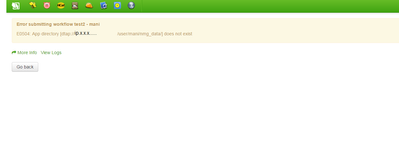
After running the oozie job in hue dashboard, it shows the following error
"App directory doesn't exits"
please try to solve this error.



Created 06-27-2016 12:10 PM
- Mark as New
- Bookmark
- Subscribe
- Mute
- Subscribe to RSS Feed
- Permalink
- Report Inappropriate Content
In addition to Kuldeep's comment check your error message and verify your directory present in hdfs location and verify your application path oozie.wf.application.path=



Created 06-27-2016 11:34 AM
- Mark as New
- Bookmark
- Subscribe
- Mute
- Subscribe to RSS Feed
- Permalink
- Report Inappropriate Content
Can you please confirm if you have your user directory(/user/mani) setup in your dtap filesystem? if its not there then please go ahead and create one.
Created 06-27-2016 12:10 PM
- Mark as New
- Bookmark
- Subscribe
- Mute
- Subscribe to RSS Feed
- Permalink
- Report Inappropriate Content
In addition to Kuldeep's comment check your error message and verify your directory present in hdfs location and verify your application path oozie.wf.application.path=


Created 02-07-2017 06:51 AM
- Mark as New
- Bookmark
- Subscribe
- Mute
- Subscribe to RSS Feed
- Permalink
- Report Inappropriate Content
I am not sure about Hue but from the terminal it can be fixed by exporting the correct oozie server.
Use this command to export the oozie url.
export OOZIE_URL=http://someip:11000/oozieTo get this oozie url you need to use hue to connect you cluster and navigate to Workflows where you can find a tab called oozie. Inside this you should see gauges where a lot of properties will be listed. Look for the property oozie.servers.


