
Our Community is getting an upgrade! To get everything ready for the relaunch, we’ll be placing the site in read-only mode starting September 21st.
We really appreciate your understanding while we get things set up behind the scenes. Catch up on all the exciting details about the move here.
Need help or have questions? Drop us a line at [email protected]

Archives of Support Questions (Read Only)
- Cloudera Community
- Board Archive
- Archives of Support Questions (Read Only)
- Re: how can i delete a bad client?
- Subscribe to RSS Feed
- Mark Question as New
- Mark Question as Read
- Float this Question for Current User
- Bookmark
- Subscribe
- Mute
- Printer Friendly Page
- Subscribe to RSS Feed
- Mark Question as New
- Mark Question as Read
- Float this Question for Current User
- Bookmark
- Subscribe
- Mute
- Printer Friendly Page
how can i delete a bad client?
- Labels:
-
Apache Ambari


Created on 04-06-2016 10:26 AM - edited 08-18-2019 05:11 AM
- Mark as New
- Bookmark
- Subscribe
- Mute
- Subscribe to RSS Feed
- Permalink
- Report Inappropriate Content
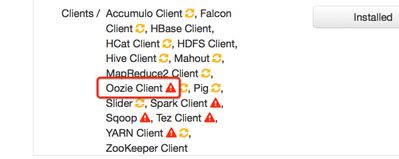
how can i delete a bad client?


Created 04-06-2016 10:31 AM
- Mark as New
- Bookmark
- Subscribe
- Mute
- Subscribe to RSS Feed
- Permalink
- Report Inappropriate Content
you can delete the client using rest api call -
try listing services 1st and grep for oozie-
# curl -u admin:admin -H "X-Requested-By: ambari" -X GET http://<ambari-server-fqdn>:8080/api/v1/clusters/<clustername>/services/ |grep oozie
refer delete command from below ur -



Created 04-06-2016 10:31 AM
- Mark as New
- Bookmark
- Subscribe
- Mute
- Subscribe to RSS Feed
- Permalink
- Report Inappropriate Content
You could use the below Curl command to do the same. Change the AMBARI SERVER, Cluster name (c1) ,
Hostname and component , For example OOZIE_CLIENT
curl -u admin:admin -X DELETE http://AMBARI_SERVER_HOST:8080/api/v1/clusters/c1/hosts/HOSTNAME/host_components/COMPONENTNAME

Created 01-19-2017 01:12 PM
- Mark as New
- Bookmark
- Subscribe
- Mute
- Subscribe to RSS Feed
- Permalink
- Report Inappropriate Content
@Jagatheesh Ramakrishnan Thanks for this info. It helped me 🙂
Created 04-06-2016 10:31 AM
- Mark as New
- Bookmark
- Subscribe
- Mute
- Subscribe to RSS Feed
- Permalink
- Report Inappropriate Content
you can delete the client using rest api call -
try listing services 1st and grep for oozie-
# curl -u admin:admin -H "X-Requested-By: ambari" -X GET http://<ambari-server-fqdn>:8080/api/v1/clusters/<clustername>/services/ |grep oozie
refer delete command from below ur -
Created 04-06-2016 10:39 AM
- Mark as New
- Bookmark
- Subscribe
- Mute
- Subscribe to RSS Feed
- Permalink
- Report Inappropriate Content
thanks you
I'm going to give it a try

Created 08-24-2018 08:09 PM
- Mark as New
- Bookmark
- Subscribe
- Mute
- Subscribe to RSS Feed
- Permalink
- Report Inappropriate Content
@Sagar Shimpi : will this process cleanup physical folders and dependencies automatically by running curl command or Ambari service deletion ? if not , do we need to delete manually ? thanks in advance.

Created 04-06-2016 10:33 AM
- Mark as New
- Bookmark
- Subscribe
- Mute
- Subscribe to RSS Feed
- Permalink
- Report Inappropriate Content
Hi there @kael lee To delete a service or client you need to use the Ambari API
There are worked examples in the Apache Ambari documentation linked below:
I used this recently so it should work fine for you.


