
Our Community is getting an upgrade! To get everything ready for the relaunch, we’ll be placing the site in read-only mode starting September 21st.
We really appreciate your understanding while we get things set up behind the scenes. Catch up on all the exciting details about the move here.
Need help or have questions? Drop us a line at [email protected]

Archives of Support Questions (Read Only)
- Cloudera Community
- Board Archive
- Archives of Support Questions (Read Only)
- Re: how can i replace ',' with new line in replac...
- Subscribe to RSS Feed
- Mark Question as New
- Mark Question as Read
- Float this Question for Current User
- Bookmark
- Subscribe
- Mute
- Printer Friendly Page
- Subscribe to RSS Feed
- Mark Question as New
- Mark Question as Read
- Float this Question for Current User
- Bookmark
- Subscribe
- Mute
- Printer Friendly Page
how can i replace ',' with new line in replacetext processor
- Labels:
-
Apache NiFi
-
Apache Ranger


Created 09-15-2017 08:47 AM
- Mark as New
- Bookmark
- Subscribe
- Mute
- Subscribe to RSS Feed
- Permalink
- Report Inappropriate Content
I want to parse json response in nifi processor I have json data like this ,I have already used this expression inside evaluatejsonpath processor : $.Data['row'] and thanks to it i got row data then i have used another expression inside replacetext processor: [] to get rid of this '[]' but i can't replace ',' with new line how can i do this?
{"squadName":"Super hero squad","homeTown":"Metro City","formed":2016,"secretBase":"Super tower","active":true,"Data":{"row":[{"name":"Molecule Man","age":29,"secretIdentity":"Dan Jukes","powers":["Radiation resistance","Turning tiny","Radiation blast"]},{"name":"Madame Uppercut","age":39,"secretIdentity":"Jane Wilson","powers":["Million tonne punch","Damage resistance","Superhuman reflexes"]},{"name":"Eternal Flame","age":1000000,"secretIdentity":"Unknown","powers":["Immortality","Heat Immunity","Inferno","Teleportation","Interdimensional travel"]}]}
and i want totransform it into this format:
<code>{"name":"Molecule Man","age":29,"secretIdentity":"Dan Jukes","powers":["Radiation resistance","Turning tiny","Radiation blast"]}{name": "MoleculeMan", "age": 29,  "secretIdentity": "DanJukes", "powers":  ["Radiation resistance", "Turning tiny", "Radiation blast"]}
   {"name": "MoleculeMan", "age": 29,  "secretIdentity": "DanJukes", "powers":  ["Radiation resistance", "Turning tiny", "Radiation blast"]}

Created on 09-15-2017 02:06 PM - edited 08-18-2019 01:24 AM
- Mark as New
- Bookmark
- Subscribe
- Mute
- Subscribe to RSS Feed
- Permalink
- Report Inappropriate Content
Hi @sally sally,
as you said you are getting rid of [] in the flow file content but in my case i haven't get rid of [] you can use your existing functionality. After that use another replace text processor with search value property as
(?<=]})(,)
if you are having any spaces or new line characters before , then make use of below regex
(?<=]})(\s*,)
and replacement value property as
shift+enterit will replaces your , after } with new line
Input:-
   {
"squadName": "Super hero squad",
"homeTown": "Metro City",
"formed": 2016,
"secretBase": "Super tower",
"active": true,
"Data": {
"row": [{
"name": "Molecule Man",
"age": 29,
"secretIdentity": "Dan Jukes",
"powers": ["Radiation resistance",
"Turning tiny",
"Radiation blast"]
},
{
"name": "Madame Uppercut",
"age": 39,
"secretIdentity": "Jane Wilson",
"powers": ["Million tonne punch",
"Damage resistance",
"Superhuman reflexes"]
},
{
"name": "Eternal Flame",
"age": 1000000,
"secretIdentity": "Unknown",
"powers": ["Immortality",
"Heat Immunity",
"Inferno",
"Teleportation",
"Interdimensional travel"]
}]
}}
Output:-[{"name":"Molecule Man","age":29,"secretIdentity":"Dan Jukes","powers":["Radiation resistance","Turning tiny","Radiation blast"]}
{"name":"Madame Uppercut","age":39,"secretIdentity":"Jane Wilson","powers":["Million tonne punch","Damage resistance","Superhuman reflexes"]} {"name":"Eternal Flame","age":1000000,"secretIdentity":"Unknown","powers":["Immortality","Heat Immunity","Inferno","Teleportation","Interdimensional travel"]}]
Replacetext configs:-
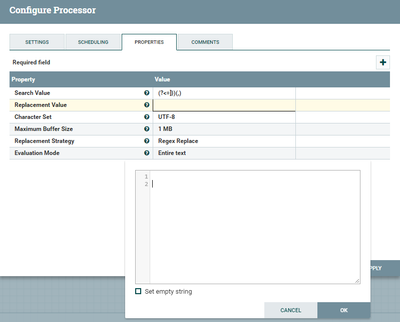
In addition
in future if you are expecting different flow files for each record make a use splitJson processor with
JsonPath Expression property as $.Data.row
connect the split property to another processor, it will results as in our array of data.row having 3 records so it will results 3 different flow files as a result from split json processor.
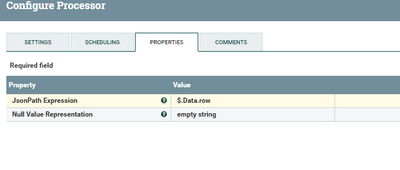
Results after splitjson configs:-
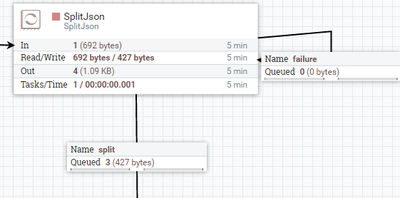
Output:- as we are having 3 flow files above and the contents of those flowfiles as follows.
flowfile1:-
{"name":"Eternal Flame","age":1000000,"secretIdentity":"Unknown","powers":["Immortality","Heat Immunity","Inferno","Teleportation","Interdimensional travel"]}flowfile2:-
{"name":"Molecule Man","age":29,"secretIdentity":"Dan Jukes","powers":["Radiation resistance","Turning tiny","Radiation blast"]}flowfile3:-
flowfile3:-{"name":"Madame Uppercut","age":39,"secretIdentity":"Jane Wilson","powers":["Million tonne punch","Damage resistance","Superhuman reflexes"]}
Created 09-15-2017 09:08 AM
- Mark as New
- Bookmark
- Subscribe
- Mute
- Subscribe to RSS Feed
- Permalink
- Report Inappropriate Content
To sum up i want to replace ',' after } with \n
Created on 09-15-2017 02:06 PM - edited 08-18-2019 01:24 AM
- Mark as New
- Bookmark
- Subscribe
- Mute
- Subscribe to RSS Feed
- Permalink
- Report Inappropriate Content
Hi @sally sally,
as you said you are getting rid of [] in the flow file content but in my case i haven't get rid of [] you can use your existing functionality. After that use another replace text processor with search value property as
(?<=]})(,)
if you are having any spaces or new line characters before , then make use of below regex
(?<=]})(\s*,)
and replacement value property as
shift+enterit will replaces your , after } with new line
Input:-
   {
"squadName": "Super hero squad",
"homeTown": "Metro City",
"formed": 2016,
"secretBase": "Super tower",
"active": true,
"Data": {
"row": [{
"name": "Molecule Man",
"age": 29,
"secretIdentity": "Dan Jukes",
"powers": ["Radiation resistance",
"Turning tiny",
"Radiation blast"]
},
{
"name": "Madame Uppercut",
"age": 39,
"secretIdentity": "Jane Wilson",
"powers": ["Million tonne punch",
"Damage resistance",
"Superhuman reflexes"]
},
{
"name": "Eternal Flame",
"age": 1000000,
"secretIdentity": "Unknown",
"powers": ["Immortality",
"Heat Immunity",
"Inferno",
"Teleportation",
"Interdimensional travel"]
}]
}}
Output:-[{"name":"Molecule Man","age":29,"secretIdentity":"Dan Jukes","powers":["Radiation resistance","Turning tiny","Radiation blast"]}
{"name":"Madame Uppercut","age":39,"secretIdentity":"Jane Wilson","powers":["Million tonne punch","Damage resistance","Superhuman reflexes"]} {"name":"Eternal Flame","age":1000000,"secretIdentity":"Unknown","powers":["Immortality","Heat Immunity","Inferno","Teleportation","Interdimensional travel"]}]
Replacetext configs:-
In addition
in future if you are expecting different flow files for each record make a use splitJson processor with
JsonPath Expression property as $.Data.row
connect the split property to another processor, it will results as in our array of data.row having 3 records so it will results 3 different flow files as a result from split json processor.
Results after splitjson configs:-
Output:- as we are having 3 flow files above and the contents of those flowfiles as follows.
flowfile1:-
{"name":"Eternal Flame","age":1000000,"secretIdentity":"Unknown","powers":["Immortality","Heat Immunity","Inferno","Teleportation","Interdimensional travel"]}flowfile2:-
{"name":"Molecule Man","age":29,"secretIdentity":"Dan Jukes","powers":["Radiation resistance","Turning tiny","Radiation blast"]}flowfile3:-
flowfile3:-{"name":"Madame Uppercut","age":39,"secretIdentity":"Jane Wilson","powers":["Million tonne punch","Damage resistance","Superhuman reflexes"]}
Created 09-15-2017 06:34 PM
- Mark as New
- Bookmark
- Subscribe
- Mute
- Subscribe to RSS Feed
- Permalink
- Report Inappropriate Content
thank you for your address , Do you know how can i replace "[{ ......}] with { .....} in replacte text i have tried this [\[\]](\{|\}) but it can annly remove first [ and leavs ] at the and of json data reuqest
Created on 09-15-2017 07:51 PM - edited 08-18-2019 01:24 AM
- Mark as New
- Bookmark
- Subscribe
- Mute
- Subscribe to RSS Feed
- Permalink
- Report Inappropriate Content
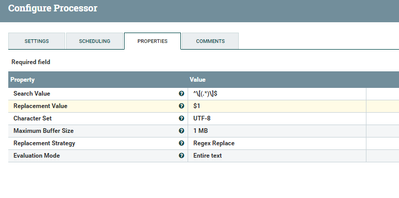
In Replace Text Processor
set Search Value property as
^\[(.*)\]$
it will captures all the data except [] into group 1 then use
Replacement Value property as
$1
as a result from replace text processor you can get all the data except [] as a new replacement of the content.
screenshots of configs:-
Input to Replace Text:-
[{"name":"Molecule Man","age":29,"secretIdentity":"Dan Jukes","powers":["Radiation resistance","Turning tiny","Radiation blast"]},{"name":"Madame Uppercut","age":39,"secretIdentity":"Jane Wilson","powers":["Million tonne punch","Damage resistance","Superhuman reflexes"]},{"name":"Eternal Flame","age":1000000,"secretIdentity":"Unknown","powers":["Immortality","Heat Immunity","Inferno","Teleportation","Interdimensional travel"]}]Output after Replace Text:-
{"name":"Molecule Man","age":29,"secretIdentity":"Dan Jukes","powers":["Radiation resistance","Turning tiny","Radiation blast"]},{"name":"Madame Uppercut","age":39,"secretIdentity":"Jane Wilson","powers":["Million tonne punch","Damage resistance","Superhuman reflexes"]},{"name":"Eternal Flame","age":1000000,"secretIdentity":"Unknown","powers":["Immortality","Heat Immunity","Inferno","Teleportation","Interdimensional travel"]}
Created 09-16-2017 07:13 AM
- Mark as New
- Bookmark
- Subscribe
- Mute
- Subscribe to RSS Feed
- Permalink
- Report Inappropriate Content
thank you , your answer was very helpful 😄


