
Our Community is getting an upgrade! To get everything ready for the relaunch, we’ll be placing the site in read-only mode starting September 21st.
We really appreciate your understanding while we get things set up behind the scenes. Catch up on all the exciting details about the move here.
Need help or have questions? Drop us a line at [email protected]

Archives of Support Questions (Read Only)
- Cloudera Community
- Board Archive
- Archives of Support Questions (Read Only)
- Re: how do you specify a content viewer in Apache ...
- Subscribe to RSS Feed
- Mark Question as New
- Mark Question as Read
- Float this Question for Current User
- Bookmark
- Subscribe
- Mute
- Printer Friendly Page
- Subscribe to RSS Feed
- Mark Question as New
- Mark Question as Read
- Float this Question for Current User
- Bookmark
- Subscribe
- Mute
- Printer Friendly Page
how do you specify a content viewer in Apache NiFi
- Labels:
-
Apache NiFi



Created 11-08-2016 01:36 AM
- Mark as New
- Bookmark
- Subscribe
- Mute
- Subscribe to RSS Feed
- Permalink
- Report Inappropriate Content
The analyze traffic patterns with NiFi tutorial creates files with content type html/xml. When I click on the EvaluateXPath processor and select Data Provenance. Then click on info icon of a provenance entry. Then click on the Content tab and click the View button. The content type is text/html and the view pane says "No viewer registered for this content type."
How can I register a viewer for html/xml or specify a different content type such as text/xml or application/xml?


Created 11-08-2016 03:11 AM
- Mark as New
- Bookmark
- Subscribe
- Mute
- Subscribe to RSS Feed
- Permalink
- Report Inappropriate Content
https://issues.apache.org/jira/browse/NIFI-353
--- seems you could add some more there.
You can UpdateAttribute and set mime.type to a viewable type


Created 11-08-2016 02:27 AM
- Mark as New
- Bookmark
- Subscribe
- Mute
- Subscribe to RSS Feed
- Permalink
- Report Inappropriate Content
The easiest "hack" is to give it a filename ending in .xml it could be update attribute Filename | ${Filename}.xml
Created 11-08-2016 03:11 AM
- Mark as New
- Bookmark
- Subscribe
- Mute
- Subscribe to RSS Feed
- Permalink
- Report Inappropriate Content
https://issues.apache.org/jira/browse/NIFI-353
--- seems you could add some more there.
You can UpdateAttribute and set mime.type to a viewable type
Created on 11-09-2016 01:24 PM - edited 08-18-2019 04:03 AM
- Mark as New
- Bookmark
- Subscribe
- Mute
- Subscribe to RSS Feed
- Permalink
- Report Inappropriate Content
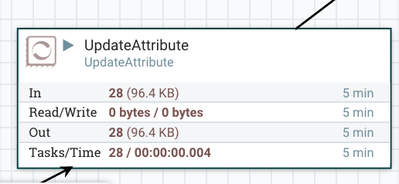
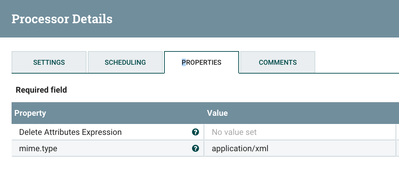
I added an UpdateAttribute processor and set the mime.type Property to application/xml. The viewer was not able to render text/xml:


Created 11-09-2016 08:58 PM
- Mark as New
- Bookmark
- Subscribe
- Mute
- Subscribe to RSS Feed
- Permalink
- Report Inappropriate Content
Was the HTML content actually valid XML?
Did the content viewer open? If so, is the content viewer unable to show the content in it's 'formatted' form? What about the 'original' or 'hex' forms?
Created 11-09-2016 01:14 PM
- Mark as New
- Bookmark
- Subscribe
- Mute
- Subscribe to RSS Feed
- Permalink
- Report Inappropriate Content
As was previously mentioned, the content type is specified in the flowfile attribute mime.type. Some Processors will automatically set this value. However, UpdateAttribute can be used to explicitly set it.
There is no content viewer for HTML bundled with Apache NiFi currently. This is an extension point so one could be developed and dropped into your instance. Alternatively, you could just use application/xml or text/plain.


