
Our Community is getting an upgrade! To get everything ready for the relaunch, we’ll be placing the site in read-only mode starting September 21st.
We really appreciate your understanding while we get things set up behind the scenes. Catch up on all the exciting details about the move here.
Need help or have questions? Drop us a line at [email protected]

Archives of Support Questions (Read Only)
- Cloudera Community
- Board Archive
- Archives of Support Questions (Read Only)
- how to change a disk used by a hadoop cluster.
- Subscribe to RSS Feed
- Mark Question as New
- Mark Question as Read
- Float this Question for Current User
- Bookmark
- Subscribe
- Mute
- Printer Friendly Page
- Subscribe to RSS Feed
- Mark Question as New
- Mark Question as Read
- Float this Question for Current User
- Bookmark
- Subscribe
- Mute
- Printer Friendly Page
how to change a disk used by a hadoop cluster.


Created 04-28-2016 11:38 AM
- Mark as New
- Bookmark
- Subscribe
- Mute
- Subscribe to RSS Feed
- Permalink
- Report Inappropriate Content
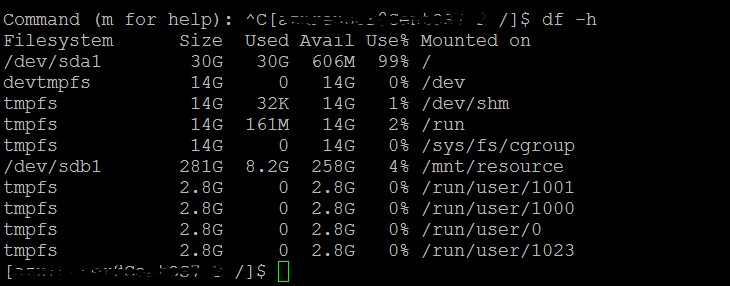
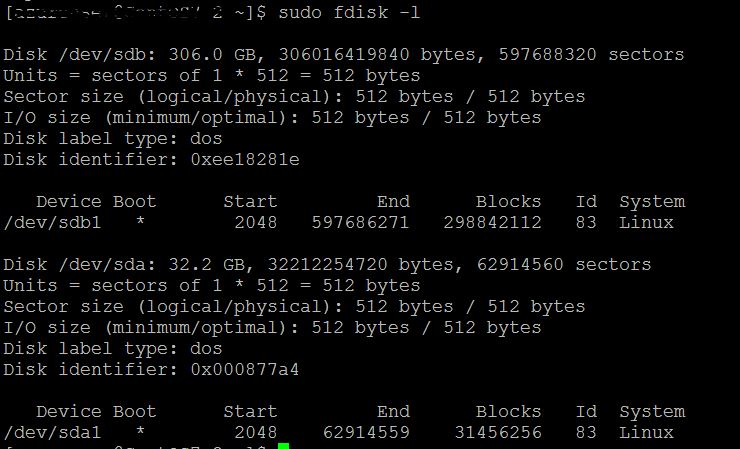
Our cluster is running on hdp 2.3.4.0 and one of the host is showing disk (/dev/sda1) usage 99% (see the attachment) where as there is enough disk space available in /dev/sdb1. By default ambari selected (I don't know how) /dev/sda1 during hadoop cluster setup. Can I somehow change the disk from /dev/sda1 to /dev/sdb1 without disturbing/loosing any data from the cluster? If not what is the best alternative. Please suggests.



Created 04-28-2016 12:30 PM
- Mark as New
- Bookmark
- Subscribe
- Mute
- Subscribe to RSS Feed
- Permalink
- Report Inappropriate Content
From hadoop FAQ on apache,
3.12. On an individual data node, how do you balance the blocks on the disk?
Hadoop currently does not have a method by which to do this automatically. To do this manually:
- Shutdown the DataNode involved
- Use the UNIX mv command to move the individual block replica and meta pairs from one directory to another on the selected host. On releases which have HDFS-6482 (Apache Hadoop 2.6.0+) you also need to ensure the subdir-named directory structure remains exactly the same when moving the blocks across the disks. For example, if the block replica and its meta pair were under /data/1/dfs/dn/current/BP-1788246909-172.23.1.202-1412278461680/current/finalized/subdir0/subdir1/, and you wanted to move it to /data/5/ disk, then it MUST be moved into the same subdirectory structure underneath that, i.e. /data/5/dfs/dn/current/BP-1788246909-172.23.1.202-1412278461680/current/finalized/subdir0/subdir1/. If this is not maintained, the DN will no longer be able to locate the replicas after the move.
- Restart the DataNode.
However, this is not something that I recommend. A cleaner approach that you can take is decommission node, change the mount point and add it back to the cluster. I say cleaner because directly touching data directory can corrupt your data with a single misstep.
Created 04-28-2016 11:40 AM
- Mark as New
- Bookmark
- Subscribe
- Mute
- Subscribe to RSS Feed
- Permalink
- Report Inappropriate Content
Created 04-28-2016 12:30 PM
- Mark as New
- Bookmark
- Subscribe
- Mute
- Subscribe to RSS Feed
- Permalink
- Report Inappropriate Content
From hadoop FAQ on apache,
3.12. On an individual data node, how do you balance the blocks on the disk?
Hadoop currently does not have a method by which to do this automatically. To do this manually:
- Shutdown the DataNode involved
- Use the UNIX mv command to move the individual block replica and meta pairs from one directory to another on the selected host. On releases which have HDFS-6482 (Apache Hadoop 2.6.0+) you also need to ensure the subdir-named directory structure remains exactly the same when moving the blocks across the disks. For example, if the block replica and its meta pair were under /data/1/dfs/dn/current/BP-1788246909-172.23.1.202-1412278461680/current/finalized/subdir0/subdir1/, and you wanted to move it to /data/5/ disk, then it MUST be moved into the same subdirectory structure underneath that, i.e. /data/5/dfs/dn/current/BP-1788246909-172.23.1.202-1412278461680/current/finalized/subdir0/subdir1/. If this is not maintained, the DN will no longer be able to locate the replicas after the move.
- Restart the DataNode.
However, this is not something that I recommend. A cleaner approach that you can take is decommission node, change the mount point and add it back to the cluster. I say cleaner because directly touching data directory can corrupt your data with a single misstep.
Created 04-28-2016 02:48 PM
- Mark as New
- Bookmark
- Subscribe
- Mute
- Subscribe to RSS Feed
- Permalink
- Report Inappropriate Content
Hi Ravi, Second approach sounds good to me. Is there a way to decommission node using Ambari? More detail in that approach would really help me
Created 04-28-2016 03:28 PM
- Mark as New
- Bookmark
- Subscribe
- Mute
- Subscribe to RSS Feed
- Permalink
- Report Inappropriate Content
Yes. You can decommission node using ambari. https://docs.hortonworks.com/HDPDocuments/Ambari-2.1.2.1/bk_Ambari_Users_Guide/content/_how_to_decom...


