
Our Community is getting an upgrade! To get everything ready for the relaunch, we’ll be placing the site in read-only mode starting September 21st.
We really appreciate your understanding while we get things set up behind the scenes. Catch up on all the exciting details about the move here.
Need help or have questions? Drop us a line at [email protected]

Archives of Support Questions (Read Only)
- Cloudera Community
- Board Archive
- Archives of Support Questions (Read Only)
- how to test custom ambari alert
- Subscribe to RSS Feed
- Mark Question as New
- Mark Question as Read
- Float this Question for Current User
- Bookmark
- Subscribe
- Mute
- Printer Friendly Page
- Subscribe to RSS Feed
- Mark Question as New
- Mark Question as Read
- Float this Question for Current User
- Bookmark
- Subscribe
- Mute
- Printer Friendly Page
how to test custom ambari alert
- Labels:
-
Apache Ambari


Created 09-20-2017 12:30 PM
- Mark as New
- Bookmark
- Subscribe
- Mute
- Subscribe to RSS Feed
- Permalink
- Report Inappropriate Content
I uset hdp 2.4 and ambari 2.2.1.1
I had custom an ambari alert and test on my test servers.
But when I copy it on mysql product environment, one server seems every thing is ok,and the other is show me :
'NoneType' object has no attribute 'modules'
So, I try to the monitor script writen in pytthon.
When I run python monitor.py, it shows ok,but on the ambari-agent,it still wrong.
So is there a way to test the script and debug the monitor script??
Created 09-21-2017 05:37 AM
- Mark as New
- Bookmark
- Subscribe
- Mute
- Subscribe to RSS Feed
- Permalink
- Report Inappropriate Content
What I don't clear is why on one server show me
'NoneType' object has no attribute 'modules'
,but the other is ok
I try to restart the ambari-agent,It show me ok
So terrible.
resloved.



Created 09-20-2017 12:32 PM
- Mark as New
- Bookmark
- Subscribe
- Mute
- Subscribe to RSS Feed
- Permalink
- Report Inappropriate Content
The error that you posted indicates some issue with your "monitor.py" python script.
'NoneType'object has no attribute 'modules'
.
Please try running that script manually to see if it works or causes the same error? Please make sure that it uses the PYTHONPATH that your ambari agent is using.
# python monitor.py
.
For example the pythonpath i use as following:
export PYTHONPATH=/usr/lib/python2.6/site-packages:/usr/lib/python2.6/site-packages/ambari_commons:/usr/lib/python2.6/site-packages:/usr/lib/python2.6/site-packages:/usr/lib/python2.6/site-packages/ambari_commons:/usr/lib/python2.6/site-packages::/usr/lib/python2.6/site-packages:/usr/lib/python2.6/site-packages/ambari_agent:/usr/lib/python2.6/site-packages
.
Created 09-20-2017 12:36 PM
- Mark as New
- Bookmark
- Subscribe
- Mute
- Subscribe to RSS Feed
- Permalink
- Report Inappropriate Content
Created 09-20-2017 01:23 PM
- Mark as New
- Bookmark
- Subscribe
- Mute
- Subscribe to RSS Feed
- Permalink
- Report Inappropriate Content
Where exactly are you putting your custom alert script? Is it the following location?
/var/lib/ambari-server/resources/host_scripts
.
I have written a similar article on this customization: https://community.hortonworks.com/articles/38149/how-to-create-and-register-custom-ambari-alerts.htm...
Above link will give some idea about how to run the alert manually using "?run_now=true" something like following:
# curl -u admin:admin -i -H 'X-Requested-By:ambari' -X PUT http://node1.example.com:8080/api/v1/clusters/ClusterDemo/alert_definitions/151?run_now=true
.


Created 04-16-2019 01:15 PM
- Mark as New
- Bookmark
- Subscribe
- Mute
- Subscribe to RSS Feed
- Permalink
- Report Inappropriate Content
Referring to the PUT command used for triggering the alert manually, Is it possible to pass some parameters/custom information to the script which gets trigged by the alert ? If yes, is it via headers OR body of the PUT request ?
Thanks.
Created 09-21-2017 01:38 AM
- Mark as New
- Bookmark
- Subscribe
- Mute
- Subscribe to RSS Feed
- Permalink
- Report Inappropriate Content
I know how to deploy a custom monitor and how to start it.
But it runs ok on one server but failed on the other one.
I had change the code to simple logic:
such as:
def execute():
	try:
		return 'OK', 'no errors'
	exception:
		return 'UNKNOW', 'UNKNOW data'
it still shows me :
'NoneType' object has no attribute 'modules'
And I surely that I can run the monitor.py manaual correctly.
Created 09-21-2017 01:42 AM
- Mark as New
- Bookmark
- Subscribe
- Mute
- Subscribe to RSS Feed
- Permalink
- Report Inappropriate Content
Created 09-21-2017 03:53 AM
- Mark as New
- Bookmark
- Subscribe
- Mute
- Subscribe to RSS Feed
- Permalink
- Report Inappropriate Content
I add the script call time to label, and I found there no time return.I will post the script soon
Created 09-21-2017 03:58 AM
- Mark as New
- Bookmark
- Subscribe
- Mute
- Subscribe to RSS Feed
- Permalink
- Report Inappropriate Content
this the code I run on two server
Created on 09-21-2017 05:13 AM - edited 08-17-2019 11:11 PM
- Mark as New
- Bookmark
- Subscribe
- Mute
- Subscribe to RSS Feed
- Permalink
- Report Inappropriate Content
This is the step that i followed:
1). Copied the "flume_monitor.py" script to ambari server "/var/lib/ambari-server/resources/host_scripts" location.
# scp /Users/jsensharma/Downloads/40443-test/flume_monitor.py root@amb25101:/var/lib/ambari-server/resources/host_scripts
.
2). Now i pushed the alert definition to my ambari cluster.
# curl -u admin:admin -i -H 'X-Requested-By:ambari' -X POST -d @/Users/jsensharma/Downloads/40443-test/flume_monitor.json  http://amb25101.example.com:8080/api/v1/clusters/plain_ambari/alert_definitions

HTTP/1.1 100 Continue
HTTP/1.1 201 Created
X-Frame-Options: DENY
X-XSS-Protection: 1; mode=block
X-Content-Type-Options: nosniff
Cache-Control: no-store
Pragma: no-cache
Set-Cookie: AMBARISESSIONID=j2au8meo5w73182sf1wnjn9z8;Path=/;HttpOnly
Expires: Thu, 01 Jan 1970 00:00:00 GMT
User: admin
Content-Type: text/plain
Content-Length: 0
3). Restarted Ambari Server.
# ambari-server restart
4). Checked the Ambari UI.
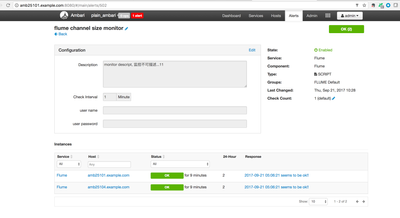
My Cluster Details:
[root@amb25101 ambari-server]# ambari-server --version
2.5.1.0-159
[root@amb25101 ambari-server]# python --version
Python 2.7.5
.


