
Our Community is getting an upgrade! To get everything ready for the relaunch, we’ll be placing the site in read-only mode starting September 21st.
We really appreciate your understanding while we get things set up behind the scenes. Catch up on all the exciting details about the move here.
Need help or have questions? Drop us a line at [email protected]

Archives of Support Questions (Read Only)
- Cloudera Community
- Board Archive
- Archives of Support Questions (Read Only)
- install HDP using ambari hanging at last step "Ins...
- Subscribe to RSS Feed
- Mark Question as New
- Mark Question as Read
- Float this Question for Current User
- Bookmark
- Subscribe
- Mute
- Printer Friendly Page
- Subscribe to RSS Feed
- Mark Question as New
- Mark Question as Read
- Float this Question for Current User
- Bookmark
- Subscribe
- Mute
- Printer Friendly Page
install HDP using ambari hanging at last step "Install, Start and Test"
- Labels:
-
Apache Ambari


Created 10-18-2016 07:02 AM
- Mark as New
- Bookmark
- Subscribe
- Mute
- Subscribe to RSS Feed
- Permalink
- Report Inappropriate Content
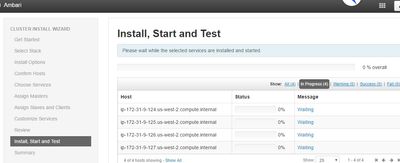
The installation has been hanging in last step - show 0% overall for long time. All previous steps were OK.
- How to check what is exactly happening ? is there a logfile somewhere on server can check ?
- How to do a restart/a fresh start ?
i had tried to interrupt the installation (kill -9 back end, even restart the server). But when i restart the server, seems Ambari jump to the last step directly and continue hanging.
- FYI, i am trying to setup a 4 nodes cluster under Redhat 7. HDP 2.3


Created 10-18-2016 08:55 AM
- Mark as New
- Bookmark
- Subscribe
- Mute
- Subscribe to RSS Feed
- Permalink
- Report Inappropriate Content
It seems to be a problem with downloading of packaged from repository.
Is it Local repository you are using ?
You can kill the action here on ambari webui and lets try downloading single package from cli using yum command "yum install hdp-select". This will make sure you have access to download packages from internet/local repository.
Let me know if that works from cli.
Created 10-18-2016 07:08 AM
- Mark as New
- Bookmark
- Subscribe
- Mute
- Subscribe to RSS Feed
- Permalink
- Report Inappropriate Content
Hi @Allen Niu
Can you attach the screenshot here of the screen on which you are struck.
Also do check below -
1. Login on ambari server and change path to - $cd /var/lib/ambari-agent/data/
2. $ ls -ltr output-* and $ ls -ltr error-*
3. Check the last output or error file to see if there are any useful logs.
Created on 10-18-2016 07:29 AM - edited 08-19-2019 01:52 AM
- Mark as New
- Bookmark
- Subscribe
- Mute
- Subscribe to RSS Feed
- Permalink
- Report Inappropriate Content
Hi Sagar,
Thanks.
See below screenshot and log.
a) No error and seems not too much info in output*.
b) One thing noticed the timestamp of last file (hostcheck.result) is few minutes back. Does this means it is still running, but just slow - about 1 hour 40min from 2nd last log?
Regards,
Allen
Created 10-18-2016 08:55 AM
- Mark as New
- Bookmark
- Subscribe
- Mute
- Subscribe to RSS Feed
- Permalink
- Report Inappropriate Content
It seems to be a problem with downloading of packaged from repository.
Is it Local repository you are using ?
You can kill the action here on ambari webui and lets try downloading single package from cli using yum command "yum install hdp-select". This will make sure you have access to download packages from internet/local repository.
Let me know if that works from cli.
Created 10-18-2016 12:05 PM
- Mark as New
- Bookmark
- Subscribe
- Mute
- Subscribe to RSS Feed
- Permalink
- Report Inappropriate Content
Yes. I did use the local repository. It seems i did not change the local repository under /etc/yum.repos.d. After i added, i have restarted the installation (wiped out the ambari repository and created a a new one) and it seems progressing. Finger crossed till the completion.
Thanks

Created 10-18-2016 01:04 PM
- Mark as New
- Bookmark
- Subscribe
- Mute
- Subscribe to RSS Feed
- Permalink
- Report Inappropriate Content
Also for troubleshooting purposes you can always do "tail -f ambari-server.log" under the "/var/log/ambari-server" directory (assuming default path was used for Ambari). This will give you a "scrolling view" of events logged by the Ambari server.
- Luis

Created 11-21-2017 03:19 AM
- Mark as New
- Bookmark
- Subscribe
- Mute
- Subscribe to RSS Feed
- Permalink
- Report Inappropriate Content
I am also getting the same error like above, Any idea how to restart the installation again ?


