
Our Community is getting an upgrade! To get everything ready for the relaunch, we’ll be placing the site in read-only mode starting September 21st.
We really appreciate your understanding while we get things set up behind the scenes. Catch up on all the exciting details about the move here.
Need help or have questions? Drop us a line at [email protected]

Archives of Support Questions (Read Only)
- Cloudera Community
- Board Archive
- Archives of Support Questions (Read Only)
- Re: java.io.FileNotFoundException: File file:/dfs/...
- Subscribe to RSS Feed
- Mark Question as New
- Mark Question as Read
- Float this Question for Current User
- Bookmark
- Subscribe
- Mute
- Printer Friendly Page
- Subscribe to RSS Feed
- Mark Question as New
- Mark Question as Read
- Float this Question for Current User
- Bookmark
- Subscribe
- Mute
- Printer Friendly Page
java.io.FileNotFoundException: File file:/dfs/dn does not exist
- Labels:
-
Apache Hadoop
-
Apache Zookeeper
-
Gateway
-
HDFS


Created on 09-30-2016 04:40 PM - edited 09-16-2022 03:42 AM
- Mark as New
- Bookmark
- Subscribe
- Mute
- Subscribe to RSS Feed
- Permalink
- Report Inappropriate Content
Hello, Folks
I got partial cloudera 5.8.2 server running.
So far I have ZooKeeper and Name Node, NFS Gateway service is running.
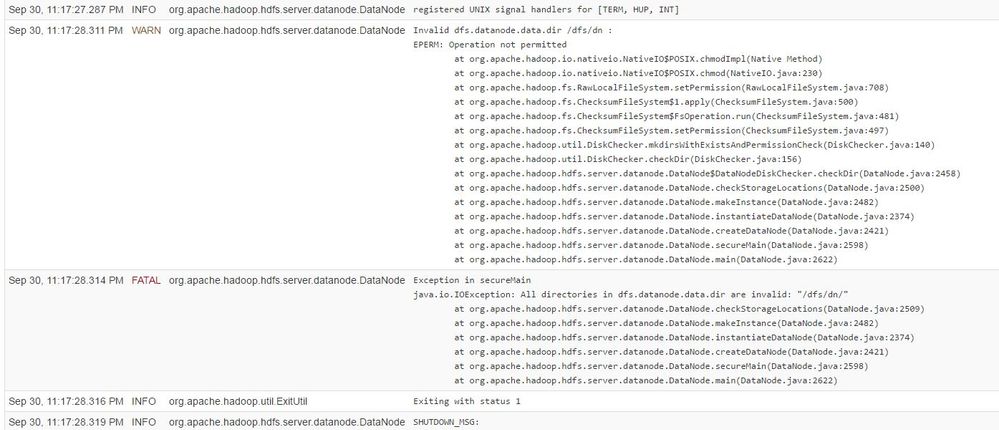
I can't get HDFS services to start on data node.
Keep getting - the Following error
java.io.FileNotFoundException: File file:/dfs/dn does not exist
Google is not very helpful either -
Any suggestion ...? Please advise.
---------
DFS Info on data node 1.
root@hadoop-dn01:/# ll dfs
total 20
drwx------ 5 hdfs hdfs 4096 Sep 30 22:32 ./
drwxr-xr-x 26 root root 4096 Sep 30 14:09 ../
drwx------ 3 hdfs hdfs 4096 Sep 26 16:19 dn/
drwx------ 2 hdfs hdfs 4096 Sep 26 20:19 nn/
drwxr-xr-x 2 hdfs hdfs 4096 Sep 30 22:32 snn/
======
root@hadoop-dn01:/# ll -l /dfs/dn
total 24
drwx------ 3 hdfs hdfs 4096 Sep 26 16:19 ./
drwx------ 5 hdfs hdfs 4096 Sep 30 22:32 ../
drwx------ 2 root root 16384 Sep 26 16:19 lost+found/
-------
Created 11-09-2016 09:03 AM
- Mark as New
- Bookmark
- Subscribe
- Mute
- Subscribe to RSS Feed
- Permalink
- Report Inappropriate Content
Ok, problem indeed with permission.
/DFS ==> root
/dfs/dn01 ==> root
==============
Correct permission:
Solution::
/dfs ==> cloudera-scm:cloudera-scm
/dfs/dn01 ==> hdfs:hdfs
chown cloudera-scm:cloudera-scm dfs
cd /dfs
chown hdfs:hdfs dn01



Created 10-03-2016 09:12 AM
- Mark as New
- Bookmark
- Subscribe
- Mute
- Subscribe to RSS Feed
- Permalink
- Report Inappropriate Content
Hello,
I have a couple of questions:
1. Have you checked the value of your datanode directory in Cloudera Manager (CM -> HDFS -> Configuration-> DataNode Data Directory)? It should state /dfs/dn.
2. Run the following command:
sudo chown -R hdfs:hdfs /dfs/dn
3. If that does not fix the issue, delete /dfs/dn, and restart HDFS.
Created 10-03-2016 11:54 AM
- Mark as New
- Bookmark
- Subscribe
- Mute
- Subscribe to RSS Feed
- Permalink
- Report Inappropriate Content
I check the configuration and start/restart the HDFS services. No luck ..still seeing the same problem.
I even try the different path and mount the storage to a different location. Still same problem.
Old /dfs/dn
new /dn01
root@hadoop-dn01:/# ll /dn01
total 24
drwx------ 3 hdfs hdfs 4096 Sep 26 16:19 ./
drwxr-xr-x 27 root root 4096 Oct 3 18:01 ../
drwx------ 2 hdfs hdfs 16384 Sep 26 16:19 lost+found/
root@hadoop-dn01:/#
---------------------
Oct 3, 6:45:31.023 PM DEBUG org.apache.htrace.core.Tracer
span.receiver.classes = ; loaded no span receivers
Oct 3, 6:45:31.161 PM DEBUG org.apache.hadoop.io.nativeio.NativeIO
Initialized cache for IDs to User/Group mapping with a cache timeout of 14400 seconds.
Oct 3, 6:45:31.161 PM WARN org.apache.hadoop.hdfs.server.datanode.DataNode
Invalid dfs.datanode.data.dir /dn01 :
EPERM: Operation not permitted
at org.apache.hadoop.io.nativeio.NativeIO$POSIX.chmodImpl(Native Method)
at org.apache.hadoop.io.nativeio.NativeIO$POSIX.chmod(NativeIO.java:230)
at org.apache.hadoop.fs.RawLocalFileSystem.setPermission(RawLocalFileSystem.java:708)
at org.apache.hadoop.fs.ChecksumFileSystem$1.apply(ChecksumFileSystem.java:500)
at org.apache.hadoop.fs.ChecksumFileSystem$FsOperation.run(ChecksumFileSystem.java:481)
at org.apache.hadoop.fs.ChecksumFileSystem.setPermission(ChecksumFileSystem.java:497)
at org.apache.hadoop.util.DiskChecker.mkdirsWithExistsAndPermissionCheck(DiskChecker.java:140)
at org.apache.hadoop.util.DiskChecker.checkDir(DiskChecker.java:156)
at org.apache.hadoop.hdfs.server.datanode.DataNode$DataNodeDiskChecker.checkDir(DataNode.java:2458)
at org.apache.hadoop.hdfs.server.datanode.DataNode.checkStorageLocations(DataNode.java:2500)
at org.apache.hadoop.hdfs.server.datanode.DataNode.makeInstance(DataNode.java:2482)
at org.apache.hadoop.hdfs.server.datanode.DataNode.instantiateDataNode(DataNode.java:2374)
at org.apache.hadoop.hdfs.server.datanode.DataNode.createDataNode(DataNode.java:2421)
at org.apache.hadoop.hdfs.server.datanode.DataNode.secureMain(DataNode.java:2598)
at org.apache.hadoop.hdfs.server.datanode.DataNode.main(DataNode.java:2622)
Oct 3, 6:45:31.164 PM FATAL org.apache.hadoop.hdfs.server.datanode.DataNode
Exception in secureMain
java.io.IOException: All directories in dfs.datanode.data.dir are invalid: "/dn01/"
at org.apache.hadoop.hdfs.server.datanode.DataNode.checkStorageLocations(DataNode.java:2509)
at org.apache.hadoop.hdfs.server.datanode.DataNode.makeInstance(DataNode.java:2482)
at org.apache.hadoop.hdfs.server.datanode.DataNode.instantiateDataNode(DataNode.java:2374)
at org.apache.hadoop.hdfs.server.datanode.DataNode.createDataNode(DataNode.java:2421)
at org.apache.hadoop.hdfs.server.datanode.DataNode.secureMain(DataNode.java:2598)
at org.apache.hadoop.hdfs.server.datanode.DataNode.main(DataNode.java:2622)
Oct 3, 6:45:31.166 PM INFO org.apache.hadoop.util.ExitUtil
Exiting with status 1
Oct 3, 6:45:31.169 PM INFO org.apache.hadoop.hdfs.server.datanode.DataNode
SHUTDOWN_MSG:
/************************************************************
SHUTDOWN_MSG: Shutting down DataNode at hadoop-dn01.fhmc.local/10.29.1.4
************************************************************/
--------------------
Same problem!! -
Created 10-07-2016 09:43 AM
- Mark as New
- Bookmark
- Subscribe
- Mute
- Subscribe to RSS Feed
- Permalink
- Report Inappropriate Content
still getting same error.
Created 11-09-2016 09:03 AM
- Mark as New
- Bookmark
- Subscribe
- Mute
- Subscribe to RSS Feed
- Permalink
- Report Inappropriate Content
Ok, problem indeed with permission.
/DFS ==> root
/dfs/dn01 ==> root
==============
Correct permission:
Solution::
/dfs ==> cloudera-scm:cloudera-scm
/dfs/dn01 ==> hdfs:hdfs
chown cloudera-scm:cloudera-scm dfs
cd /dfs
chown hdfs:hdfs dn01


