
Our Community is getting an upgrade! To get everything ready for the relaunch, we’ll be placing the site in read-only mode starting September 21st.
We really appreciate your understanding while we get things set up behind the scenes. Catch up on all the exciting details about the move here.
Need help or have questions? Drop us a line at [email protected]

Archives of Support Questions (Read Only)
- Cloudera Community
- Board Archive
- Archives of Support Questions (Read Only)
- java.net:UnknownhostException:Namenode , While tri...
- Subscribe to RSS Feed
- Mark Question as New
- Mark Question as Read
- Float this Question for Current User
- Bookmark
- Subscribe
- Mute
- Printer Friendly Page
- Subscribe to RSS Feed
- Mark Question as New
- Mark Question as Read
- Float this Question for Current User
- Bookmark
- Subscribe
- Mute
- Printer Friendly Page
java.net:UnknownhostException:Namenode , While trigger hive job in HDinsight cluster,Can any one help me to out of this great appreciated.


Created 11-05-2016 02:45 PM
- Mark as New
- Bookmark
- Subscribe
- Mute
- Subscribe to RSS Feed
- Permalink
- Report Inappropriate Content
hd-hive.pngI am new to HDinsight hadoop cluster , when i have open and Ambari ->hive view>query and execute any hive query(show tables etc..) i am getting error: java.net:UnknowhostException: namenode
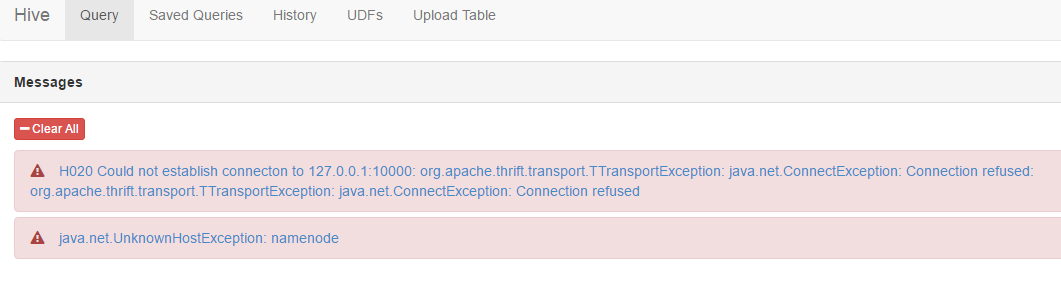
Note: I am able to trigger hive query in HIVE cli .
HDP 2.7
hive 1.2

Created 11-05-2016 06:48 PM
- Mark as New
- Bookmark
- Subscribe
- Mute
- Subscribe to RSS Feed
- Permalink
- Report Inappropriate Content
@rama
Hive view will internally use: webhdfs file system uri So please check if the following property is set properly or not?
Click HDFS > Configs > Advanced > Advanced hdfs-site > dfs.namenode.http-address. When you enter the value in the view definition, pre-pend "webhdfs://" to the value you find in the advanced HDFS configuration settings.
For example, webhdfs://c6401.ambari.apache.org:50070
Please see: https://docs.hortonworks.com/HDPDocuments/Ambari-2.1.0.0/bk_ambari_views_guide/content/section_get_v...
Created 11-06-2016 03:15 AM
- Mark as New
- Bookmark
- Subscribe
- Mute
- Subscribe to RSS Feed
- Permalink
- Report Inappropriate Content
Thanks you@jss
I could not find dfs.namenode.http-address property too..i have share my hdfs_site screen short please help me to locate

Created 11-06-2016 04:00 AM
- Mark as New
- Bookmark
- Subscribe
- Mute
- Subscribe to RSS Feed
- Permalink
- Report Inappropriate Content
@rama
Please use the search filter to find the property mentioned.
Search for "dfs.namenode.http-address" in the "Properties Filter" text box which is present in the
HDFS > Configs > Advanced (In this page) you will find a search box beside the "Manage Config Groups" just put the property "dfs.namenode.http-address" there to search.
Created 11-06-2016 04:27 AM
- Mark as New
- Bookmark
- Subscribe
- Mute
- Subscribe to RSS Feed
- Permalink
- Report Inappropriate Content
Thanks you so much@jss
i could able to find the properties(attached screen short) ,so i need to edit properties ?hfds-http.png

Created 11-06-2016 07:23 AM
- Mark as New
- Bookmark
- Subscribe
- Mute
- Subscribe to RSS Feed
- Permalink
- Report Inappropriate Content
@rama
Hope the following article will help:
You do not need to edit the "dfs.namenode.http-address' instead you need to refer to that value so that it can be used inside your Hive View.
Manage Ambai --> Views --> HiveView (check its property "WebHDFS FileSystem URI*") this value need to be changed.
When it comes to setting WebHDFS FileSystem URI* , make sure you set to webhdfs://${dfs.nameservices}   where ${dfs.nameservices} is the value defined in the "hdfs-site.xml"   With *NO* Port to be specified.  (When NameNode HA is configured)

Restart ambari-server
Created 11-06-2016 01:42 PM
- Mark as New
- Bookmark
- Subscribe
- Mute
- Subscribe to RSS Feed
- Permalink
- Report Inappropriate Content
Thanks @jss
I will check and let you know the result..
Created 11-08-2016 08:58 AM
- Mark as New
- Bookmark
- Subscribe
- Mute
- Subscribe to RSS Feed
- Permalink
- Report Inappropriate Content
HI @jss
I could find some configuration difference here
In PROD cluster ->managed ambari->views>hive->hive views->cluster configuration is set to "Local Ambari Managed Cluster" and its working fine
IN Dev cluster ->managed ambari->views>hive->hive views->cluster configuration is set to " custom" here it is not working
So should i change to "Local Ambari Managed Cluster"
if you want to me do this one , after save this should i need to restart the ambari server?
please suggest me

- « Previous
-
- 1
- 2
- Next »

