
Our Community is getting an upgrade! To get everything ready for the relaunch, we’ll be placing the site in read-only mode starting September 21st.
We really appreciate your understanding while we get things set up behind the scenes. Catch up on all the exciting details about the move here.
Need help or have questions? Drop us a line at [email protected]

Archives of Support Questions (Read Only)
- Cloudera Community
- Board Archive
- Archives of Support Questions (Read Only)
- manipulate flowfile with executescript processor i...
- Subscribe to RSS Feed
- Mark Question as New
- Mark Question as Read
- Float this Question for Current User
- Bookmark
- Subscribe
- Mute
- Printer Friendly Page
- Subscribe to RSS Feed
- Mark Question as New
- Mark Question as Read
- Float this Question for Current User
- Bookmark
- Subscribe
- Mute
- Printer Friendly Page
manipulate flowfile with executescript processor in nifi with python
- Labels:
-
Apache NiFi


Created on 04-27-2017 02:06 PM - edited 08-17-2019 08:37 PM
- Mark as New
- Bookmark
- Subscribe
- Mute
- Subscribe to RSS Feed
- Permalink
- Report Inappropriate Content
Hello,
I want to do some stuff on my data while ingesting so i created a little python script to do that .
I am ingesting csv files and want to remove carriage return, linefeed etc in the columns. Also adding new column with timestamp
My script looks lige this
import csv
import sys
flowFile = session.get()
 with open(flowFile, 'rb') as csvfile:
        spamreader = csv.reader(csvfile, delimiter='    ', quotechar='|')
        for row in spamreader:
                for col in row:
                        col.rstrip('\n\r ')


                print ', '.join(row)
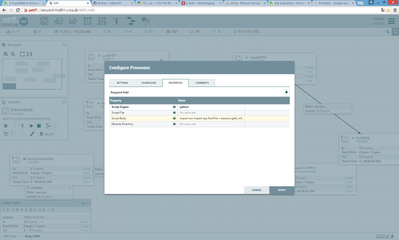
Right now i got this error when running it
2017-04-27 12:40:13,463 ERROR [Timer-Driven Process Thread-8] o.a.nifi.processors.script.ExecuteScript ExecuteScript[id=af58777c-015b-1000-ffff-ffff972978f8] Failed to process session due to org.apache.nifi.processor.exception.ProcessException: javax.script.ScriptException: NameError: name 'flowfile' is not defined in <script> at line number 3: org.apache.nifi.processor.exception.ProcessException: javax.script.ScriptException: NameError: name 'flowfile' is not defined in <script> at line number 3
What should i add to this script in order to output the manipulated flowfiles to the next process. Do i need to rewrite them like
session.write(flowfile).
I am not a python programmer so please be kind and supply small example
Thank you
Created 11-28-2017 10:32 AM
- Mark as New
- Bookmark
- Subscribe
- Mute
- Subscribe to RSS Feed
- Permalink
- Report Inappropriate Content
I found that the replacetext processor could do this for me with a very little effort. So i did not use executeScript for this.



Created 04-28-2017 05:38 PM
- Mark as New
- Bookmark
- Subscribe
- Mute
- Subscribe to RSS Feed
- Permalink
- Report Inappropriate Content
Does the script have to be written using Python? There is a three part article written by @Matt Burgess that has some great examples: ExecuteScript Cookbook


Created 11-28-2017 01:34 AM
- Mark as New
- Bookmark
- Subscribe
- Mute
- Subscribe to RSS Feed
- Permalink
- Report Inappropriate Content
Hi,
Have you been able to make it work? Could you please share your script here?
Thanks
Created 11-28-2017 10:32 AM
- Mark as New
- Bookmark
- Subscribe
- Mute
- Subscribe to RSS Feed
- Permalink
- Report Inappropriate Content
I found that the replacetext processor could do this for me with a very little effort. So i did not use executeScript for this.


Created 11-28-2017 06:53 PM
- Mark as New
- Bookmark
- Subscribe
- Mute
- Subscribe to RSS Feed
- Permalink
- Report Inappropriate Content
Looks like it might just have been a typo between "flowFile" and "flowfile"


