
Our Community is getting an upgrade! To get everything ready for the relaunch, we’ll be placing the site in read-only mode starting September 21st.
We really appreciate your understanding while we get things set up behind the scenes. Catch up on all the exciting details about the move here.
Need help or have questions? Drop us a line at [email protected]

Archives of Support Questions (Read Only)
- Cloudera Community
- Board Archive
- Archives of Support Questions (Read Only)
- Re: nameNode HA not working
- Subscribe to RSS Feed
- Mark Question as New
- Mark Question as Read
- Float this Question for Current User
- Bookmark
- Subscribe
- Mute
- Printer Friendly Page
- Subscribe to RSS Feed
- Mark Question as New
- Mark Question as Read
- Float this Question for Current User
- Bookmark
- Subscribe
- Mute
- Printer Friendly Page
nameNode HA not working


Created on 01-17-2017 10:35 PM - edited 08-19-2019 02:15 AM
- Mark as New
- Bookmark
- Subscribe
- Mute
- Subscribe to RSS Feed
- Permalink
- Report Inappropriate Content
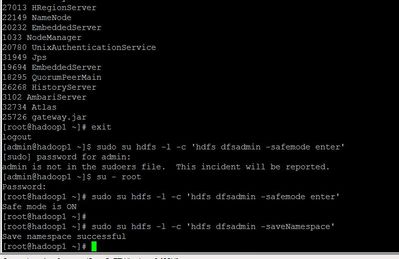
I am using ambari to enable the namenode HA but its not detecting the checkpoint and not advancing the screen . please see below




Created 01-18-2017 10:10 AM
- Mark as New
- Bookmark
- Subscribe
- Mute
- Subscribe to RSS Feed
- Permalink
- Report Inappropriate Content
Please save ambari-server and ambari-agent logs on the journal node machines for further reference.
One h@cky approach could be -
1. Copy the link from browser's address bar where enable Namenode HA wizard is stuck.
2. Open new tab in the same browser.
3. Paste the copied link.
4. increase the step number manually, i.e. if step4 is the last value in the copied url then make it as step5
5. press enter and move on!
Please don't forget to create a Hortonworks Support ticket if you have a support subscription, it will help us to identify a BUG and fix it to avoid further occurrences of this issue.
Hope this helps!
-Kuldeep

Created 01-17-2017 10:56 PM
- Mark as New
- Bookmark
- Subscribe
- Mute
- Subscribe to RSS Feed
- Permalink
- Report Inappropriate Content
ambari-web uses below pointed code to determine enabling of next button:
Following API call will help to debug further the reason behind this issue:
http://c6401.ambari.apache.org:8080/api/v1/clusters/c1/hosts/{NAMENODE_HOSTNAME}/host_components/NAM...
Value of Safemode and JournalTransactionInfo should not be empty.
value of LastAppliedOrWrittenTxId - value of MostRecentCheckpointTxId should be less than or equal to 1
Created 01-18-2017 10:10 AM
- Mark as New
- Bookmark
- Subscribe
- Mute
- Subscribe to RSS Feed
- Permalink
- Report Inappropriate Content
Please save ambari-server and ambari-agent logs on the journal node machines for further reference.
One h@cky approach could be -
1. Copy the link from browser's address bar where enable Namenode HA wizard is stuck.
2. Open new tab in the same browser.
3. Paste the copied link.
4. increase the step number manually, i.e. if step4 is the last value in the copied url then make it as step5
5. press enter and move on!
Please don't forget to create a Hortonworks Support ticket if you have a support subscription, it will help us to identify a BUG and fix it to avoid further occurrences of this issue.
Hope this helps!
-Kuldeep
Created 01-27-2017 04:31 PM
- Mark as New
- Bookmark
- Subscribe
- Mute
- Subscribe to RSS Feed
- Permalink
- Report Inappropriate Content
awesome approach . .the work around worked.
thanks a lot


