Archives of Support Questions (Read Only)

This is an archived board for historical reference. Information and links may no longer be available or relevant
Announcements
This board is archived and read-only for historical reference. To ask a new question, please post a new topic on the appropriate active board.

problem with replace text

avatar
Expert Contributor

I am using extract text with replace text as below

Original string:

_fwip="abc" new fwip in context as new_fwip="[This is \"new_fwip\""] and other text

extract text properties

abc: (_fwip.*")\]

replace text properties

search value: .*

replace value: ${abc.1}

I am getting the value

_fwip="abc" new fwip in context as new_fwip="[This is "new_fwip""

In the replaced text I am missing \.

Can you please help me to understand why I am missing \

Thanks for your help

1 ACCEPTED SOLUTION

avatar
Master Guru
@Mark

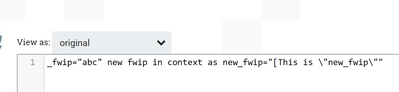
I have tried with same configurations as you mentioned in the question in extract text and in replace text processors, The output flowfile contents from replace text processor resulting with \ in it.

Output:-

50381-output.png

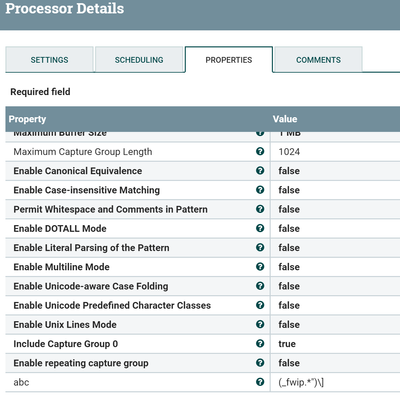
Here is my configurations:-

Extract Text:-

50382-extracttext.png

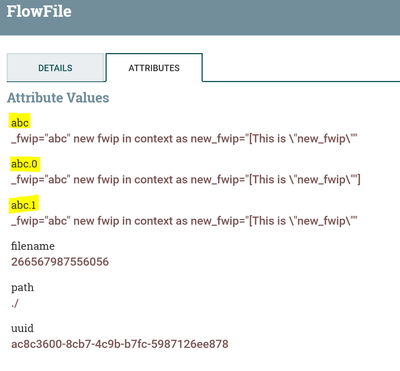
Output from extract text processor:-

50383-extracttext-output.png

abc attribute value having \ in it

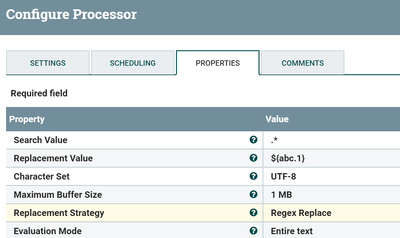
Replace Text:-

As Regex Replace as Replacement Strategy

50384-replacetext.png

(Or)

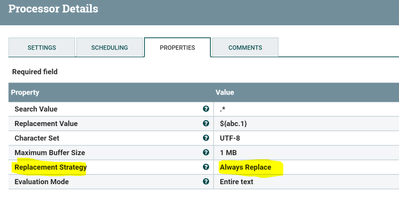
Replacement Strategy as Always Replace

50385-replacetext.png

Output:-

Both of these Replacement strategies are resulting same output that i mentioned as first screenshot.

Once check the attribute abc value after Extract Text processor having \ in it or not.

If you still having issue then share your flow and configs of the processors please..

View solution in original post

1 REPLY 1

avatar
Master Guru
@Mark

I have tried with same configurations as you mentioned in the question in extract text and in replace text processors, The output flowfile contents from replace text processor resulting with \ in it.

Output:-

50381-output.png

Here is my configurations:-

Extract Text:-

50382-extracttext.png

Output from extract text processor:-

50383-extracttext-output.png

abc attribute value having \ in it

Replace Text:-

As Regex Replace as Replacement Strategy

50384-replacetext.png

(Or)

Replacement Strategy as Always Replace

50385-replacetext.png

Output:-

Both of these Replacement strategies are resulting same output that i mentioned as first screenshot.

Once check the attribute abc value after Extract Text processor having \ in it or not.

If you still having issue then share your flow and configs of the processors please..