
Our Community is getting an upgrade! To get everything ready for the relaunch, we’ll be placing the site in read-only mode starting September 21st.
We really appreciate your understanding while we get things set up behind the scenes. Catch up on all the exciting details about the move here.
Need help or have questions? Drop us a line at [email protected]

Archives of Support Questions (Read Only)
- Cloudera Community
- Board Archive
- Archives of Support Questions (Read Only)
- question on Ambari services
- Subscribe to RSS Feed
- Mark Question as New
- Mark Question as Read
- Float this Question for Current User
- Bookmark
- Subscribe
- Mute
- Printer Friendly Page
- Subscribe to RSS Feed
- Mark Question as New
- Mark Question as Read
- Float this Question for Current User
- Bookmark
- Subscribe
- Mute
- Printer Friendly Page
question on Ambari services
- Labels:
-
Apache Ambari
-
Apache Hadoop


Created 07-26-2016 11:06 PM
- Mark as New
- Bookmark
- Subscribe
- Mute
- Subscribe to RSS Feed
- Permalink
- Report Inappropriate Content
I was given an environment to support recently without proper documentation and knowledge transfer. I am looking to document something like
| Node Name | List of services it runs |
Is there any easy way to get the list of services rather than logging into each box ?
Specifically I am looking for the box which acts as Ambari server and I believe this is where Ambari Metrics collector process runs and all Ambari metrics monitor process pushes the data to this server. Please correct me if I am wrong.


Created 07-26-2016 11:14 PM
- Mark as New
- Bookmark
- Subscribe
- Mute
- Subscribe to RSS Feed
- Permalink
- Report Inappropriate Content
From Ambari Web UI, you can go to each host and can see the component/service that each host houses.
Host Page showing all hosts in cluster : Example: screen-shot-2016-07-26-at-41103-pm.png
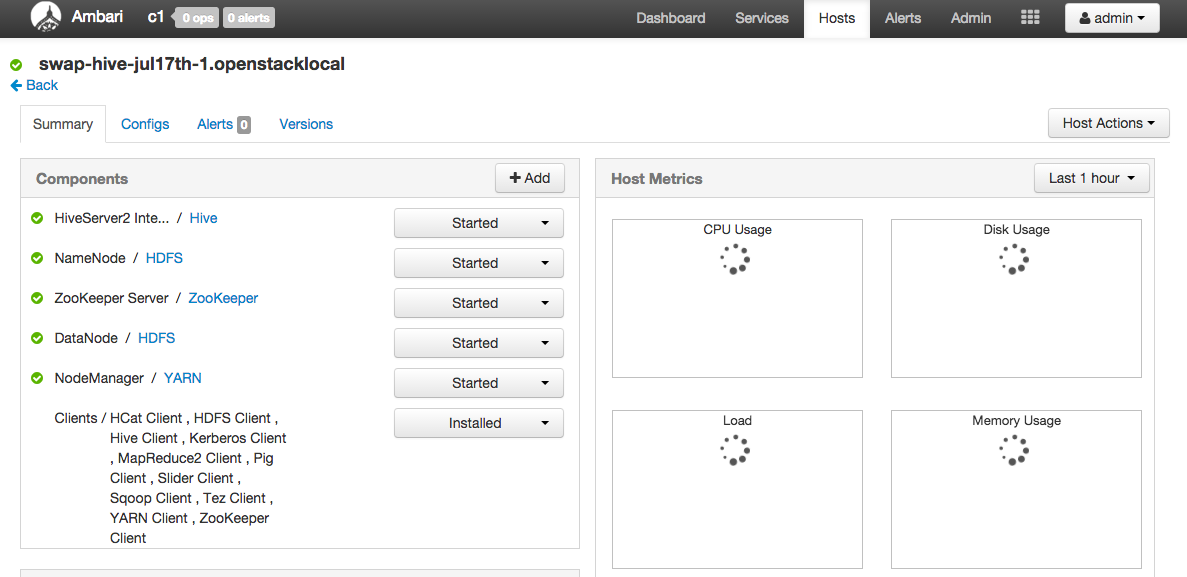
Clocking on a specific host will take you to that host specific page showing component/Service that it has: Example : screen-shot-2016-07-26-at-41126-pm.png
Let me know if you have further question.
Created 07-26-2016 11:14 PM
- Mark as New
- Bookmark
- Subscribe
- Mute
- Subscribe to RSS Feed
- Permalink
- Report Inappropriate Content
From Ambari Web UI, you can go to each host and can see the component/service that each host houses.
Host Page showing all hosts in cluster : Example: screen-shot-2016-07-26-at-41103-pm.png
Clocking on a specific host will take you to that host specific page showing component/Service that it has: Example : screen-shot-2016-07-26-at-41126-pm.png
Let me know if you have further question.



Created 07-26-2016 11:31 PM
- Mark as New
- Bookmark
- Subscribe
- Mute
- Subscribe to RSS Feed
- Permalink
- Report Inappropriate Content
Kumar,
Do you have access to Ambari UI? You can use the Ambari UI Host summary page to do this.
http://<ambari_server_host>:8080/#/main/hosts/<hostname>/summary


