
Our Community is getting an upgrade! To get everything ready for the relaunch, we’ll be placing the site in read-only mode starting September 21st.
We really appreciate your understanding while we get things set up behind the scenes. Catch up on all the exciting details about the move here.
Need help or have questions? Drop us a line at [email protected]

Archives of Support Questions (Read Only)
- Cloudera Community
- Board Archive
- Archives of Support Questions (Read Only)
- "E090 HDFS020 Could not write file" error occurred
- Subscribe to RSS Feed
- Mark Question as New
- Mark Question as Read
- Float this Question for Current User
- Bookmark
- Subscribe
- Mute
- Printer Friendly Page
- Subscribe to RSS Feed
- Mark Question as New
- Mark Question as Read
- Float this Question for Current User
- Bookmark
- Subscribe
- Mute
- Printer Friendly Page
"E090 HDFS020 Could not write file" error occurred
- Labels:
-
Apache Hive
-
Apache Ranger


Created on 12-02-2016 10:29 AM - edited 08-19-2019 02:02 AM
- Mark as New
- Bookmark
- Subscribe
- Mute
- Subscribe to RSS Feed
- Permalink
- Report Inappropriate Content
Hi, I just installed Ranger from Ambari UI.
When I throw query, "E090 HDFS020 Could not write file" error occurred. I already checked and applied the Support KB as follow: https://community.hortonworks.com/content/supportkb/49578/e090-hdfs020-could-not-write-file-useradmi... However, the error still exist.
Before Ranger was installed, there were no error like that.
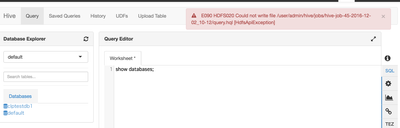
I have no idea for this. Cloud you please tell me what I should check?
Regards, Takashi
Created 01-12-2017 01:03 AM
- Mark as New
- Bookmark
- Subscribe
- Mute
- Subscribe to RSS Feed
- Permalink
- Report Inappropriate Content
Hi, I configured hadoop.proxyuser.root.hosts=* of HDFS configs in Ambari.
Then the issue was gone.
Thank you for everyone!



Created 12-02-2016 10:32 AM
- Mark as New
- Bookmark
- Subscribe
- Mute
- Subscribe to RSS Feed
- Permalink
- Report Inappropriate Content
can you try creating a ranger hdfs policy for the admin user on resource /user/admin with recursive true

Created 12-02-2016 10:44 AM
- Mark as New
- Bookmark
- Subscribe
- Mute
- Subscribe to RSS Feed
- Permalink
- Report Inappropriate Content
Create the directory /user/admin under hdfs as below and then try running the query:
hdfs dfs -mkdir /user/admin
hdfs dfs -chown -R admin:admin /user/admin
Created 12-02-2016 11:12 AM
- Mark as New
- Bookmark
- Subscribe
- Mute
- Subscribe to RSS Feed
- Permalink
- Report Inappropriate Content
Thank you! /user/admin directory is as below:
[admin@ip-192-168-xxx ~]$ hdfs dfs -chown admin:admin /user/admin
[admin@ip-192-168-xxx ~]$ hdfs dfs -ls  /user/admin
Found 3 items
drwx------   - admin hdfs          0 2016-12-01 11:47 /user/admin/.Trash
drwxr-xr-x   - admin hdfs          0 2016-12-01 11:52 /user/admin/.hiveJars
drwxr-xr-x   - admin hdfs          0 2016-12-01 11:39 /user/admin/hive
Ranger policy is as below:
I don't understand what is the root cause...
Created 12-02-2016 11:18 AM
- Mark as New
- Bookmark
- Subscribe
- Mute
- Subscribe to RSS Feed
- Permalink
- Report Inappropriate Content
Are you able to run the queries now? If yes, then issue could be missing HDFS directory and no Ranger policy in place.
Created 12-02-2016 12:12 PM
- Mark as New
- Bookmark
- Subscribe
- Mute
- Subscribe to RSS Feed
- Permalink
- Report Inappropriate Content
Sorry, I still have the issue. I'm getting the same error now...





Created 01-11-2017 07:24 PM
- Mark as New
- Bookmark
- Subscribe
- Mute
- Subscribe to RSS Feed
- Permalink
- Report Inappropriate Content
Are you running Apache Atlas?
Created 01-12-2017 01:03 AM
- Mark as New
- Bookmark
- Subscribe
- Mute
- Subscribe to RSS Feed
- Permalink
- Report Inappropriate Content
Hi, I configured hadoop.proxyuser.root.hosts=* of HDFS configs in Ambari.
Then the issue was gone.
Thank you for everyone!

Created 10-29-2017 01:44 AM
- Mark as New
- Bookmark
- Subscribe
- Mute
- Subscribe to RSS Feed
- Permalink
- Report Inappropriate Content
Thanks.
It also works for me.
I am using HDP 2.6.2 with Ambari 2.5,
After installing, the default proxy value is
hadoop.proxyuser.root.hosts=ambari1.ec2.internal
After changing to
hadoop.proxyuser.root.hosts=*
Error is resolved.

Created 11-21-2017 12:08 PM
- Mark as New
- Bookmark
- Subscribe
- Mute
- Subscribe to RSS Feed
- Permalink
- Report Inappropriate Content
@Takashi Nasu is the issue resolved? I am having the similar issue. I tried all the above solution given by folks but still facing the same error. I do not have security installed in my system and i believe its just permission issue but couldnt able to identify where it could be. Can @Deepak Sharma or any one help to resolve this please


