
Our Community is getting an upgrade! To get everything ready for the relaunch, we’ll be placing the site in read-only mode starting September 21st.
We really appreciate your understanding while we get things set up behind the scenes. Catch up on all the exciting details about the move here.
Need help or have questions? Drop us a line at [email protected]

Archives of Support Questions (Read Only)
- Cloudera Community
- Board Archive
- Archives of Support Questions (Read Only)
- "HiveServer2 Enable Impersonation" setting not ava...
- Subscribe to RSS Feed
- Mark Question as New
- Mark Question as Read
- Float this Question for Current User
- Bookmark
- Subscribe
- Mute
- Printer Friendly Page
- Subscribe to RSS Feed
- Mark Question as New
- Mark Question as Read
- Float this Question for Current User
- Bookmark
- Subscribe
- Mute
- Printer Friendly Page
"HiveServer2 Enable Impersonation" setting not available via the API
- Labels:
-
Apache Hive
-
Cloudera Manager


Created on 07-21-2016 04:33 AM - edited 09-16-2022 03:30 AM
- Mark as New
- Bookmark
- Subscribe
- Mute
- Subscribe to RSS Feed
- Permalink
- Report Inappropriate Content
Hi,
I'm using the API to change the "HiveServer2 Enable Impersonation" configuration setting of the Hive service. However the option is not accessbile through the API.
Here's the setting in the webinterface:
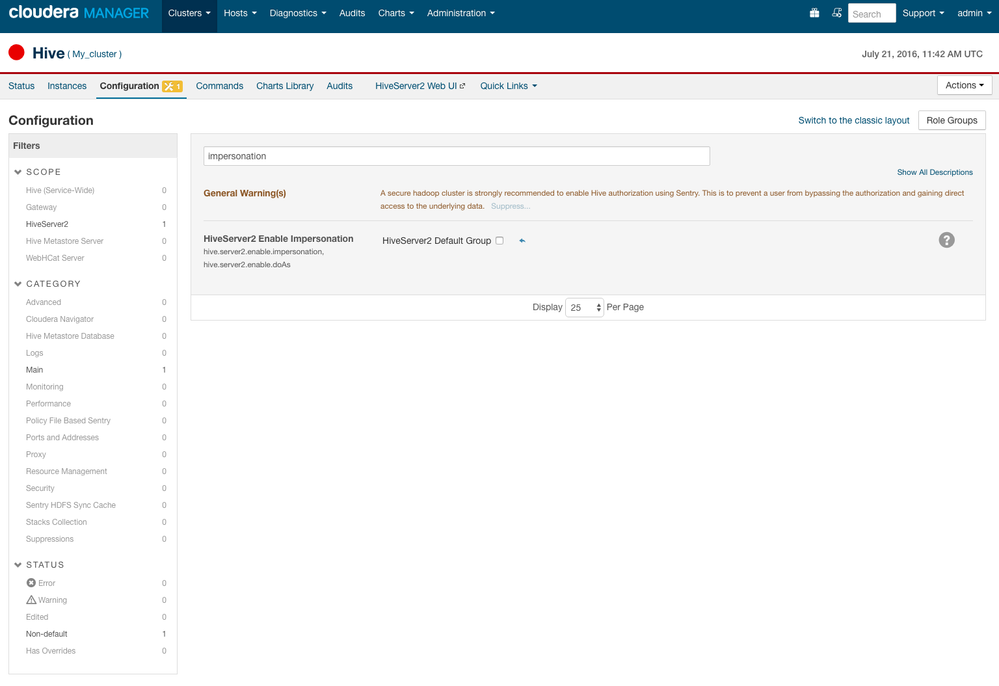
I can change it just fine with the web interface and there I can see that it is desribed as "hive_server2_enable_impersonation" and "hive.server2.enable.doAs".
But when I try to change those values through the API it fails with:
{
  "message" : "Unknown configuration attribute 'hive_server2_enable_impersonation'."
}
I am trying with:
curl -X PUT -H "Content-Type:application/json" -u admin:admin "http:/localhost:7180/api/v12/clusters/My_cluster/services/hive/config" -d '{ "items" : [ { "name" : "hive_server2_enable_impersonation", "value" : "false" } ] }'


curl -X PUT -H "Content-Type:application/json" -u admin:admin "http:/localhost:7180/api/v12/clusters/My_cluster/services/hive/config" -d '{ "items" : [ { "name" : "hive.server2.enable.doAs", "value" : "false" } ] }'
When I check the config json of the Hive service as returned by:
curl -X GET -H "Content-Type:application/json" -u admin:admin"http://localhost:7180/api/v12/clusters/My_cluster/services/hive/config?view=FULL"
I don't see any option to change this anywhere in the result.
What's going on here, isn't everything accesible through the API or was this setting just forgotten?



Created 11-14-2016 02:43 PM
- Mark as New
- Bookmark
- Subscribe
- Mute
- Subscribe to RSS Feed
- Permalink
- Report Inappropriate Content
Hi... this is old, but just came across it.
hiveserver2_enable_impersonation is set at the HiveServer2 role level, so you would need to use the full path to your HiveServer2 role. for instance:
curl -X PUT -H "Content-Type:application/json" -u admin:admin -k "https://localhost:7183/api/v12/clusters/cluster/services/hive/roles/hive-HIVESERVER2-609b6bea2fc852513192152e64d3ec19/config" -d '{ "items" : [ { "name" : "hiveserver2_enable_impersonation", "value" : "false" } ] }'
Since the attribute does not exist at the service level (where you attempted to set it), the attribute is not found.
I hope that might help you or others.
Cheers,
Ben
Created 11-14-2016 02:43 PM
- Mark as New
- Bookmark
- Subscribe
- Mute
- Subscribe to RSS Feed
- Permalink
- Report Inappropriate Content
Hi... this is old, but just came across it.
hiveserver2_enable_impersonation is set at the HiveServer2 role level, so you would need to use the full path to your HiveServer2 role. for instance:
curl -X PUT -H "Content-Type:application/json" -u admin:admin -k "https://localhost:7183/api/v12/clusters/cluster/services/hive/roles/hive-HIVESERVER2-609b6bea2fc852513192152e64d3ec19/config" -d '{ "items" : [ { "name" : "hiveserver2_enable_impersonation", "value" : "false" } ] }'
Since the attribute does not exist at the service level (where you attempted to set it), the attribute is not found.
I hope that might help you or others.
Cheers,
Ben


