
Our Community is getting an upgrade! To get everything ready for the relaunch, we’ll be placing the site in read-only mode starting September 21st.
We really appreciate your understanding while we get things set up behind the scenes. Catch up on all the exciting details about the move here.
Need help or have questions? Drop us a line at [email protected]

Archives of Support Questions (Read Only)
- Cloudera Community
- Board Archive
- Archives of Support Questions (Read Only)
- spark 2.1 properties (spark-env.sh, spark-defaults...
- Subscribe to RSS Feed
- Mark Question as New
- Mark Question as Read
- Float this Question for Current User
- Bookmark
- Subscribe
- Mute
- Printer Friendly Page
- Subscribe to RSS Feed
- Mark Question as New
- Mark Question as Read
- Float this Question for Current User
- Bookmark
- Subscribe
- Mute
- Printer Friendly Page
spark 2.1 properties (spark-env.sh, spark-defaults.conf)
- Labels:
-
Apache Spark


Created on 03-30-2017 01:47 PM - edited 08-18-2019 02:04 AM
- Mark as New
- Bookmark
- Subscribe
- Mute
- Subscribe to RSS Feed
- Permalink
- Report Inappropriate Content
hello,
I am not actually use HDP distribution but i want to test spark and hadoop.
I downlaods spark-2.1.0-bin-hadoop2.7 and i want to start spark-shell, but i got this error.
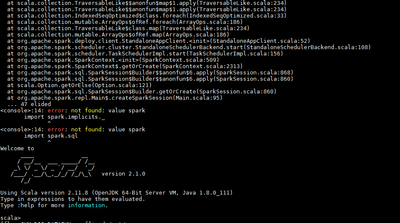
Spark context not found.
Can you give me best value on file spark-env.sh and spark-defaults.conf??
Thanks


Created 03-30-2017 08:35 PM
- Mark as New
- Bookmark
- Subscribe
- Mute
- Subscribe to RSS Feed
- Permalink
- Report Inappropriate Content
Find sample spark-default.conf as below. Replace the correct value for below markers:
<hadoop-client-native> : Dir path to hadoop native dir , In hdp clusters , it is generally /usr/hdp/current/hadoop-client/lib/native
<spark-history-dir> : HDFS dir on cluster where spark history server event log should be stored. Make sure this dir is owned by spark:hadoop with 777 permission
spark.driver.extraLibraryPath <hadoop-client-native>:<hadoop-client-native>/Linux-amd64-64
spark.eventLog.dir hdfs:///<spark-history-dir>
spark.eventLog.enabled true
spark.executor.extraLibraryPath <hadoop-client-native>:<hadoop-client-native>/Linux-amd64-64
spark.history.fs.logDirectory hdfs:///<spark-history-dir>
spark.history.provider org.apache.spark.deploy.history.FsHistoryProvider
spark.history.ui.port 18080
spark.yarn.containerLauncherMaxThreads 20
spark.yarn.driver.memoryOverhead 384
spark.yarn.executor.memoryOverhead 384
spark.yarn.historyServer.address xxx:18080
spark.yarn.preserve.staging.files false
spark.yarn.queue default
spark.yarn.scheduler.heartbeat.interval-ms 5000
spark.yarn.submit.file.replication 3
Find sample spark-env.sh as below. Please update the paths as per your environment.
export SPARK_CONF_DIR=/etc/spark/conf
export SPARK_LOG_DIR=/var/log/spark
export SPARK_PID_DIR=/var/run/spark
export HADOOP_HOME=${HADOOP_HOME:-/usr/hdp/current/hadoop-client}
export HADOOP_CONF_DIR=${HADOOP_CONF_DIR:-/usr/hdp/current/hadoop-client/conf}
# The java implementation to use.
export JAVA_HOME=<jdk path>
Hope this helps.
Created 03-30-2017 08:35 PM
- Mark as New
- Bookmark
- Subscribe
- Mute
- Subscribe to RSS Feed
- Permalink
- Report Inappropriate Content
Find sample spark-default.conf as below. Replace the correct value for below markers:
<hadoop-client-native> : Dir path to hadoop native dir , In hdp clusters , it is generally /usr/hdp/current/hadoop-client/lib/native
<spark-history-dir> : HDFS dir on cluster where spark history server event log should be stored. Make sure this dir is owned by spark:hadoop with 777 permission
spark.driver.extraLibraryPath <hadoop-client-native>:<hadoop-client-native>/Linux-amd64-64
spark.eventLog.dir hdfs:///<spark-history-dir>
spark.eventLog.enabled true
spark.executor.extraLibraryPath <hadoop-client-native>:<hadoop-client-native>/Linux-amd64-64
spark.history.fs.logDirectory hdfs:///<spark-history-dir>
spark.history.provider org.apache.spark.deploy.history.FsHistoryProvider
spark.history.ui.port 18080
spark.yarn.containerLauncherMaxThreads 20
spark.yarn.driver.memoryOverhead 384
spark.yarn.executor.memoryOverhead 384
spark.yarn.historyServer.address xxx:18080
spark.yarn.preserve.staging.files false
spark.yarn.queue default
spark.yarn.scheduler.heartbeat.interval-ms 5000
spark.yarn.submit.file.replication 3
Find sample spark-env.sh as below. Please update the paths as per your environment.
export SPARK_CONF_DIR=/etc/spark/conf
export SPARK_LOG_DIR=/var/log/spark
export SPARK_PID_DIR=/var/run/spark
export HADOOP_HOME=${HADOOP_HOME:-/usr/hdp/current/hadoop-client}
export HADOOP_CONF_DIR=${HADOOP_CONF_DIR:-/usr/hdp/current/hadoop-client/conf}
# The java implementation to use.
export JAVA_HOME=<jdk path>
Hope this helps.

Created 09-04-2017 04:49 PM
- Mark as New
- Bookmark
- Subscribe
- Mute
- Subscribe to RSS Feed
- Permalink
- Report Inappropriate Content
This worked for me, thanks.


