
Our Community is getting an upgrade! To get everything ready for the relaunch, we’ll be placing the site in read-only mode starting September 21st.
We really appreciate your understanding while we get things set up behind the scenes. Catch up on all the exciting details about the move here.
Need help or have questions? Drop us a line at [email protected]

Archives of Support Questions (Read Only)
- Cloudera Community
- Board Archive
- Archives of Support Questions (Read Only)
- Re: unable to delete consumeKafka processor on can...
- Subscribe to RSS Feed
- Mark Question as New
- Mark Question as Read
- Float this Question for Current User
- Bookmark
- Subscribe
- Mute
- Printer Friendly Page
- Subscribe to RSS Feed
- Mark Question as New
- Mark Question as Read
- Float this Question for Current User
- Bookmark
- Subscribe
- Mute
- Printer Friendly Page
unable to delete consumeKafka processor on canvas
- Labels:
-
Apache Kafka
-
Apache NiFi


Created 09-29-2016 03:52 PM
- Mark as New
- Bookmark
- Subscribe
- Mute
- Subscribe to RSS Feed
- Permalink
- Report Inappropriate Content
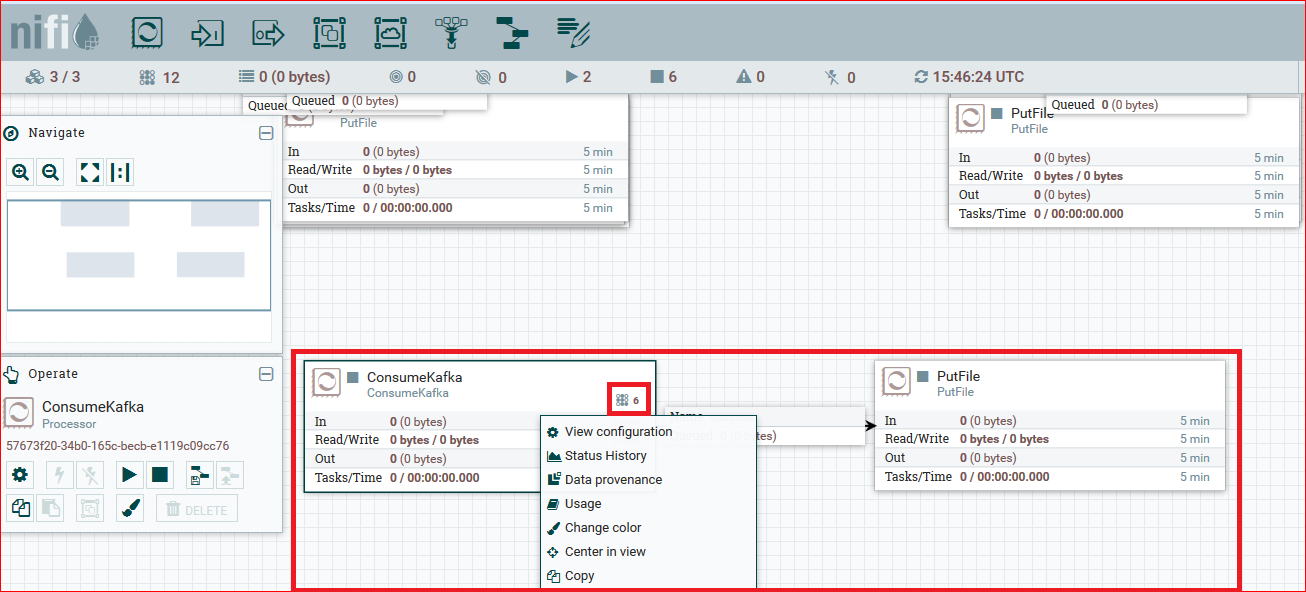
Please check attachment i''m not able to delete the consumeKafka processor. i also wanted to know what does the small icon on right-upper corner of processor with some number mean. i guessing this must show some kind of warning messages but nothing happens on mouse hover.nifi-processor-error.png



Created 09-29-2016 04:01 PM
- Mark as New
- Bookmark
- Subscribe
- Mute
- Subscribe to RSS Feed
- Permalink
- Report Inappropriate Content
The icon/number in the right-upper corner is the number of tasks the processor is executing. More information about these "active tasks" can be found in the documentation (https://nifi.apache.org/docs/nifi-docs/html/user-guide.html#processor_anatomy).

Created 09-29-2016 03:58 PM
- Mark as New
- Bookmark
- Subscribe
- Mute
- Subscribe to RSS Feed
- Permalink
- Report Inappropriate Content
Which Kafka version are you using? The timeout handling varied greatly between 0.8, 0.9 and 0.10, Match the consumer processor to the broker version, please (0.8 -> Put/Get/Kafka, 0.9 -> Publish/Consume, 0.10 -> Publish/Consume_0_10).
You might be running into this issue: https://issues.apache.org/jira/browse/NIFI-2739
If you can't wait until NiFi 1.1 is released, this patch is already included in HDF 2.0
Created 09-29-2016 03:59 PM
- Mark as New
- Bookmark
- Subscribe
- Mute
- Subscribe to RSS Feed
- Permalink
- Report Inappropriate Content
The number in the top-right corner of the processor is showing how many active threads there are executing for this component.
Created 09-29-2016 04:01 PM
- Mark as New
- Bookmark
- Subscribe
- Mute
- Subscribe to RSS Feed
- Permalink
- Report Inappropriate Content
The icon/number in the right-upper corner is the number of tasks the processor is executing. More information about these "active tasks" can be found in the documentation (https://nifi.apache.org/docs/nifi-docs/html/user-guide.html#processor_anatomy).


Created 09-29-2016 04:27 PM
- Mark as New
- Bookmark
- Subscribe
- Mute
- Subscribe to RSS Feed
- Permalink
- Report Inappropriate Content
Sometimes you have to delete the connection between two processors before you can delete one of the processors. Try that to see if you can delete your processor.
Created 09-30-2016 07:16 AM
- Mark as New
- Bookmark
- Subscribe
- Mute
- Subscribe to RSS Feed
- Permalink
- Report Inappropriate Content
i tried deleting the connection flow, it didn't work as well. later i restarted NIFI and processor came out of indefinite block state.


