Archives of Support Questions (Read Only)

This is an archived board for historical reference. Information and links may no longer be available or relevant
Announcements
This board is archived and read-only for historical reference. To ask a new question, please post a new topic on the appropriate active board.

unable to run the command...(cat ~/.profile) in Indexing and Searching text within images with Apache Solr

avatar
New Member

I have downloaded leptonica and tesseract from the link given as in the tutorial " Indexing and Searching text within images with Apache Solr"

(" http://hortonworks.com/hadoop-tutorial/indexing-and-searching-text-within-images-with-apache-solr/ ")

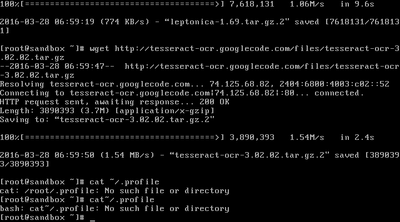
but when i am running cat ~/.profile it shows an error ... file or path not found.

Please help me to resolve the issue.

3017-virtualbox-hortonworks-sandbox-with-hdp-24-28-03-2.png

1 ACCEPTED SOLUTION

avatar
Super Collaborator

I see you are logged in as root. If you run the ls -la command in your home directory, you should see at least a .bash_profile. You can add the exports in that file. Or you can create a .profile in your home directory.

View solution in original post

1 REPLY 1

avatar
Super Collaborator

I see you are logged in as root. If you run the ls -la command in your home directory, you should see at least a .bash_profile. You can add the exports in that file. Or you can create a .profile in your home directory.