
Our Community is getting an upgrade! To get everything ready for the relaunch, we’ll be placing the site in read-only mode starting September 21st.
We really appreciate your understanding while we get things set up behind the scenes. Catch up on all the exciting details about the move here.
Need help or have questions? Drop us a line at [email protected]

Archives of Support Questions (Read Only)
- Cloudera Community
- Board Archive
- Archives of Support Questions (Read Only)
- yarn scheduler question
- Subscribe to RSS Feed
- Mark Question as New
- Mark Question as Read
- Float this Question for Current User
- Bookmark
- Subscribe
- Mute
- Printer Friendly Page
- Subscribe to RSS Feed
- Mark Question as New
- Mark Question as Read
- Float this Question for Current User
- Bookmark
- Subscribe
- Mute
- Printer Friendly Page
yarn scheduler question
- Labels:
-
Apache Ambari
-
Apache Hadoop
-
Apache YARN


Created 04-23-2017 01:41 PM
- Mark as New
- Bookmark
- Subscribe
- Mute
- Subscribe to RSS Feed
- Permalink
- Report Inappropriate Content
I asked this simple question before but got no response , trying again .
if I set these values for the scheduler in YARN config , it breaks YARN , what am I doing wrong here?
yarn.scheduler.capacity.maximum-am-resource-percent=0.2
yarn.scheduler.capacity.maximum-applications=10000
yarn.scheduler.capacity.node-locality-delay=40
yarn.scheduler.capacity.root.accessible-node-labels=*
yarn.scheduler.capacity.root.acl_administer_queue=*
yarn.scheduler.capacity.root.capacity=100
yarn.scheduler.capacity.root.queues=Engineering,Marketing,Support
yarn.scheduler.capacity.root.Engineering.acl_administer_jobs=*
yarn.scheduler.capacity.root.Engineering.acl_submit_applications=*
yarn.scheduler.capacity.root.Engineering.capacity=100
yarn.scheduler.capacity.root.Engineering.maximum-capacity=100
yarn.scheduler.capacity.root.Engineering.state=RUNNING
yarn.scheduler.capacity.root.Engineering.user-limit-factor=1
yarn.scheduler.capacity.Engineering.minimum-user-limit-percent=100
yarn.scheduler.capacity.root.Marketing.acl_administer_jobs=*
yarn.scheduler.capacity.root.Marketing.acl_submit_applications=*
yarn.scheduler.capacity.root.Marketing.capacity=100
yarn.scheduler.capacity.root.Marketing.maximum-capacity=100
yarn.scheduler.capacity.root.Marketing.state=RUNNING
yarn.scheduler.capacity.root.Marketing.user-limit-factor=1
yarn.scheduler.capacity.Marketing.minimum-user-limit-percent=100



Created on 04-24-2017 07:33 AM - edited 08-17-2019 09:25 PM
- Mark as New
- Bookmark
- Subscribe
- Mute
- Subscribe to RSS Feed
- Permalink
- Report Inappropriate Content
I tried your config and the ResourceManager's logs show error: "Illegal capacity of -1.0 for queue root.Support".
Support is defined in root.queues, but it's capacity is undefined. If you fixed that (add yarn.scheduler.capacity.root.Support.capacity) the next problem will be, that the sum of the capacities of any queue's child queues must be 100%. In your case, root.Marketing + root.Engineering = 200%. Try the following:
yarn.scheduler.capacity.root.Engineering.capacity=40
yarn.scheduler.capacity.root.Marketing.capacity=40
yarn.scheduler.capacity.root.Support.capacity=20
or any other 3 numbers that add up to 100.
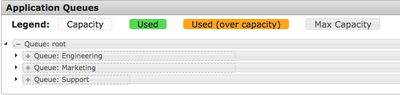
If you fix this too, your config will be valid:


Created 04-23-2017 01:44 PM
- Mark as New
- Bookmark
- Subscribe
- Mute
- Subscribe to RSS Feed
- Permalink
- Report Inappropriate Content
Hello Sami
Without the logs and or error message this is left up to guess. A quick look seems to show that your are allocating more than the total amount of ressources and that you do not seem to have defined the support queue you listed.
Created on 04-24-2017 07:33 AM - edited 08-17-2019 09:25 PM
- Mark as New
- Bookmark
- Subscribe
- Mute
- Subscribe to RSS Feed
- Permalink
- Report Inappropriate Content
I tried your config and the ResourceManager's logs show error: "Illegal capacity of -1.0 for queue root.Support".
Support is defined in root.queues, but it's capacity is undefined. If you fixed that (add yarn.scheduler.capacity.root.Support.capacity) the next problem will be, that the sum of the capacities of any queue's child queues must be 100%. In your case, root.Marketing + root.Engineering = 200%. Try the following:
yarn.scheduler.capacity.root.Engineering.capacity=40
yarn.scheduler.capacity.root.Marketing.capacity=40
yarn.scheduler.capacity.root.Support.capacity=20
or any other 3 numbers that add up to 100.
If you fix this too, your config will be valid:


