
Our Community is getting an upgrade! To get everything ready for the relaunch, we’ll be placing the site in read-only mode starting September 21st.
We really appreciate your understanding while we get things set up behind the scenes. Catch up on all the exciting details about the move here.
Need help or have questions? Drop us a line at [email protected]

Community Articles
 Hi, I'm CLEO! Something exciting is coming to the Community. Stay Tuned!
- Cloudera Community
- Support
- Community Articles
- Automating Cluster Connectivity Manager (CCM) in C...
- Subscribe to RSS Feed
- Mark as New
- Mark as Read
- Bookmark
- Subscribe
- Printer Friendly Page
- Report Inappropriate Content
- Subscribe to RSS Feed
- Mark as New
- Mark as Read
- Bookmark
- Subscribe
- Printer Friendly Page
- Report Inappropriate Content



Created on
05-29-2020
08:05 AM
- edited on
04-21-2026
04:29 AM
by
 GrazittiAPI

Cloudera Data Platform recently introduced Cluster Connectivity Manager (CCM) in tech preview, a feature with which CDP can communicate with workload clusters without the need for inbound network connections to customer workload clusters.
In this article, I will highlight how to automate the setup of CCM for both AWS and Azure including:
- Cloud Network Setup
- CDP Environment setup
Before you continue reading:
- You can find all automation on my github (here)
- Please refer to the official documentation for more details (here)
- This is just an example, different deployments require a different set of parameters!
Overview
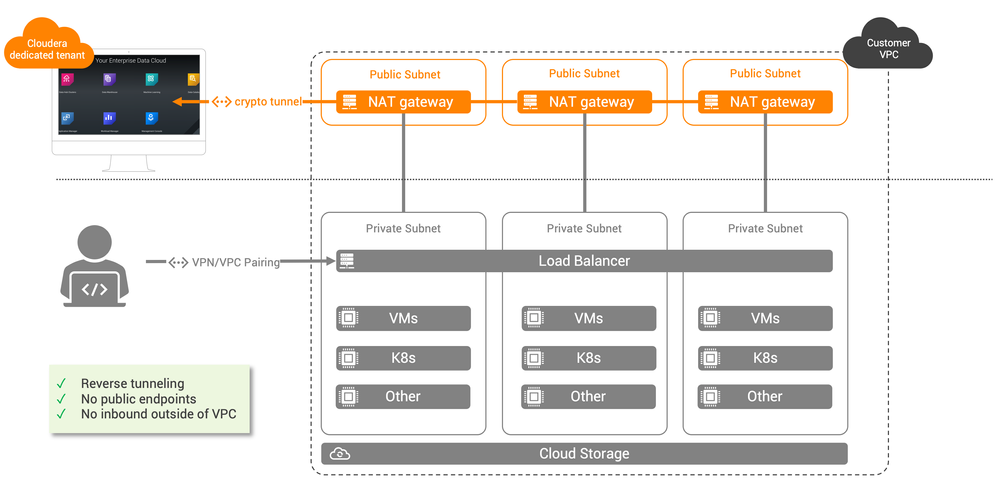
- Each tenant (i.e. customer) will have their own dedicated tunnel using a dedicated Apache Mina server
- The diagram above describes a setup in AWS. The Azure setup is very similar but does not require public subnets or NAT gateways.
Network Setup
Note: for both setup, you will notice that the open port 22 is inbound for a specific CIDR. This is to enable SSH to the different boxes for CDP and can be restricted to a CIDR within the VPC.
AWS
For AWS, we will need the following setup:
- One VPC
- 3 public networks
- 1 internet gateway
- 1 public route from a public network to IGW
- 3 private networks
- 3 private network to NAT gateway
- 2 security groups
The following is a sample code:
#!/bin/bash


 display_usage() {
	echo "
Usage:
    $(basename "$0") [--help or -h] <prefix> <region> <sg_cidr>

Description:
    Creates network assets for CDP env demployment

Arguments:
    prefix:         prefix of your assets
    region:         AWS region
    sg_cidr:        CIDR to open in your security group
    --help or -h:   displays this help"

}

# check whether user had supplied -h or --help . If yes display usage
if [[ ( $1 == "--help") ||  $1 == "-h" ]]
then
    display_usage
    exit 0
fi


# Check the numbers of arguments
if [  $# -lt 3 ]
then
    echo "Not enough arguments!"  >&2
    display_usage
    exit 1
fi

if [  $# -gt 3 ]
then
    echo "Too many arguments!"  >&2
    display_usage
    exit 1
fi

prefix=$1
region=$2
sg_cidr=$3


# 1. Creating VPC
vpc_id=$(aws ec2 create-vpc --cidr 10.10.0.0/16 | jq -r .Vpc.VpcId)
aws ec2 create-tags --resources $vpc_id --tags Key=Name,Value="$prefix-cdp-vpc" > /dev/null 2>&1

# 2. Creating public subnets

# 2.1. Subnets
public_sub_1=$(aws ec2 create-subnet --vpc-id $vpc_id --cidr-block 10.10.0.0/24 --availability-zone "$region"a | jq -r .Subnet.SubnetId)
public_sub_2=$(aws ec2 create-subnet --vpc-id $vpc_id --cidr-block 10.10.1.0/24 --availability-zone "$region"b | jq -r .Subnet.SubnetId)
public_sub_3=$(aws ec2 create-subnet --vpc-id $vpc_id --cidr-block 10.10.2.0/24 --availability-zone "$region"c | jq -r .Subnet.SubnetId)
aws ec2 create-tags --resources $public_sub_1 --tags Key=Name,Value="$prefix-pub-subnet-1" > /dev/null 2>&1
aws ec2 create-tags --resources $public_sub_2 --tags Key=Name,Value="$prefix-pub-subnet-2" > /dev/null 2>&1
aws ec2 create-tags --resources $public_sub_3 --tags Key=Name,Value="$prefix-pub-subnet-3" > /dev/null 2>&1


# 2.2. Internet gateway
igw_id=$(aws ec2 create-internet-gateway | jq -r .InternetGateway.InternetGatewayId)
aws ec2 create-tags --resources $igw_id --tags Key=Name,Value="$prefix-igw"

aws ec2 attach-internet-gateway --internet-gateway-id $igw_id --vpc-id $vpc_id > /dev/null 2>&1
aws ec2 modify-vpc-attribute --enable-dns-support "{\"Value\":true}" --vpc-id $vpc_id > /dev/null 2>&1
aws ec2 modify-vpc-attribute --enable-dns-hostnames "{\"Value\":true}" --vpc-id $vpc_id > /dev/null 2>&1


# 2.3. Route
route_pub=$(aws ec2 create-route-table --vpc-id $vpc_id | jq -r .RouteTable.RouteTableId)
aws ec2 create-tags --resources $route_pub --tags Key=Name,Value="$prefix-pub-route" > /dev/null 2>&1

aws ec2 create-route --route-table-id $route_pub --destination-cidr-block 0.0.0.0/0 --gateway-id $igw_id > /dev/null 2>&1

aws ec2 associate-route-table  --subnet-id $public_sub_1 --route-table-id $route_pub > /dev/null 2>&1
aws ec2 associate-route-table  --subnet-id $public_sub_2 --route-table-id $route_pub > /dev/null 2>&1
aws ec2 associate-route-table  --subnet-id $public_sub_3 --route-table-id $route_pub > /dev/null 2>&1


# 3. Creating private subnets

# 3.1. Subnets
private_sub_1=$(aws ec2 create-subnet --vpc-id $vpc_id --cidr-block 10.10.160.0/19 --availability-zone "$region"a | jq -r .Subnet.SubnetId)
private_sub_2=$(aws ec2 create-subnet --vpc-id $vpc_id --cidr-block 10.10.192.0/19 --availability-zone "$region"b | jq -r .Subnet.SubnetId)
private_sub_3=$(aws ec2 create-subnet --vpc-id $vpc_id --cidr-block 10.10.224.0/19 --availability-zone "$region"c | jq -r .Subnet.SubnetId)
aws ec2 create-tags --resources $private_sub_1 --tags Key=Name,Value="$prefix-priv-subnet-1" > /dev/null 2>&1
aws ec2 create-tags --resources $private_sub_2 --tags Key=Name,Value="$prefix-priv-subnet-2" > /dev/null 2>&1
aws ec2 create-tags --resources $private_sub_3 --tags Key=Name,Value="$prefix-priv-subnet-3" > /dev/null 2>&1

# 3.1. NAT gateways
alloc_id_1=$(aws ec2 allocate-address --domain vpc | jq -r .AllocationId)
alloc_id_2=$(aws ec2 allocate-address --domain vpc | jq -r .AllocationId)
alloc_id_3=$(aws ec2 allocate-address --domain vpc | jq -r .AllocationId)

nat_1=$(aws ec2 create-nat-gateway --subnet-id $public_sub_1 --allocation-id $alloc_id_1 | jq -r .NatGateway.NatGatewayId)
sleep 30
nat_2=$(aws ec2 create-nat-gateway --subnet-id $public_sub_2 --allocation-id $alloc_id_2 | jq -r .NatGateway.NatGatewayId)
sleep 30
nat_3=$(aws ec2 create-nat-gateway --subnet-id $public_sub_3 --allocation-id $alloc_id_3 | jq -r .NatGateway.NatGatewayId)
sleep 30

# 3.2. Routes
route_priv_1=$(aws ec2 create-route-table --vpc-id $vpc_id | jq -r .RouteTable.RouteTableId)
route_priv_2=$(aws ec2 create-route-table --vpc-id $vpc_id | jq -r .RouteTable.RouteTableId)
route_priv_3=$(aws ec2 create-route-table --vpc-id $vpc_id | jq -r .RouteTable.RouteTableId)
aws ec2 create-tags --resources $route_priv_1 --tags Key=Name,Value="$prefix-priv-route-1" > /dev/null 2>&1
aws ec2 create-tags --resources $route_priv_2 --tags Key=Name,Value="$prefix-priv-route-2" > /dev/null 2>&1
aws ec2 create-tags --resources $route_priv_3 --tags Key=Name,Value="$prefix-priv-route-3" > /dev/null 2>&1

aws ec2 create-route --route-table-id $route_priv_1 --destination-cidr-block 0.0.0.0/0 --nat-gateway-id $nat_1 > /dev/null 2>&1
aws ec2 create-route --route-table-id $route_priv_2 --destination-cidr-block 0.0.0.0/0 --nat-gateway-id $nat_2 > /dev/null 2>&1
aws ec2 create-route --route-table-id $route_priv_3 --destination-cidr-block 0.0.0.0/0 --nat-gateway-id $nat_3 > /dev/null 2>&1


aws ec2 associate-route-table  --subnet-id $private_sub_1 --route-table-id $route_priv_1 > /dev/null 2>&1
aws ec2 associate-route-table  --subnet-id $private_sub_2 --route-table-id $route_priv_2 > /dev/null 2>&1
aws ec2 associate-route-table  --subnet-id $private_sub_3 --route-table-id $route_priv_3 > /dev/null 2>&1


# 4. VPC endpoints
s3_endpoint=$(aws ec2 create-vpc-endpoint --vpc-id $vpc_id --service-name com.amazonaws.${region}.s3 | jq -r .VpcEndpoint.VpcEndpointId)
dynamo_endpoint=$(aws ec2 create-vpc-endpoint --vpc-id $vpc_id --service-name com.amazonaws.${region}.dynamodb | jq -r .VpcEndpoint.VpcEndpointId)

aws ec2 modify-vpc-endpoint --vpc-endpoint-id $s3_endpoint --add-route-table-ids $route_pub $route_priv_1 $route_priv_2 $route_priv_3 > /dev/null 2>&1
aws ec2 modify-vpc-endpoint --vpc-endpoint-id $dynamo_endpoint --add-route-table-ids $route_pub $route_priv_1 $route_priv_2 $route_priv_3 > /dev/null 2>&1

# 5. Security groups


knox_sg_id=$(aws ec2 create-security-group --description "AWS CDP Knox security group" --group-name "$prefix-knox-sg" --vpc-id $vpc_id | jq -r .GroupId)
aws ec2 create-tags --resources $knox_sg_id --tags Key=Name,Value="$prefix-knox-sg" > /dev/null 2>&1


aws ec2 authorize-security-group-ingress --group-id $knox_sg_id --protocol tcp --port 22 --cidr $sg_cidr
aws ec2 authorize-security-group-ingress --group-id $default_sg_id --protocol tcp --port 0-65535 --cidr 10.10.0.0/16  > /dev/null 2>&1
aws ec2 authorize-security-group-ingress --group-id $default_sg_id --protocol udp --port 0-65535 --cidr 10.10.0.0/16 > /dev/null 2>&1
aws ec2 authorize-security-group-ingress --group-id $default_sg_id --protocol tcp --port 0-65535 --cidr 10.10.224.0/19  > /dev/null 2>&1
aws ec2 authorize-security-group-ingress --group-id $default_sg_id --protocol udp --port 0-65535 --cidr 10.10.224.0/19 > /dev/null 2>&1


default_sg_id=$(aws ec2 create-security-group --description "AWS default security group" --group-name "$prefix-default-sg" --vpc-id $vpc_id | jq -r .GroupId)
aws ec2 create-tags --resources $default_sg_id --tags Key=Name,Value="$prefix-default-sg"

aws ec2 authorize-security-group-ingress --group-id $default_sg_id --protocol tcp --port 0-65535 --cidr 10.10.0.0/16  > /dev/null 2>&1
aws ec2 authorize-security-group-ingress --group-id $default_sg_id --protocol udp --port 0-65535 --cidr 10.10.0.0/16 > /dev/null 2>&1
aws ec2 authorize-security-group-ingress --group-id $default_sg_id --protocol tcp --port 0-65535 --cidr 10.10.224.0/19  > /dev/null 2>&1
aws ec2 authorize-security-group-ingress --group-id $default_sg_id --protocol udp --port 0-65535 --cidr 10.10.224.0/19 > /dev/null 2>&1


echo "{\"VpcId\": \"$vpc_id\",
       \"InternetGatewayId\": \"$igw_id\",
       \"PublicSubnets\": [\"$public_sub_1\", \"$public_sub_2\", \"$public_sub_3\"],
       \"PublicRouteTableId\": \"$route_pub\",
       \"PublicNatGatewayIds\": [\"$nat_1\", \"$nat_2\", \"$nat_3\"],
       \"PrivateSubnets\": [\"$private_sub_1\", \"$private_sub_2\", \"$private_sub_3\"],
       \"PrivateRouteTableIds\": [\"$route_priv_1\", \"$route_priv_2\", \"$route_priv_3\"],
       \"VPCEndpoints\": [\"$s3_endpoint\", \"$dynamo_endpoint\"],
       \"KnoxGroupId\": \"$knox_sg_id\" ,
       \"DefaultGroupId\": \"$default_sg_id\"}"
Azure
For Azure, we will need the following setup:
- One vnet
- 3 private subnets
- 2 security groups
The following is a sample code:
#!/bin/bash


 display_usage() {
	echo "
Usage:
    $(basename "$0") [--help or -h] <prefix> <sg_cidr>

Description:
    Creates network assets for CDP env demployment

Arguments:
    prefix:         prefix of your assets
    sg_cidr:        CIDR to open in your security group
    --help or -h:   displays this help"

}

# check whether user had supplied -h or --help . If yes display usage
if [[ ( $1 == "--help") ||  $1 == "-h" ]]
then
    display_usage
    exit 0
fi


# Check the numbers of arguments
if [  $# -lt 2 ]
then
    echo "Not enough arguments!"  >&2
    display_usage
    exit 1
fi

if [  $# -gt 2 ]
then
    echo "Too many arguments!"  >&2
    display_usage
    exit 1
fi

prefix=$1
sg_cidr=$2


# 1. Vnets and subnets
az network vnet create -g $prefix-cdp-rg  --name $prefix-cdp-vnet --address-prefix 10.10.0.0/16

az network vnet subnet create -g $prefix-cdp-rg --vnet-name $prefix-cdp-vnet  -n $prefix-priv-subnet-1 --address-prefixes 10.10.160.0/19
az network vnet subnet create -g $prefix-cdp-rg --vnet-name $prefix-cdp-vnet  -n $prefix-priv-subnet-2 --address-prefixes 10.10.192.0/19
az network vnet subnet create -g $prefix-cdp-rg --vnet-name $prefix-cdp-vnet  -n $prefix-priv-subnet-3 --address-prefixes 10.10.224.0/19

az network vnet subnet update -n $prefix-priv-subnet-1 --vnet-name $prefix-cdp-vnet -g $prefix-cdp-rg --service-endpoints "Microsoft.Sql" "Microsoft.Storage"
az network vnet subnet update -n $prefix-priv-subnet-2 --vnet-name $prefix-cdp-vnet -g $prefix-cdp-rg --service-endpoints "Microsoft.Sql" "Microsoft.Storage"
az network vnet subnet update -n $prefix-priv-subnet-3 --vnet-name $prefix-cdp-vnet -g $prefix-cdp-rg --service-endpoints "Microsoft.Sql" "Microsoft.Storage"


# 2. NSG

az network nsg create -g $prefix-cdp-rg  -n $prefix-knox-nsg
az network nsg create -g $prefix-cdp-rg  -n $prefix-default-nsg

az network nsg rule create -g $prefix-cdp-rg --nsg-name $prefix-knox-nsg -n ssh_cidr --priority 102 --source-address-prefixes "$sg_cidr" --destination-address-prefixes '*'  --destination-port-ranges 22 --direction Inbound --access Allow --protocol Tcp --description "Allow SSH to boxes from CIDR."
az network nsg rule create -g $prefix-cdp-rg --nsg-name $prefix-knox-nsg -n outbound --priority 107 --source-address-prefixes '*' --destination-address-prefixes '*'  --destination-port-ranges '*' --direction Outbound --access Allow --protocol '*' --description "Allow outbound access."


az network nsg rule create -g $prefix-cdp-rg --nsg-name $prefix-default-nsg -n outbound --priority 107 --source-address-prefixes '*' --destination-address-prefixes '*'  --destination-port-ranges '*' --direction Outbound --access Allow --protocol '*' --description "Allow outbound access."
CDP setup
Note: This setup is using the CDP CLI. You could also select these networks from the UI directly. It also assumes the creation of a proper IAM and storage, which can also be automated in my github.
AWS
    cdp environments create-aws-environment --environment-name ${prefix}-cdp-env \
        --credential-name ${credential} \
        --region ${region} \
        --security-access securityGroupIdForKnox="${knox_sg_id}",defaultSecurityGroupId="${default_sg_id}"  \
        --authentication publicKeyId="${key}" \
        --log-storage storageLocationBase="${prefix}-cdp-bucket",instanceProfile="arn:aws:iam::$AWS_ACCOUNT_ID:instance-profile/${prefix}-log-role" \
        --subnet-ids "${pub_sub_1}" "${pub_sub_2}" "${pub_sub_3}" "${priv_sub_1}" "${priv_sub_2}" "${priv_sub_3}" \
        --vpc-id "${vpc}" \
        --s3-guard-table-name ${prefix}-cdp-table \
        --enable-tunnel \
        --tags key="enddate",value="${END_DATE}" key="project",value="${PROJECT}"
Azure
    cdp environments create-azure-environment  --environment-name ${prefix}-cdp-env \
        --credential-name ${credential} \
        --region "${region}" \
        --public-key "${key}" \
        --security-access securityGroupIdForKnox="$knox_nsg",defaultSecurityGroupId="$default_nsg" \
        --log-storage storageLocationBase="abfs://logs@${prefix}cdpsa.dfs.core.windows.net",managedIdentity="/subscriptions/${SUBSCRIPTION_ID}/resourceGroups/${prefix}-cdp-rg/providers/Microsoft.ManagedIdentity/userAssignedIdentities/loggerIdentity" \
        --existing-network-params networkId="$network_id",resourceGroupName="$prefix-cdp-rg",subnetIds="$subnet_1","$subnet_2","$subnet_3" \
        --tags key="enddate",value="${END_DATE}" key="project",value="${PROJECT}" \
        --no-use-public-ip \
        --enable-tunnel

Created on 01-13-2021 04:21 AM
- Mark as Read
- Mark as New
- Bookmark
- Permalink
- Report Inappropriate Content
@pvidal - Thanks for this great article for automating own CDP deployment.
There can be another scenario during quickstart or own CDP deployment on Azure with limited outbound/inbound internet connection.
1. Using a combination of quickstart/own deployed NSGs and separately built Azure Firewall
- how to modify existing NSGs to work with Azure Firewall?
2. Use only Azure firewall
- get rid of NSGs?
Looking for any detailed guidance after going through below docs;
https://docs.cloudera.com/management-console/cloud/security-overview/topics/security-in-bound-commun...
https://docs.cloudera.com/management-console/cloud/connection-to-private-subnets/topics/mc-ccm-confi...
https://docs.cloudera.com/management-console/cloud/proxy/topics/mc-whitelist-urls-environment.html
Any help is much appreciated!
Created on 01-13-2021 07:09 AM
- Mark as Read
- Mark as New
- Bookmark
- Permalink
- Report Inappropriate Content
@joyabrata you have a few options:
- you can study the documentation expectations for outbound dettails here https://docs.cloudera.com/management-console/cloud/proxy/topics/mc-whitelist-urls-environment.html
- you can use automation scripts like: https://github.com/paulvid/cdp-one-click/ to set up everything end to end.

| User | Count |
|---|---|
| 6 | |
| 4 | |
| 2 | |
| 2 | |
| 1 |


