Our Community is getting an upgrade! To get everything ready for the relaunch, we’ll be placing the site in read-only mode starting September 21st.
We really appreciate your understanding while we get things set up behind the scenes. Catch up on all the exciting details about the move here.
Need help or have questions? Drop us a line at [email protected]

Community Articles

Find and share helpful community-sourced technical articles.
Announcements
Share your experience with Cloudera on G2 and get a $25 Amazon Gift card.
Hi, I'm CLEO! Something exciting is coming to the Community. Stay Tuned!

Labels (1)
avatar

PROBLEM:

When the hostname is mixed like:

172.26.93.148 GRAFANA-hdp253-s1.openstacklocal GRAFANA-hdp253-s1 
172.26.93.149 GRAFANA-hdp253-s2.openstacklocal GRAFANA-hdp253-s2 
172.26.93.150 GRAFANA-hdp253-s3.openstacklocal GRAFANA-hdp253-s3 

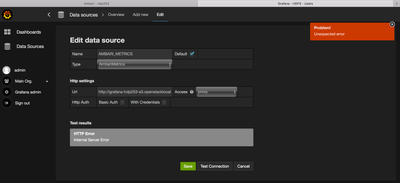
Ambari creates the datasource with a lower case hostname:

17611-grafana-datasource.png

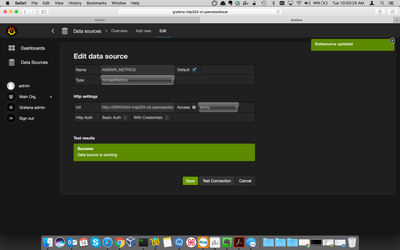
Once you enter the hostname with mixed case, Grafana works:

17612-grafana-working.png

RESOLUTION

Grafana 2.6.0 backend uses Go 1.5. Go's DNS lookup had a bug where the look up is case sensitive: https://github.com/golang/go/issues/12806

We can manual workaround by using the original casing in the Grafana Data Source URL as mentioned in the description. Another workaround is to update the /etc/hosts file to have all lowercase patterns as well. This bug was fixed in Go 1.6, so we will no longer have this issue once we upgrade Grafana to a later version (say 4.1.x) in a future version of Ambari.

1,127 Views
Version history
Last update:
‎09-16-2022 01:40 AM
Updated by:
Contributors