Our Community is getting an upgrade! To get everything ready for the relaunch, we’ll be placing the site in read-only mode starting September 21st. We really appreciate your understanding while we get things set up behind the scenes. Catch up on all the exciting details about the move here. Need help or have questions? Drop us a line at [email protected]
Created on 02-07-201705:33 AM - edited 08-17-201905:03 AM
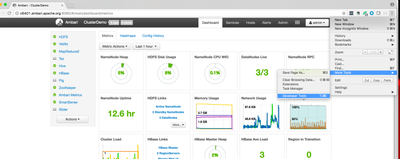
- Ambari manages it's Http Session information's using "AMBARISESSIONID". So if we want to logout the logged in user then we will need to find out it's "AMBARISESSIONID" cookie value. We can get it using browser debug tools like for Google chrome we can use Menu -> More Tools --> Developer Tools
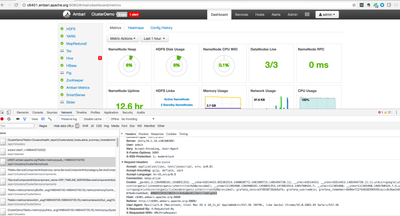
The we can go to the "Network" tab of the developer tool and then on the right hand side we should see the Cookies and other request headers.
Here i have found that the value for the "AMBARISESSIONID" Http Session Cookie is "1t4o6q0ph8j23etnl3e6ig5b3" hence now we can simply make a curl call as following in order to get this user logged out:
- As soon as the above curl command is executed we will see that the user is logged out from the ambari UI on the browser.
.
We can also enable the Http Session logging in the ambari server log by editing the file "/etc/ambari-server/conf/log4j.properties" and adding the following line at the end.
Now When we will restart ambari server then we can see that the logged in users sessions are printed there:
07 Feb 2017 05:21:20,283 DEBUG [ambari-client-thread-29] session:275 - Got Session ID 1t4o6q0ph8j23etnl3e6ig5b3 from cookie
With the above approach we can get all the active Session IDs and can force logout them all. However enabling DEBUG logging will causes excessive log event generation so we need to be careful there.