Our Community is getting an upgrade! To get everything ready for the relaunch, we’ll be placing the site in read-only mode starting September 21st.
We really appreciate your understanding while we get things set up behind the scenes. Catch up on all the exciting details about the move here.
Need help or have questions? Drop us a line at [email protected]

Community Articles

Find and share helpful community-sourced technical articles.
Announcements
Share your experience with Cloudera on G2 and get a $25 Amazon Gift card.
Hi, I'm CLEO! Something exciting is coming to the Community. Stay Tuned!

avatar

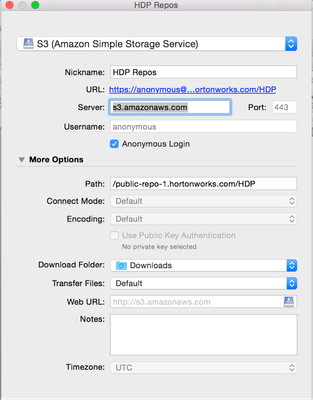
1. Configure the FTP client (Below is a screenshot from Cyberduck)

10747-1.png

2. Refer the below link for the HDP stack version

http://docs.hortonworks.com/HDPDocuments/Ambari-2.4.1.0/bk_ambari-installation/content/hdp_stack_rep...

For ex: I'm interested in this repo

http://public-repo-1.hortonworks.com/HDP/centos6/2.x/updates/2.5.0.0/hdp.repo

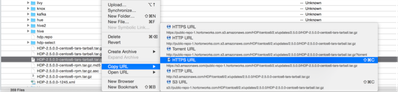
3. Navigate to the above path manually, right click the respective hdp.repo and select HTTPS URL.

In the below screen print I have showed the same and you'll download the tar file in HTTPS.

10748-2.png

Hope this helps!

Thanks

1,898 Views
Comments
avatar
New Member

@knarendran; Any guidance on using local repositories over https?

Version history
Last update:
‎09-16-2022 01:37 AM
Updated by:
Contributors