Our Community is getting an upgrade! To get everything ready for the relaunch, we’ll be placing the site in read-only mode starting September 21st.
We really appreciate your understanding while we get things set up behind the scenes. Catch up on all the exciting details about the move here.
Need help or have questions? Drop us a line at [email protected]
Created on 05-01-2016 08:44 AM - edited 08-17-2019 12:33 PM
Configure Ldap server on Redhat/Centos :-
#rpm –qa|grep openldap
2. If packages are not installed then install the packages with yum command
#yum install openldap-* -y
3. Once pacakge are installed then check with following command
#rpm –qa |grep openldap
4. Create Ldap password with following command
#slappasswd [Enter the password and copy the md5 formate password for adding the password into the database file]
5. Edit database files for domain
#vi /etc/openldap/slapd.d/cn=config/olcDatabase={2}bdb.ldif
oldSuffix:dc=example,dc=com
olcRootDN:cn=Manager,dc=example,dc=com
olcRootPW:
copy the password here which is
generated after set the slpappasswd.
#vi /etc/openldap/slpapd.d/cn=config/olcDatabase={1}monitor.ldif
olcAccess: {0}to * by dn.base="gidNumber=0+uidNumber=0,cn=peercred,cn=external,cn=auth" read by dn.base="cn=manager,dc=example,dc=com" read by * none6.Run the updatedb command to initialize database. Create or update a database used by locate. It will take a time to update. So keep a patient and wait for few second
#yum install mlocate #updatedb
7.Copy LDAP example database file
#cp /usr/share/openldap-servers/DB_CONFIG.example /var/lib/ldap/DB_CONFIG #chown ldap:ldap -Rf /var/lib/ldap #slaptest –u
8. Start ldap server.
#service slapd start
9. Check the service process is started properly and is running using ps command
#ps -aef |grep slapd #netstat -tauepn |grep 389
10. Run ldapsearch command
#ldapsearch –x –b "dc=example,dc=com"
11. Install Migration tools. A set of script for migrating user,group,aliases, hosts,netgroups,network,protocols,RPCs, and servicesfrom existing nameserver (flat files, NIS, and NetInfo) to LDAP.
#yum install -y migrationtools
#cd /usr/share/migrationtools
#vi migrate_common.ph
Do the following changes :-
NAMEINGCONTEXT{‘group’} = ”ou=Groups”;
DEFAULT_MAIL_DOMAIN = “example.com”
DEFAULT_BASE = “dc=example,dc=com”
EXTENDED_SCHEMA = 1;
12. Create LDIF file for base and users
#mkdir /root/ldap/ #/usr/share/migrationtools/migrate_base.pl >/root/ldap/base.ldif
- Create users,password and groups for LDAP user testing. #mkdir /home/ldap #useradd –d /home/ldap/user1 user1;passwd user1 #useradd –d /home/ldap/user2 user2;passwd user2 #useradd –d /home/ldap/user3 user3;passwd user3 #getent passwd |tail –n 3 >/root/ldap/users #getent shadow |tail –n 3 >/root/ldap/passwords #getent group |tail –n 3 >/root/ldap/groups - Create LDAP files for users #./usr/share/migrationtools/migrate_passwd.pl /root/ldap/users > /root/ldap/users.ldif #./usr/share/migrationtools/migrate_group.pl /root/ldap/groups > /root/ldap/groups.ldif
13. Add data to LDAP server
#ldapadd –x –W –D “cn=Manager,dc=example,dc=com” –f /root/ldap/base.ldif #ldapadd –x –W –D “cn=Manager,dc=example,dc=com” –f /root/ldap/users.ldif #ldapadd –x –W –D “cn=Manager,dc=example,dc=com” –f /root/ldap/groups.ldif
14. Test user data in LDAP
#ldapsearch –x –b “dc=example,dc=com” #ldapsearch –x –b “dc=example,dc=com” |grep user1 #slapcat –v
14.a) Lets map the users to respective group as shown below -
Create a file name groupsmap.ldif and add below lines to it -
#cat /root/groupsmap.ldif dn: cn=user1,ou=Groups,dc=example,dc=com changetype: modify add: memberUid memberUid: user1 dn: cn=user2,ou=Groups,dc=example,dc=com changetype: modify add: memberUid memberUid: user2 dn: cn=user3,ou=Groups,dc=example,dc=com changetype: modify add: memberUid memberUid: user3
Use Ldap modify command to modify the entries for user and group mapping -
#ldapmodify -D "cn=Manager,dc=example,dc=com" -W < /root/groupsmap.ldif
15. LDAP Client Configuration
#yum install openldap-clients openldap openldap-devel nss-pam-ldapd pam_ldap authconfig authconfig-gtk –y
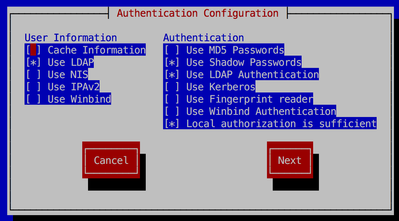
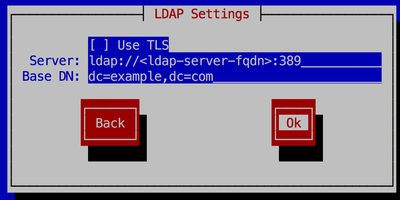
16.Run authconfig command to configure ldap client.
$authconfig-tui
17. Check the configuration set in file
#cat /etc/openldap/ldap.conf
18. Check ldap client configuration at client side
#getent passwd user1 #su - user1
19. If you are not able to see user home directory the use the authconfig command to enable home directory
#authconfig --enableldapauth --enablemkhomedir --ldapserver=ldap://<ldap-server-fqdn>:389 --ldapbasedn="dc=example,dc=com" --update
20. You can also configure home directory on NFS. Add-on step will be required for nfs ldap configuration.
Created on 11-29-2016 06:32 PM
Tried doing this.
1 ) Directly editing the config files is not recommended. You have to regen the CRC or delete that line.
2 ) ldapsearch –x –b "dc=example,dc=com" -- asks for a password. Any password I give is rejected with:
ldap_sasl_interactive_bind_s: Invalid credentials (49) additional info: SASL(-13): user not found: no secret in database
Maybe some parts missing?
Created on 01-23-2017 10:41 AM
Doesn't work on RHEL7, can't pass to customers as an easy process to follow
Created on 02-18-2017 11:24 AM
You can ignore the crc check errors. Those will not impact on ldap startup.
For "ldap_sasl_interactive_bind_s: Invalid credentials (49" it seems there is either wrond DN or password.
Can you please check and confirm.
Created on 02-18-2017 11:25 AM
This is created on Centos6. Need to check on RHEL7.
Created on 07-17-2017 08:50 PM
Hi Sagar,
Good work, nice guide.
Please edit line, as follows:
#vi /etc/openldap/slpapd.d/cn=config/olcDatabase={1}monitor.ldif
#vi /etc/openldap/slapd.d/cn=config/olcDatabase={1}monitor.ldifAlso edit line on 14.a), so it reads(group!(S)):
dn: cn=user1,ou=Group,dc=example,dc=com
instead of:
dn: cn=user1,ou=Groups,dc=example,dc=com
Created on 07-17-2017 09:13 PM
Hi,
I dont see where is this being used after, nor understand what is it for? would anyone elaborate more on this line?
Thanks!
Regards.
Created on 05-26-2020 10:36 AM
Some errors occur when changing the config files and starting the service
> May 26 16:50:18 c2562-node3.coelab slapd[5869]: ldif_read_file: checksum error on "/etc/openldap/slapd.d/cn=config/olcDat....ldif"
Is required to change the checksum of the modified files. This additional documentation may help .
Created on 07-01-2020 09:43 AM - edited 07-01-2020 11:06 AM
Great article! I faced the following error while trying adding data to ldap (Step 13.)
# ldapadd -x -W -D "cn=Manager,dc=example,dc=com" -f /root/ldap/base.ldif
Enter LDAP Password:
adding new entry "dc=example,dc=com"
ldap_add: Invalid syntax (21)
additional info: objectClass: value #1 invalid per syntax
After some research, found that we need to add the cosine and nis LDAP schemas before running the preceding command.
# ldapadd -Y EXTERNAL -H ldapi:/// -f /etc/openldap/schema/cosine.ldif
# ldapadd -Y EXTERNAL -H ldapi:/// -f /etc/openldap/schema/nis.ldif
# ldapadd -Y EXTERNAL -H ldapi:/// -f /etc/openldap/schema/inetorgperson.ldif