Our Community is getting an upgrade! To get everything ready for the relaunch, we’ll be placing the site in read-only mode starting September 21st. We really appreciate your understanding while we get things set up behind the scenes. Catch up on all the exciting details about the move here. Need help or have questions? Drop us a line at [email protected]
Created on 11-08-201704:51 PM - edited 08-17-201910:20 AM
H2O is an open source deep learning technology for data scientists. Sparkling Water allows users to combine the fast, scalable machine learning algorithms of H2O with the capabilities of Spark.
In this tutorial, I will walk you through the steps required to setup H2O Sparkling Water (specifically PySparkling Water) along with Zeppelin in order to execute your machine learning scripts.
Here are a few points to note before I get started:
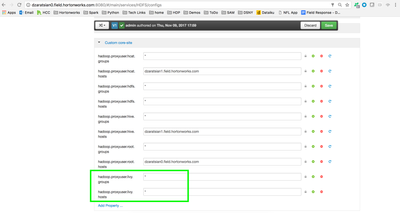
1.) There is a known issue when running Sparkling Water within Zeppelin. This issue is documented in this Jira (AttributeError: 'Logger' object has no attribute 'isatty'). To bypass this issue, I use Zeppelin combined with Livy Server to execute the Sparkling Water jobs. If you are not familiar with Apache Livy, it is a service that enables easy interaction with a Spark cluster over a REST interface.
2.) Testing was performed within the following environment:
Step 2: Unzip and move the PySparkling Water dependency to HDFS:
# Unzip Sparkling Water
unzip sparkling-water-2.1.16.zip
# Move the .zip dependency to a location within HDFS (make sure that this location is accessible from Zeppelin/Livy)
hadoop fs -put sparkling-water-2.1.16/py/build/dist/h2o_pysparkling_2.1-2.1.16.zip /tmp/.
Step 3: Ensure that required python libraries are installed on each datanode:
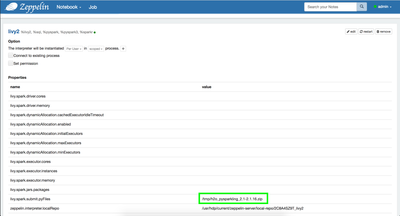
Step 6: Within Zeppelin, edit the Livy Interpreter and add a new parameter called livy.spark.submit.pyFiles (the value of this parameter should be your HDFS path to the PySparking Water .zip file):
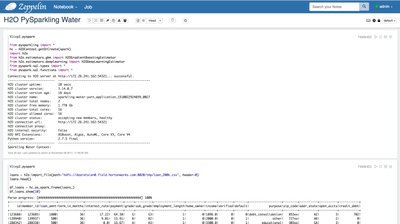
Step 7: Within Zeppelin, import libraries, initialize the H2OContext, then run your PySparkling Water Scripts:
%livy2.pyspark
from pysparkling import *
hc = H2OContext.getOrCreate(spark)
import h2o
from h2o.estimators.gbm import H2OGradientBoostingEstimator
from h2o.estimators.deeplearning import H2ODeepLearningEstimator
from pyspark.sql.types import *
from pyspark.sql.functions import *
loans = h2o.import_file(path="hdfs://dzaratsian0.field.hortonworks.com:8020/tmp/loan_200k.csv", header=0)
loans.head()
df_loans = hc.as_spark_frame(loans,)
df_loans.show(10)<br>