Our Community is getting an upgrade! To get everything ready for the relaunch, we’ll be placing the site in read-only mode starting September 21st.
We really appreciate your understanding while we get things set up behind the scenes. Catch up on all the exciting details about the move here.
Need help or have questions? Drop us a line at [email protected]

Community Articles

Find and share helpful community-sourced technical articles.
Announcements
Share your experience with Cloudera on G2 and get a $25 Amazon Gift card.
Hi, I'm CLEO! Something exciting is coming to the Community. Stay Tuned!

Labels (2)
avatar
Expert Contributor

Short Description

How to setup popular SQL development tools, like DbVisualizer, to access HDP Hive in secured network zone via Knox.

Article

Most customers setup Hadoop/Hive cluster in secured network Zone. There's no direct network connection between office and Hadoop network. So Knox is always setup to proxy Hive connections from office network. This article will setup DbVisualizer to connect to Knox Hive URL step by step.

Download Hive Driver for HDP2.6.1

Download hive-jdbc.jar https://github.com/timveil/hive-jdbc-uber-jar/releases

The latest for HDP2.6.1 is https://github.com/timveil/hive-jdbc-uber-jar/releases/download/v1.6-2.6.1/hive-jdbc-uber-2.6.1.0-12...

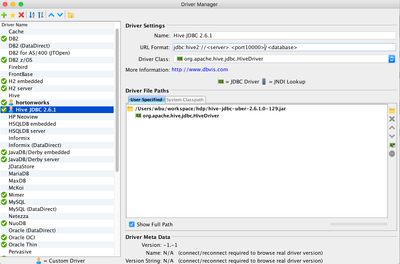
Create a new Database Driver use the hive-jdbc.jar

25384-screen-shot-2017-07-22-at-175534.png

URL Format: jdbc:hive2://<server>:<port10000>/<database>

The URL Format is for standard hive2 jdbc, will change later in actual connection for Knox.

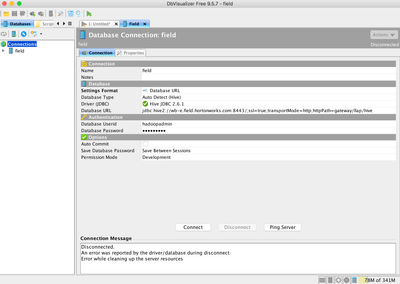
Create a new Connection with this new Driver

25385-screen-shot-2017-07-22-at-175831.png

Use Database URL, and edit the Database URL as

jdbc:hive2://<KNOX_NODE_FQDN>:<port>/;ssl=true;transportMode=http;httpPath=<KNOX_HIVE_HTTPPATH>

Default knox hive http path is gateway/default/hive, but please double check with your system admin.

Add Knox node certificate or CA certificate into DbVisualizer JVM truststore, otherwise will get SSL Exception during DB connection.

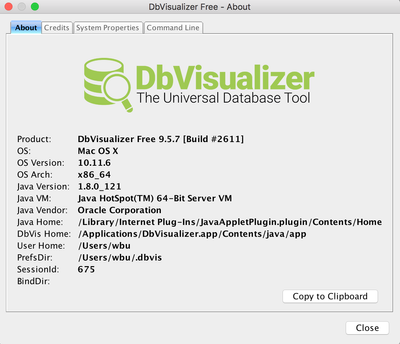
25386-screen-shot-2017-07-22-at-180525.png

Check the Java Home of DbVisualizer. Then add Knox node certificate or CA certificate into the truststore

$ sudo keytool -import
-alias knox -file wb-e.crt.pem -keystore /Library/InternetPlug-Ins/JavaAppletPlugin.plugin/Contents/Home/lib/security/cacerts

Enter keystore password:changeit

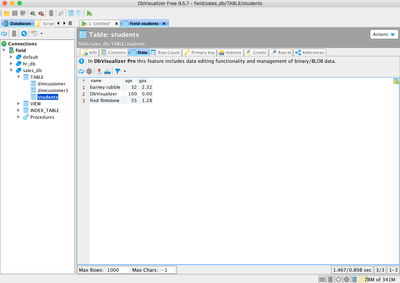
Enjoy DbVisualizer

25387-screen-shot-2017-07-22-at-180940.png

4,804 Views
0 Kudos
Version history
Last update:
‎08-17-2019 11:41 AM
Updated by:
Expert Contributor Expert Contributor
Contributors