Our Community is getting an upgrade! To get everything ready for the relaunch, we’ll be placing the site in read-only mode starting September 21st.
We really appreciate your understanding while we get things set up behind the scenes. Catch up on all the exciting details about the move here.
Need help or have questions? Drop us a line at [email protected]

Community Articles

Find and share helpful community-sourced technical articles.
Announcements
Share your experience with Cloudera on G2 and get a $25 Amazon Gift card.
Hi, I'm CLEO! Something exciting is coming to the Community. Stay Tuned!

Labels (1)
avatar
Super Guru

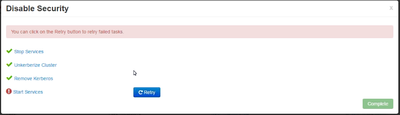
ISSUE: While performing unkerberizing cluster all services were down and nothing was coming up. Also the unkeberized cluster step failed. The start of services was failed.

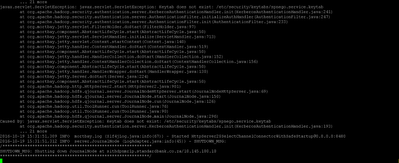
Tried to manually start Namenodes which came up but the status was not displayed correctly in Ambari UI. The journal node were not able to start and was failing with error as shown below.

ERROR: Screenshot is attached below

9430-unkerb-cluster.png

Journal node error:

9441-jn-error.png

ROOT CAUSE:

There were multiple issue as below -

1. From the JN error it says "missing spnego keytab". From the error It seems the kerberos was not properly disabled on cluster.

2. As checked in hdfs-site.xml the property "hadoop.http.authentication.type" was set to kerberos.

3. Oozie was not able to detect active namenode, since the property "hadoop.http.authentication.simple.anonymous.allowed" was set to false.

RESOLUTION:

1. Setting hadoop.http.authentication.type to simple in hdfs-site.xml, HDFS was able to restart

2. Setting the property hadoop.http.authentication.simple.anonymous.allowed=true in hdfs-site.xml oozie was able to detect active namenode and also namenode status was corrrectly displayed in namenode UI.

495 Views
Version history
Last update:
‎08-17-2019 08:12 AM
Updated by:
Contributors