Community Articles

Find and share helpful community-sourced technical articles.
Announcements
Now Live: Explore expert insights and technical deep dives on the new Cloudera Community BlogsRead the Announcement
Labels (1)
avatar
Master Guru

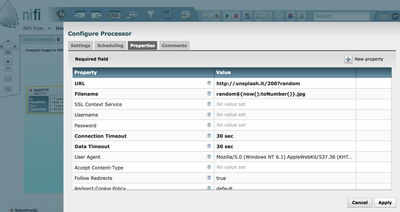
Using the GetHTTP Processor we grab random images from the DigitalOcean's Unsplash.it free image site. I give it a random file name so we can save it uniquely in HDFS.

5963-gethttp.png

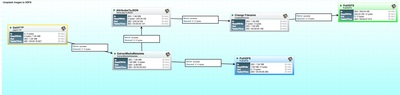
The Entire Data Flow from GetHTTP to Final HDFS storage of image and it's metadata as JSON.

5965-unsplash1.png

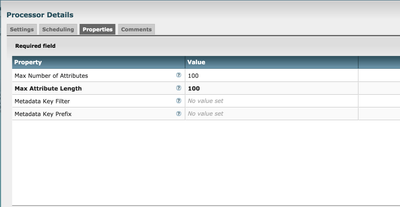
ExtractMediaMetaData Processor

5967-extramediametadata.png

The final results:

hdfs dfs -cat /mediametadata/random1469112881039.json

{"Number of Components":"3","Resolution Units":"none","Image Height":"200
pixels","File Name":"apache-tika-3181704319795384377.tmp",
"Data Precision":"8 bits",
"File Modified Date":"Thu Jul 21 14:54:43 UTC 2016","tiff:BitsPerSample":"8",
"Compression Type":"Progressive,Huffman","X-Parsed-By":"org.apache.tika.parser.DefaultParser,
org.apache.tika.parser.jpeg.JpegParser",
"Component 1":"Y component: Quantization table 0, Sampling factors 2 horiz/2vert",
"Component 2":"Cb component: Quantization table 1,Sampling factors 1 horiz/1 vert",
"tiff:ImageLength":"200","mime.type":"image/jpeg","gethttp.remote.source":"unsplash.it",
"Component3":"Cr component: Quantization table 1, Sampling factors 1 horiz/1vert",
"X Resolution":"1 dot",
"FileSize":"4701 bytes","tiff:ImageWidth":"200","path":"./",
"filename":"random1469112881039.jpg","ImageWidth":"200 pixels",
"uuid":"8b7c4f9f-9436-4ccb-b06e-9a720c91f6e0",
"Content-Type":"image/jpeg",
"YResolution":"1 dot"}

We have as many images as we want. Using the Unsplash.it parameters I picked an image width of always 200. You can customize that.

Below is the image downloaded with the above metadata.

5964-random1469112881039.jpg

1,306 Views
Version history
Last update:
‎09-16-2022 01:35 AM
Updated by:
Contributors