Our Community is getting an upgrade! To get everything ready for the relaunch, we’ll be placing the site in read-only mode starting September 21st.
We really appreciate your understanding while we get things set up behind the scenes. Catch up on all the exciting details about the move here.
Need help or have questions? Drop us a line at [email protected]

Community Articles

Find and share helpful community-sourced technical articles.
Announcements
Share your experience with Cloudera on G2 and get a $25 Amazon Gift card.
Hi, I'm CLEO! Something exciting is coming to the Community. Stay Tuned!

Labels (1)
avatar
Master Guru

With NiFi 1.00 I ingested a lot of image data from drones, mostly to get metadata like geo. I also ingested a resized version of the image in case I wanted to use it. I found a use for it.

8336-dronesphoenix.png

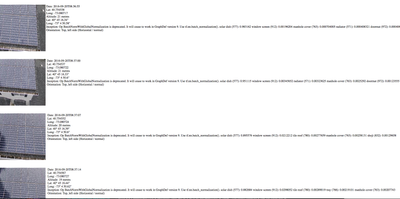
I am pulling this out very simply with Spring for a simple HTML page. So I wrote a quick Java program to pull out fields I stored in Phoenix (from the metadata) and I wanted to display the image. I could have streamed it out of HDFS using HDFS libraries to read the file and then stream it.

sql = "select datekey, fileName, gPSAltitude, gPSLatitude, gPSLongitude, orientation,geolat,geolong,inception from dronedata1 order by datekey asc";
out.append(STATIC_HEADER);
PreparedStatement ps = connection.prepareStatement(sql);
ResultSet res = ps.executeQuery();
while (res.next()) {
    try {
      out.append("<br><br>\n<table width=100%><tr><td valign=top><img src=\"");
      out.append("http://tspanndev10.field.hortonworks.com:50070/webhdfs/v1/drone/").
      append(res.getString("fileName")).append("?op=OPEN\"></td>");
      out.append("<td valign=top>Date: ").append(res.getString("datekey"));
      out.append("\n<br>Lat: ").append(res.getString("geolat"));
      out.append("\n<br>Long: ").append(res.getString("geolong"));
      out.append("\n<br><br>\n</td></tr></table>\n");
    } catch (Exception e) {
      e.printStackTrace();
    }
 }

It was a lot easier to use the built-in WebHDFS to display an image. Wrapping the Web API call to the image file in an HTML IMG SRC tag loads our image.

http://node1:50070/webhdfs/v1/drone/Bebop2_20160920083655-0400.jpg?op=OPEN

8335-dronesphoenix2.png

It's pretty simple and you can use this with a MEAN application, Python Flask or your non-JVM front-end of choice. And now you have a solid distributed host for your images. I recommend this only for internal sites and public images. Having this data publicly available on the cloud is dangerous!

3,741 Views