Our Community is getting an upgrade! To get everything ready for the relaunch, we’ll be placing the site in read-only mode starting September 21st.
We really appreciate your understanding while we get things set up behind the scenes. Catch up on all the exciting details about the move here.
Need help or have questions? Drop us a line at [email protected]

Community Articles

Find and share helpful community-sourced technical articles.
Announcements
Share your experience with Cloudera on G2 and get a $25 Amazon Gift card.
Hi, I'm CLEO! Something exciting is coming to the Community. Stay Tuned!

avatar
Master Guru

There are many ways to validate a json file against a avro schema to verify all is kosher. Sharing a practice I have been using for few years.

Objective - Validate avro schema well bound to the json file

First you must have a avro schema and json file. From there download the latest a avro-tools jar. At the moment 1.8.1 is the latest avro-tools version jar available.

Store the avro schema and json file in the same directory. Issue a wget to fetch the avro-tools jar

wget http://www.us.apache.org/dist/avro/avro-1.8.1/java/avro-tools-1.8.1.jar

Here is what the directory looks like

14100-a.jpg

Objective Details - Validate avro schema student.avsc binds to student.json

How - Issue the following

java -jar ./avro-tools-1.8.1.jar fromjson --schema-file YourSchemaFile.avsc YourJsonFile.json > AnyNameForYourBinaryAvro.avro

Using the student files example:

java -jar ./avro-tools-1.8.1.jar fromjson --schema-file student.avsc student.json > student.avro

14101-b.jpg

Validation passed, a avro binary was created.

14102-c.jpg

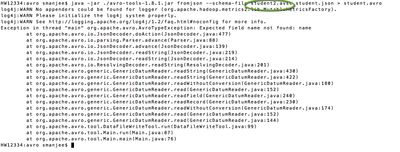
Now as a last step lets break something. Another avro schema (student2.avsc) is created which does not conform to student.json. Lets verify the avro-tools jar will fails to build a avro binary

14103-d.jpg

As you can see from above output the avro binary failed to create due to validation errors

32,892 Views
Version history
Last update:
‎08-17-2019 01:37 PM
Updated by:
Contributors