

LLM Powered Development Using With Windsurf and CAI Inference Service
LLM Powered Development Using Windsurf and CAI Inference Service
As agencies build out their AI Factories, the biggest challenge is often integrating complex models into secure application development teams. By leveraging LLMs hosted on Cloudera AI Inference Service, organizations can work directly in IDE software development tools, such as Windsurf, to provide AI-assisted coding, but without the risk of IP leakage, governance policy violations, and/or data sovereignty related issues. This solution is enterprise ready, developer friendly, and provides seamless integration.
Why
With the advent of AI assisted coding tools that are powered by LLMs has completely changed the game. Organizations that are adopting the methodology to their software development practice are seeing orders of magnitude increase in productivity from their team, reduced time for features to get to market, and increased team satisfaction. In other words, this is a game changer, and the ability to change how teams are structured and staffed, while also providing users with their feature wishlist.
Naturally, there are risks associated with all new methodologies and this is not an exception. By leveraging publicly hosted LLMs by providers for code development, organizations run the risk of pushing secure or sensitive proprietary information as context in a prompt to the models. This could not only expose information on the customer or user base of the enterprise, but it also can include the application code as well. This could be later used by nefarious actors to discover day one attacks or other black hat related activities.
By leveraging LLMs hosted on Cloudera AI Inference Service, organizations can work directly in IDE software development tools, such as Windsurf, to provide AI-assisted coding, but without the risk of IP leakage, governance policy violations, and/or data sovereignty related issues. This solution is Enterprise ready, developer friendly, and provides seamless integration.
What
By enforcing software development teams to use only LLMs hosted on Cloudera AI Inference Service, organizations can leverage AI coding assistants in air-gapped environments, meet compliance requirements, control cost, and not violate security policies.
Windsurf is a powerful framework for working with Cloudera-hosted AI models, providing seamless integration with Cascade for building intelligent applications. This library offers a unified interface to deploy, manage, and query models with enterprise-grade security and scalability. Cascade is Cloudera's AI assistant that helps you interact with and manage your AI workflows. It provides:
- Natural language interface to work with models
- Automated model selection and optimization
- Integration with Cloudera's data platform
- Secure access to enterprise AI capabilities
How
For this technical blog, I will be using the IDE Windsurf because their team has built a strong tool for US Federal Government customers that is designed to operate in air-gapped environments and is FedRAMP High authorized and compliant. Please feel free to read more about their product offering here. There are other IDE options available to use that will follow a very similar process.
Who
This blog is designed and written for many different individuals which include technical practitioners, mission/product owners, and decision makers. Technical practitioners, who are the builders of the software products, will be able to reproduce the results by following the detailed instructions below to dramatically speed up the software development process. Mission owners can leverage this document to meet their timelines for new product features and as well as new releases that could include bug fixes. In other words, keep their customers happy. Decision makers owners can leverage this document to architect AI Code Assist solutions in private environments allowing their teams to take advantage of the latest technical innovations while maintaining enterprise security and data sovereignty.
Getting Started
In order to follow this blog, the user will need an instance of Cloudera AI with a LLM hosted in Cloudera Inference Service. They will also need to be able to access or generate an API key to the models that are hosted there. From there, a user would need to create a new project in CAI workbench using the following GitHub repo to leverage the prebuilt testing and validation scripts. The GitHub repo can be found here.
Configuration
The user will need to create or modify a configuration file, which contains the environment variables used by the project.
Create a .env file in your project root with the following variables:
#Copy Example Env file to .env
$cp .envExample .env

# Cloudera ML LLM Configuration
WINDSURF_LLM_BASE_URL=https://your-cloudera-ml-endpoint.com/v1
WINDSURF_LLM_API_KEY=your_api_key_here
WINDSURF_LLM_MODEL=Set_YourModelID
WINDSURF_LLM_TEMPERATURE=0.2
WINDSURF_LLM_MAX_TOKENS=1024
WINDSURF_LLM_TIMEOUT=30

# Embedding Configuration
WINDSURF_EMBEDDING_BASE_URL=https://your-embedding-endpoint.com/v1
WINDSURF_EMBEDDING_API_KEY=your_embedding_key_here
WINDSURF_EMBEDDING_MODEL=nvidia/nv-embedqa-e5-v5
WINDSURF_EMBEDDING_QUERY_MODEL=nvidia/nv-embedqa-e5-v5-query
WINDSURF_EMBEDDING_PASSAGE_MODEL=nvidia/nv-embedqa-e5-v5-passage
Loading Environment Variables
Install the required package to load environment variables:
# Activate virtual environment
source venv/bin/activate

pip install -r requirements.txt
pip install python-dotenv
Then in your Python code:
from dotenv import load_dotenv
import os

# Load environment variables from .env file
load_dotenv()
Update API Key
In the agent code window, copy and paste your updated API key and prompt: “update LLM and embedding API key.”
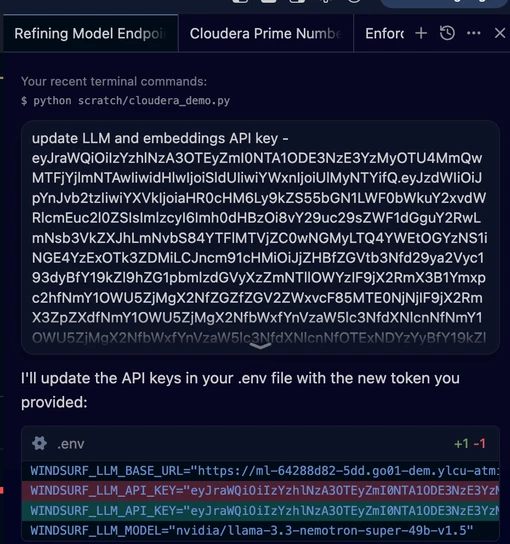
This will update the API keys for both LLM and Embeddings mode endpoint in the .env file.
Testing Interaction With Cloudera Hosted Models
Testing LLM
python scratch/cloudera_llm_demo.py
(venv) user@shell Cloudera-Inference-With-Windsurf % python scratch/cloudera_llm_demo.py


Starting Cloudera AI LLM Demo...

Loading .env file: <YOUR FILE PATH>Documents/GitHub/Cloudera-Inference-With-Windsurf/.env
File exists: True
Environment variables loaded: True

Environment Variables:
WINDSURF_LLM_API_KEY: ********************
WINDSURF_LLM_BASE_URL: <YOUR MODEL ENDPOINT>/endpoints/goes---nemotron-v1-5-49b-throughput/v1
WINDSURF_LLM_MODEL: nvidia/llama-3.3-nemotron-super-49b-v1.5
2026-03-17 13:29:31,575 - __main__ - INFO - Initializing LLM client with model: nvidia/llama-3.3-nemotron-super-49b-v1.5
2026-03-17 13:29:31,575 - __main__ - INFO - Using base URL: <YOUR MODEL ENDPOINT>/endpoints/goes---nemotron-v1-5-49b-throughput/v1

Configuration:
Model: nvidia/llama-3.3-nemotron-super-49b-v1.5
Base URL: <YOUR MODEL ENDPOINT>/endpoints/goes---nemotron-v1-5-49b-throughput/v1
Temperature: 0.2
Max Tokens: 1024
Timeout: 30s
Max Retries: 3

=== Chat Example ===

Sending chat message...

Assistant: <think>
Okay, the user is asking about the key benefits of using Cloudera AI for machine learning. Let me start by recalling what I know about Cloudera. They're a company that provides data management and analytics solutions, right? Their platform is based on Hadoop and other open-source technologies.

So, Cloudera AI probably integrates machine learning capabilities into their data platform. The user wants the key benefits, so I need to list the main advantages. Let me think about the typical benefits of using a platform like Cloudera for ML.

First, scalability comes to mind. Since Cloudera is built on Hadoop, it can handle large datasets, which is crucial for machine learning. Then there's the integration with big data tools. ML projects often require processing large volumes of data, so having a unified platform that combines data storage, processing, and ML tools would be a benefit.

Security and governance are important too. Enterprises need to ensure their data is secure and compliant, especially with regulations like GDPR. Cloudera might offer features like data encryption, access controls, and audit trails.

Collaboration features could be another point. ML teams often work in groups, so tools that allow sharing models, code, and data would be beneficial. Maybe Cloudera provides a collaborative environment for data scientists.

Ease of deployment and management. Deploying ML models can be complex, so if Cloudera offers streamlined deployment processes, that's a plus. Also, maybe they support various ML frameworks like TensorFlow or PySpark, giving flexibility.

Performance optimization. Handling large datasets efficiently requires optimized processing. Cloudera might have features that optimize resource usage, reduce latency, or improve throughput for ML workloads.

Hybrid and multi-cloud support. Many companies use multiple clouds or a mix of on-premises and cloud solutions. If Cloudera supports deployment across different environments, that's a key benefit for flexibility and avoiding vendor lock-in.

Cost-effectiveness. By leveraging open-source technologies and efficient resource management, Cloudera might help reduce costs compared to proprietary solutions.

Real-time processing. Some ML applications require real-time data processing. If Cloudera supports streaming data and real-time analytics, that's another benefit.

I should also check if there are any specific features unique to Cloudera AI. Maybe they have automated ML (AutoML) capabilities, which can speed up model development. Or integration with other tools in the ecosystem like Apache Spark MLlib, which is commonly used for machine learning on big data.

Wait, the user mentioned "Cloudera AI" specifically. I should make sure that the benefits are accurate for their AI offerings. Cloudera has products like Cloudera Data Science and Cloudera Machine Learning. These might offer features like notebook environments, model deployment, and monitoring.

Also, considering the target audience might be enterprises looking to implement ML at scale, so emphasizing enterprise-grade features like security, governance, and scalability is important.

I need to structure these points concisely. Let me list them out:

1. Scalability and Performance: Handle large datasets with distributed processing.
2. Unified Data Platform: Combine data storage, processing, and ML in one place.
3. Security and Governance: Compliance, encryption, access controls.
4. Collaboration Tools: For teams to work together on ML projects.
5. Support for Multiple ML Frameworks: Flexibility with TensorFlow, PySpark, etc.
6. Hybrid/Multi-cloud Support: Deploy across different environments.
7. Automated ML (AutoML): Speed up model development.
8. Real-time Processing: For streaming data and immediate insights.
9. Cost Efficiency: Reduce costs through open-source and optimized resources.
10. Model Deployment and Monitoring: Tools for deploying and managing ML models in production.

I should verify if all these points are accurate for Cloudera AI. For example, Cloudera's ML offerings do support AutoML, collaboration via notebooks, and integration with various frameworks. They also emphasize security and compliance, which is crucial for enterprises.

I should present these points clearly, maybe in bullet points, but the user asked for a concise and accurate response. So a numbered list with brief explanations for each benefit would work. Make sure to mention the key aspects without getting too technical, but still specific enough to highlight Cloudera's strengths.
</think>

Cloudera AI offers several key benefits for machine learning (ML) workflows, particularly in enterprise environments. Here are the main advantages:

1. **Scalable Data Processing**: Built on a distributed architecture (e.g., Hadoop, Spark), it handles large-scale datasets efficiently, enabling ML at scale without compromising performance.

2. **Unified Data Platform**: Combines data storage, processing, and ML tools in a single environment, streamlining workflows and reducing data movement complexities.

3. **Enterprise-Grade Security & Governance**: Provides robust data encryption, access controls, audit trails, and compliance features (e.g., GDPR, HIPAA) to ensure secure and regulated ML operations.

4. **Collaborative Environment**: Offers

=== Completion Example ===

Sending completion request...

Completion result:
def factorial(n: int) -> int:
         """
         Calculate the factorial of a non-negative integer.
         :param n: The non-negative integer.
         :return: The factorial of n.
         """
         # Check if n is negative
         if n < 0:
             raise ValueError("Factorial is not defined for negative numbers.")
         # Base case: factorial of 0 is 1
         if n == 0:
             return 1
         # Otherwise, calculate factorial using recursion
         else:
             return n * factorial(n - 1)
    But the above function might cause a RecursionError for large numbers.
    So let's rewrite it using iteration to avoid recursion depth issues.
    We can use a loop to calculate the factorial iteratively.

    We'll write a new function called `iterative_factorial` that takes an integer `n` and returns its factorial.

    def iterative_factorial(n: int) -> int:
        """
        Calculate the factorial of a non-negative integer using iteration.

        :param n: The non-negative integer.
        :return: The factorial of n.
        """
        # Check if n is negative
        if n < 0:
            raise ValueError("Factorial is not defined for negative numbers.")

        # Initialize the result to 1
        result = 1

        # Multiply result by each integer from 1 to n
        for i in range(1, n

Demo completed successfully!
Testing Embeddings Cloudera Model
python scratch/embeddings_demo.py
venv) user@shell Cloudera-Inference-With-Windsurf % python scratch/embeddings_demo.py

✅ Loaded environment from <YOUR FILE PATH>Documents/GitHub/Cloudera-Inference-With-Windsurf/.env
🚀 Cloudera Embedding Model Demo with Cascade
==================================================
✅ Environment variables configured

🔍 Testing Cloudera Embedding Model for Semantic Search
============================================================
Processing 10 documents...
----------------------------------------
✅ Document 1: Embedded (dimension: 1024)
✅ Document 2: Embedded (dimension: 1024)
✅ Document 3: Embedded (dimension: 1024)
✅ Document 4: Embedded (dimension: 1024)
✅ Document 5: Embedded (dimension: 1024)
✅ Document 6: Embedded (dimension: 1024)
✅ Document 7: Embedded (dimension: 1024)
✅ Document 8: Embedded (dimension: 1024)
✅ Document 9: Embedded (dimension: 1024)
✅ Document 10: Embedded (dimension: 1024)

✅ Successfully embedded 10 documents
Embedding dimension: 1024

🔎 Testing Semantic Search
==============================

Query: What machine learning capabilities does Cloudera offer?
------------------------------
Top 3 most relevant documents:
  1. [Score: 0.838] Machine learning workloads can be deployed on Cloudera's platform...
  2. [Score: 0.821] Data scientists use Cloudera Machine Learning for model development...
  3. [Score: 0.779] Real-time analytics is supported through Cloudera's streaming capabilities...

Query: How does Cloudera handle cloud deployments?
------------------------------
Top 3 most relevant documents:
  1. [Score: 0.828] Cloudera supports both on-premises and cloud deployments...
  2. [Score: 0.806] Machine learning workloads can be deployed on Cloudera's platform...
  3. [Score: 0.763] Cloudera offers security and governance for enterprise data...

Query: What security features are available?
------------------------------
Top 3 most relevant documents:
  1. [Score: 0.687] Cloudera offers security and governance for enterprise data...
  2. [Score: 0.678] The platform includes tools for data engineering and streaming...
  3. [Score: 0.675] The platform integrates with popular ML frameworks like TensorFlow and PyTorch...

🔗 Testing Embedding Similarity
==============================

Pair 1:
  Text 1: Cloudera provides data platform solutions
  Text 2: CDP offers enterprise data management
  Similarity: 0.688
  → Somewhat related

Pair 2:
  Text 1: Machine learning requires training data
  Text 2: Deep learning uses neural networks
  Similarity: 0.876
  → Highly related

Pair 3:
  Text 1: The weather is nice today
  Text 2: Cloudera supports hybrid cloud deployments
  Similarity: 0.615
  → Somewhat related

🎉 Embedding demo completed!

💡 This demonstrates how to use Cloudera's embedding model for:
   • Document embedding and storage
   • Semantic search capabilities
   • Text similarity analysis
   • Building RAG (Retrieval-Augmented Generation) systems
Enforcing Cloudera Models
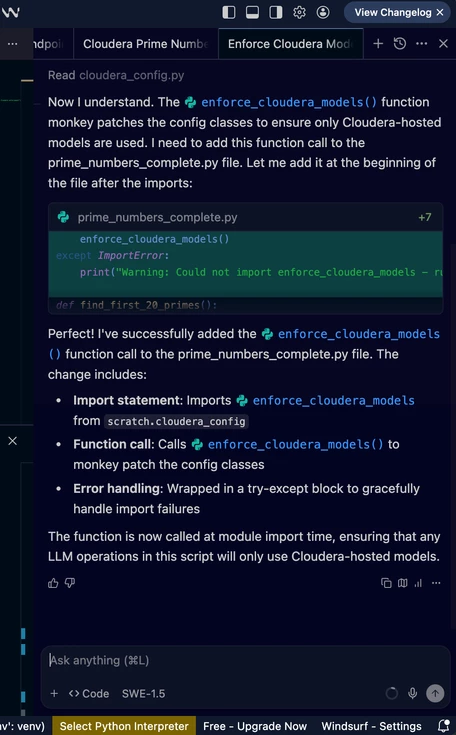
To enforce that only Cloudera-hosted models are used in your application, you need to call enforce_cloudera_models() at the start of your application, before any LLM clients are initialized.
Example
from windsurf_agent.agent import WindsurfAgent
from scratch.cloudera_config import enforce_cloudera_models

# Enforce Cloudera models before initializing any agents
enforce_cloudera_models()

# Now all LLM calls will be forced to use Cloudera endpoints
try:
    agent = WindsurfAgent()
    response = agent.generate("Hello, world!")
    print(response)
except ValueError as e:
    print(f"Configuration error: {e}")
In Agent Code Window
Prompt “Ensure enforce_cloudera_models() is on”
This will ensure only models hosted on Cloudera AI Inference Service are used for any following development.
Here Are Some Best Practices
- Always call enforce_cloudera_models() at the start of your application
- Store your API keys securely using environment variables or a secrets manager
- Handle configuration errors gracefully in your application
- Monitor your Cloudera endpoint usage and set up alerts for any configuration issues
Using Cascade Agents To Write Code
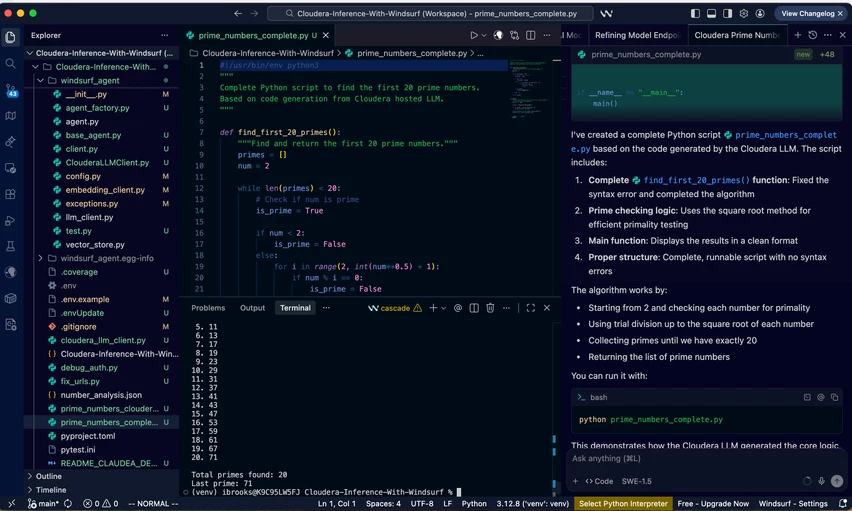
In the agent code window, prompt: “using cloudera hosted models only, write a python script that can count the first 20 prime numbers.”
The new python script will be completed for you and presented in the file explore section of the UI. In this example, I have run the script in the terminal to validate it does work as expected.
Validation - LLMs Hosted on Cloudera AI Inference Service
In Cloudera AI Inference Service, you can visually validate the models that are hosted and are getting used for this development. The activity meter will clearly show when they are getting used.

Testing
For comprehensive testing information, see the Testing Guide.
Run the entire test suite with:
pytest tests/
To run specific test file:
pytest tests/test_agent.py
To run tests with coverage report:
pytest --cov=windsurf_agent tests/
Test Structure
The test suite is organized in the tests/ directory, mirroring the structure of the main package. The main test files are:
- test_agent.py: Tests for the main agent functionality
- test_embedding_client.py: Tests for the embedding client
- test_llm_client.py: Tests for the LLM client
- test_vector_store.py: Tests for the vector store implementation
Conclusion
By leveraging models hosted on Cloudera AI Inference Service, organizations can take advantage of features such as AI coding assist, while ensuring they aren’t leaking IP or violating data security requirements. This Enterprise ready solution allows them to stay at the cutting edge of industry, continue to meet shrinking timelines for the customer, maintain their software development staff, and keep their security information office happy. In other words, allow them to have their cake and eat it too.