Our Community is getting an upgrade! To get everything ready for the relaunch, we’ll be placing the site in read-only mode starting September 21st.
We really appreciate your understanding while we get things set up behind the scenes. Catch up on all the exciting details about the move here.
Need help or have questions? Drop us a line at [email protected]

Intros and Suggestions

Introduce yourself to the community, provide feedback or participate in off topic discussions
Announcements
Share your experience with Cloudera on G2 and get a $25 Amazon Gift card.
Hi, I'm CLEO! Something exciting is coming to the Community. Stay Tuned!

How to mark my own post as solved? Thanks.

avatar
Contributor
 
1 ACCEPTED SOLUTION

avatar
Community Manager

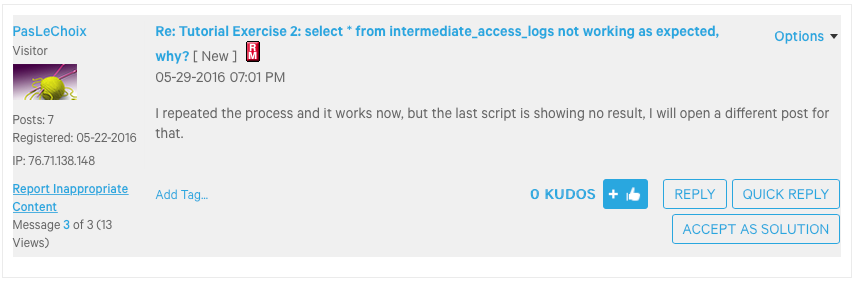
Great question! It is quite simple actually. I assume it is the one in the screen shot below. If you look at the bottom right you will see a button marked "Accept as Solution" or something similar if your view is different. Simply click the button and the comment will be marked as the solution and the thread marked as solved. Let me know if you need anything else. 🙂


Screen Shot 2016-05-30 at 7.48.33 AM.png

Keep the questions coming

View solution in original post

1 REPLY 1

avatar
Community Manager

Great question! It is quite simple actually. I assume it is the one in the screen shot below. If you look at the bottom right you will see a button marked "Accept as Solution" or something similar if your view is different. Simply click the button and the comment will be marked as the solution and the thread marked as solved. Let me know if you need anything else. 🙂


Screen Shot 2016-05-30 at 7.48.33 AM.png

Keep the questions coming